Have you been following WordPress SEO advice but still not seeing the rankings you expected? In many cases, the problem isn’t your effort; it’s the outdated advice you’re relying on. Many website owners still believe in WordPress SEO myths that affect rankings, such as depending only on SEO plugins or overusing keywords. While WordPress offers a strong foundation for SEO, better rankings come from creating helpful content, improving technical performance, building authority, and delivering a great user experience. If you’re managing SEO yourself or through a WordPress SEO agency, understanding what truly influences search rankings can help you make smarter SEO decisions. In this blog, we’ll debunk some of the biggest WordPress SEO myths and explain what actually helps your website rank better.
WordPress SEO: Real Ranking Factors OverviewOutdated practices like keyword stuffing, relying solely on plugins, and fearing duplicate penalties hinder website performance. True WordPress optimization requires structuring content around search intent, building topical authority, and designing a logical internal linking system. Technical health, such as optimizing Core Web Vitals, utilizing structured data, and managing index bloat by excluding low-value pages, ensures search engines efficiently crawl and prioritize high-quality, trustworthy content that ranks. |
WordPress SEO Myths That Are Secretly Limiting Your Rankings
Myth 1: WordPress Is SEO-Friendly Right Out of the Box
WordPress is built with SEO-friendly features, but it doesn’t automatically optimize your website for search engines. You’ll still need to improve your site’s structure, optimize metadata, strengthen internal linking, enhance page speed, and manage crawlability. Without these optimizations, issues like orphan pages, weak site architecture, and unnecessary archive pages can make it harder for search engines to understand and rank your content effectively.
Myth 2: Installing an SEO Plugin Is Enough
SEO plugins simplify tasks like generating meta titles, XML sitemaps, and schema markup, but they don’t influence rankings on their own. Without valuable content, clear search intent alignment, strong internal linking, topical authority, and a technically optimized website, an SEO plugin alone won’t improve your WordPress rankings.
Myth 3: Meta Keywords Still Help Rankings
The meta keywords tag was once used by search engines, but Google no longer considers it a ranking factor. Modern search algorithms evaluate your page based on:
- Its content,
- Relevance, and
- Overall quality instead of keyword lists hidden in the code.
Spending time filling out the meta keywords field offers no SEO benefit and distracts from optimizations that can genuinely improve your visibility.
Myth 4: Higher Keyword Density Leads to Better Rankings
Repeating your target keyword multiple times won’t help your page rank higher. Google’s algorithms are designed to understand context, search intent, and topic relevance rather than counting keyword frequency. Overusing keywords can make your content sound unnatural and reduce readability. A well-written page that thoroughly answers the user’s query is far more likely to perform well in search results.
Myth 5: Duplicate Content Always Causes a Google Penalty
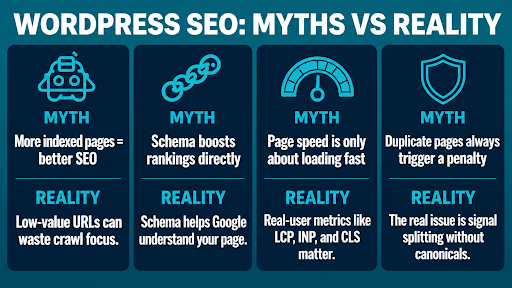
Many WordPress websites contain similar content across archive pages, categories, or filtered URLs, but that doesn’t automatically trigger a Google penalty. The real concern is helping search engines identify the preferred version of a page. Without proper canonical tags or URL management, ranking signals can be split across multiple URLs, making it harder for your primary page to perform well. Professional WordPress SEO services often prioritize canonical optimization to consolidate ranking signals and improve search visibility.
Myth 6: Categories and Tags Are Bad for SEO
Categories and tags help organize your content, improve internal linking, and make it easier for visitors to find related posts. They only become an SEO issue when they’re overused or poorly managed. Creating hundreds of one-time tags, overlapping categories, or empty archive pages can lead to thin content and index bloat, reducing your website’s crawl efficiency.
Myth 7: XML Sitemaps Guarantee Google Will Index Every Page
An XML sitemap helps search engines discover your content more efficiently, but it doesn’t guarantee that every submitted page will be indexed. Google still evaluates each page based on its quality, uniqueness, and overall value. If a page offers little useful content or duplicates another page, it may remain unindexed even though it’s included in your sitemap.
Myth 8: robots.txt Can Keep Pages Out of Google Search
The robots.txt file only tells search engines which pages they shouldn’t crawl. It doesn’t prevent pages from being indexed if Google discovers them through other links. If you want a page removed from search results, you should use a proper noindex directive instead of relying on robots.txt alone.
| Google Insight: According to Google Search Central, blocking a page with ‘robots.txt’ doesn’t guarantee it won’t appear in search results. If Google discovers the URL through external links or other sources, it may still index the URL. To reliably exclude a page from search, Google recommends using password protection or a “noindex” directive. |
What Actually Improves WordPress Rankings in Modern SEO
Once the common SEO myths are out of the way, the next question becomes: what actually influences WordPress rankings today? To answer this, the following practices have a far greater impact on long-term visibility than any SEO shortcut and form the foundation of strategies recommended by every experienced WordPress SEO expert.
Focus on Search Intent Instead of Keywords
Before writing any WordPress page, understand what users actually expect when they search. A page targeting “WordPress speed optimization” should explain performance issues, optimization techniques, plugin recommendations, and testing methods rather than repeatedly mentioning the keyword. When your content fully answers the user’s question in the expected format, it has a much stronger chance of ranking than content written primarily around keyword frequency.
Build Topical Authority
Instead of publishing random blog posts, focus on covering one topic thoroughly. Create a detailed pillar page and support it with related articles that answer specific questions your audience is searching for. This helps search engines understand that your WordPress website has in-depth knowledge on the subject, making it more likely to rank for a wider range of relevant searches.
Build a Strong Internal Linking Strategy
Internal links help search engines understand how your pages are connected and which ones are most important. Instead of linking pages randomly, connect related articles naturally and direct readers to your key service or pillar pages. A well-planned internal linking structure also makes it easier for visitors to discover more useful content across your website.
Improve Core Web Vitals
A fast, stable website creates a better experience for visitors and can support stronger rankings, especially in competitive search results. Rather than chasing perfect performance scores, focus on practical improvements like using a lightweight WordPress theme, compressing large images, removing unnecessary plugins, and reducing scripts that slow down page loading. Google Search Console’s Core Web Vitals report classifies URLs into Good, Needs Improvement, and Poor based on real-user Chrome UX Report (CrUX) data, making it a reliable way to identify pages that require performance improvements.
Strengthen Trust Signals
Google wants to know who created the content and whether readers can trust it. Adding author bios, editorial guidelines, references to credible sources, and real examples can improve your site’s credibility. For businesses, keeping contact details, company information, and service pages updated also strengthens trust and gives users more confidence in your content. A reputable WordPress SEO company should clearly showcase these trust signals to build confidence with both users and search engines.
Use Structured Data Correctly
Structured data helps search engines better understand your content and may make your pages eligible for rich results, such as review stars, breadcrumbs, or FAQs. While it won’t directly improve rankings, using the right schema markup for your content can increase visibility in search results and encourage more users to click on your pages.
Keep Low-Value Pages Out of Google’s Index
More indexed pages don’t always lead to better rankings. Thin archive pages, duplicate URLs, filtered pages, and internal search results can waste Google’s crawl resources without adding value. Regularly review your WordPress website and keep only useful, high-quality pages indexed while using canonical tags or noindex where appropriate to help search engines focus on your most important content.
What WordPress SEO Actually Looks Like Behind the Rankings
Conclusion
Improving your WordPress rankings isn’t about following every SEO trend; it’s about focusing on what truly helps your website perform better. When you move beyond common SEO myths and use proven strategies, you create a stronger foundation for long-term growth. As a trusted WordPress SEO agency, Think Shaw helps businesses uncover what’s holding their websites back and implement practical SEO strategies that improve visibility, build credibility, and drive lasting results.
FAQs About WordPress SEO Myths and Better Rankings
Can too many SEO plugins hurt my WordPress website?
Running multiple SEO plugins together can create conflicting settings, duplicate metadata, and technical issues that may affect search performance.
Should I delete old blog posts that aren’t getting traffic?
Not always. Updating, merging, or redirecting outdated content is often more beneficial than deleting pages outright.
Will changing my URL structure improve existing rankings?
Changing URLs without proper redirects can cause traffic loss. URL updates should only be made when they offer a clear SEO benefit.
Do broken internal links affect WordPress SEO?
Broken links can reduce crawl efficiency, create a poor user experience, and make it harder for search engines to navigate your website.
Can migrating my WordPress website affect SEO rankings?
Yes. Without careful planning, migrations can lead to indexing issues, broken redirects, and temporary ranking fluctuations.
How often should I audit my WordPress SEO strategy?
A comprehensive SEO audit every three to six months helps identify technical issues, outdated content, and new optimization opportunities before they impact rankings.