For a service-based small business, a well-built Google Ads account is less about the size of the budget and more about how logically it’s organized. Google Ads runs on a three-tier hierarchy: account, campaigns, and ad groups, with each level controlling different settings, from budget and bidding down to keywords and ad copy. Most local service businesses find success separating campaigns by service line and intent, for example, brand, core non-brand, and optionally competitor terms, rather than lumping every offering into one generic campaign. Get this structure right from the start, and every ad, keyword, and landing page works together instead of competing for the same budget.
This guide breaks down exactly how to build that structure step by step, so your campaigns generate qualified leads instead of wasted clicks.
Structuring Google Ads Campaign: OverviewA well-structured Google Ads campaign for a service-based small business organizes ads by service category (not keyword match type), uses 2–4 tightly themed ad groups per campaign with 3–10 closely related keywords each, applies geo-targeted radius settings around the actual service area, and allocates 65–80% of budget to core non-brand campaigns targeting high-intent searches. This structure improves Quality Score, lowers cost-per-lead, and keeps spend aligned with the services that generate revenue. |
What Is the Ideal Campaign Structure for a Service-Based Small Business?
The ideal structure for a service-based small business isn’t the biggest or most complex account; it’s the simplest one that still gives you control over budget, targeting, and messaging where it matters most. Rather than throwing every service into one campaign, the winning approach segments your account around a few key “levers”: service category, location, and buyer intent, then builds only as many campaigns and ad groups as those levers actually require. Most experts now recommend starting small, often with a single Search campaign, and expanding only when data justifies it.
Core Structural Principles
- Default to the fewest campaigns possible. Start with one Search campaign and a single ad group, then split further only when you have a clear reason, such as a separate budget, location, or service line that needs independent control.
- Segment by service line, not by keyword count. A plumber offering both emergency repairs and bathroom remodels should run these as separate campaigns or ad groups, since search intent, urgency, and customer value differ sharply between them.
- Separate brand, competitor, and category campaigns. A common 2026 LinkedIn framework allocates roughly 10-15% of budget to branded terms, 15-45% to competitor terms, and the remainder to high-intent category keywords, since each has distinct cost-per-click and conversion behavior.
- Keep ad groups tightly themed. Best practice calls for 10-20 closely related keywords per ad group (some specialists recommend as few as 8-14), all sharing the same theme and search intent, so ad copy and landing pages can stay highly relevant.
- Layer in match types deliberately. Combining broad match with phrase or exact match inside the same ad group lets Smart Bidding find converting traffic while still reaching Google’s AI-powered surfaces like AI Mode, which exact match alone cannot access.
How Should You Organize Ad Groups and Keywords Within Each Campaign?
Within each campaign, ad groups should follow the “one theme, one intent” rule: every keyword in a group should be closely related enough that a single ad and landing page can serve all of them relevantly. Here’s a Google approved strategy:
- Group keywords by service type or user intent, such as “emergency plumber” versus “drain cleaning,” keeping each ad group to roughly 5-20 tightly related terms rather than broad lists.
- Always isolate brand keywords from generic ones, since they convert differently.
- Add negative keywords at both campaign and ad group levels to filter irrelevant traffic, and pair each ad group with 2-3 responsive search ads and a matching landing page for maximum relevance and Quality Score.
How Do You Set Geo-Targeting and Budget Allocation Correctly?
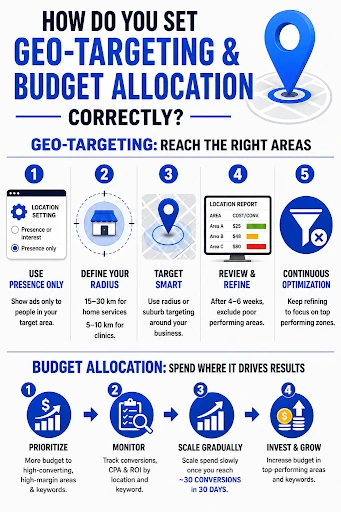
Geo-targeting starts with switching Google’s default “Presence or interest” setting to “Presence only,” since the default also serves ads to people merely searching about your area from elsewhere, wasting spend on leads who can’t physically use your service. Define your service radius realistically, typically 15-30 km for home services like plumbing or electrical work and 5-10 km for clinics or in-person consultations. Use radius or suburb-level targeting around your business address, then review the location report after 4-6 weeks to exclude underperforming zones with high cost-per-acquisition. For budget, allocate more toward high-converting, high-margin service areas and keywords, then scale spend gradually once a campaign reaches roughly 30 conversions in 30 days for reliable Smart Bidding optimization.
 What Ad Extensions and Optimization Steps Improve Performance Over Time?
Ad assets (formerly “extensions”) add extra real estate to search ads at no additional cost, making sitelinks and callouts a priority for any service business account.
- Add 6-8 sitelinks with descriptions. Each should point to a distinct page, pricing, top service categories, testimonials, or a booking form, never the homepage, since Google’s own data shows raising sitelinks to six lifts conversions by up to 3.5%.
- Write 8-10 concise callouts. Keep them under 25 characters; use verifiable specifics like “24/7 emergency service” instead of vague claims like “quality service”.
- Enable call, location, and structured snippet assets. Google recommends at least four asset types running per campaign for stronger Ad Rank and visibility.webtonic+1
- Review the Search Terms Report weekly. Add negative keywords and pause irrelevant spend; this is the single highest-leverage recurring task.
- Test responsive search ad variations continuously. Run at least two RSAs per ad group, pin key value propositions, and let each variant collect 200+ clicks before comparing performance.
- Audit Quality Score monthly. Flag keywords scoring below 5/10 and improve ad relevance or landing page experience accordingly.
- Reallocate budget based on cost-per-conversion. Rank ad groups and campaigns by CPA, then shift spend toward proven winners and pause consistent underperformers.
Conclusion
A well-structured Google Ads account rewards patience, precision, and consistent refinement over quick, scattered fixes. Getting the campaign hierarchy, ad groups, geo-targeting, and assets right isn’t a one-time setup task; it’s an ongoing discipline that separates thriving service businesses from those burning budget on guesswork. That’s exactly where a specialized partner like Think Shaw, a Google Certified White Hat agency, adds real value. Our PPC specialists build tailored campaign strategies, manage bidding and lead tracking, and deliver monthly performance reporting so your ad spend translates into measurable calls and bookings, not just clicks.
Ready to stop guessing and start growing? Talk to Think Shaw’s Google Ads experts today.
Google Ads Campaign FAQs
How long before Google Ads shows results?
Ads can generate booked calls or form fills within the first week of launch, unlike SEO, which typically takes 2-4 months for initial traction.
Should I choose Google Ads or SEO first for my service business?
Choose Google Ads first if you need leads within 90 days; run SEO alongside it as a longer-term compounding strategy for months 4-6 onward.
What’s considered a good cost-per-lead for local services?
Average cost-per-lead benchmarks hover around $67, though this varies significantly by industry, location, and competition level.
Should a service business use Performance Max or Search campaigns?
Search should be the primary engine for budgets under $2,000/month due to higher-intent targeting; add Performance Max only after 30-50 verified monthly conversions.
How many ad extensions should a new campaign include?
Start with sitelinks, callouts, and call assets; Google recommends running at least four asset types for stronger visibility from day one.