If your brand is serious about paid growth, Google Ads remains one of the most powerful e-commerce advertising platforms available. The reason is that e-commerce campaigns are the most direct path to scalable online revenue, but getting there takes more than just switching on Google Ads and hoping for the best. So, if you own a fashion brand, a skincare line, a home décor store, or any other e-commerce business, you need to change to a different strategy, be it working independently or with a Google Ads agency.
Because this commonly used pattern means targeting audiences who will never convert or sending paid traffic to the wrong pages. Do you know what it will cost you? You’ll end up wasting your budget and ROAS that never move, along with your customers, on competitors. But no need to worry, as we have this guide that will change that and help you know exactly what is going wrong and how to fix it. Let’s read more into it!
At a Glance: E-commerce Google Ads Success EssentialsSuccessful e-commerce Google Ads campaigns depend on avoiding common mistakes such as poor keyword targeting, weak landing pages, broken conversion tracking, and under-optimized Shopping feeds. Whether you manage campaigns in-house or work with a Google Ads agency, following proven optimization practices can improve ROAS, reduce wasted ad spend, and drive more consistent online sales. |
The Top 6 Google Ads Mistakes in E-commerce Campaigns
Mistake 1: Not Using Negative Keywords
Most e-commerce brands set up their Google Ads campaigns and never think about negative keywords. So what happens? Google starts showing your ads to completely the wrong people. Someone searching for a free version of your product, a DIY alternative, sees your ad, they click it, you pay for it, and they leave without buying. That money is gone, and it adds up fast.
Even according to Search Engine Land, accounts using negative keywords saw conversion rates up to three times higher than those without them, which tells you everything you need to know about how much this one habit matters.
- Tip to avoid the mistake: Always check your Search Terms report every week and add anything irrelevant as a negative keyword. Do it at both the campaign and account levels so nothing slips through.
Mistake 2: Using Broad Match Without Any Guardrails
Broad match tells Google to find people who might be interested in your keywords, but Google’s definition of “might be interested” is very generous. Before you know it, your ads are showing up for searches that are only vaguely related to what you sell. You are still getting clicks, your spend is going out, but the people landing on your site were never really looking for what you offer. Any experienced Google Ads company will tell you that broad match without structure is one of the fastest ways to quietly drain an e-commerce budget.
- Tip to avoid the mistake: If you are going to use broad match, pair it with Smart Bidding and keep a tight negative keyword list running alongside it. Do not switch everything to broad match at once; test it gradually, and watch your Search Terms report closely.
Mistake 3: Sending Paid Traffic to Your Homepage
This one is surprisingly very common, and it quietly kills conversion rates. When someone clicks an ad for “men’s waterproof running shoes” and lands on your homepage, they now have to go and find that product themselves. Most will not bother and will just leave. Other than the conversion rate impact, it also hurts your Quality Score, which means you end up paying more per click than you should.
Google also lists landing page experience as one of the main Quality Score components, which means the relevance and usefulness of the page after the click can directly affect campaign quality signals.
- Tip to avoid the mistake: Every ad should link to the most relevant product or category page. The more aligned the experience, the better your Quality Score and the lower your CPC.
Mistake 4: Ignoring Your Product Feed in Shopping Campaigns
Your Shopping campaign relies entirely on your product feed to know which searches to show your products for. If that feed has missing GTINs, vague titles, or incorrect categories, Google simply cannot match your products to the right searches, and your impression share drops as a result.
- Tip to avoid the mistake: Go into Merchant Center and check the Diagnostics tab. Fix any disapproved products, fill in missing GTINs, rewrite vague product titles to include the most descriptive terms first, and make sure your product categories are as specific as possible.
Mistake 5: Running Campaigns With Broken Conversion Tracking
This is the one that does the most damage because it affects everything else. If your conversion tracking is set up incorrectly, like tracking the wrong event, firing twice, or not firing at all, then your Smart Bidding strategy is learning from bad information. It will chase the wrong signals, hit the wrong targets, and your ROAS will not reflect reality.
- Tip to avoid the mistake: Link your GA4 account to Google Ads, turn on auto-tagging, and use Google Tag Assistant to verify that your purchase event is firing correctly on the order confirmation page. Also, check for duplicate conversion actions, as these are one of the most common hidden issues.
Mistake 6: Not Giving Google’s AI Anything to Work With
Performance Max is increasingly the default campaign type for e-commerce, but it is only as good as the information you give it. If you are not uploading customer lists, not enabling enhanced conversions, and not providing audience signals, Performance Max is essentially starting from scratch every time. That means a longer learning phase, more wasted spend, and weaker results for longer. Working with a results-driven Google Ads services agency means having someone who actively feeds the right signals into your campaigns, so the algorithm works for you from day one.
- Tip to avoid the mistake: Make sure to upload your customer email list via Customer Match, enable enhanced conversions in your Google Ads settings, and add audience signals to your Performance Max asset groups using your existing purchasers and website visitors. The more relevant data you feed in, the faster and more efficiently the campaign learns.
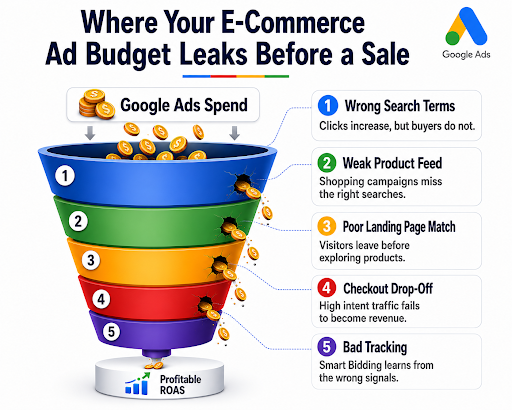
Why Do Clicks Fail to Become Profitable Sales?
Even when your campaigns are getting clicks, the budget can leak at multiple points before a visitor becomes a customer. This visual breaks down the most common stages where Google Ads spend loses value before it turns into profitable revenue.
What a High-Performing E-commerce Google Ads Campaign Looks Like in 2026
Measurement Comes Before Everything Else
Before a high-performing campaign even goes live, the basics are already sorted. The team knows exactly which actions are being tracked; they have checked that everything is firing correctly, and they are confident the data coming in is accurate. When your numbers are clean and reliable, every decision you make from that point, like where to spend more, where to pull back, is based on reality, not guesswork. This is the standard any credible Google Ads agency holds itself to before a single penny goes live.
First-Party Data Is Actively Feeding the Algorithm
Google’s AI needs information to do its job well. The best e-commerce campaigns give it plenty to work with: existing customer lists, data from past purchases, and details about who has already visited the site. The more relevant information you feed in, the quicker Google understands who to show your ads to. Without this, the algorithm is essentially starting from zero, and you are paying for that learning period.
Campaign Structure Reflects How People Actually Shop
Not everyone searching on Google is in the same mindset. Someone searching for your brand name already knows you, and they just need a nudge. Someone searching for a generic product term is still deciding. A skilled Google ad agency builds campaigns that reflect this distinction with separate budgets, separate messaging, and separate goals for each stage. That way, the right message reaches the right person at the right moment, and nothing gets wasted.
Conclusion
Getting Google Ads right in e-commerce is rarely about finding a clever new tactic; it is all about getting the fundamentals in order and keeping them there. However, if you need more help regarding this, Think Shaw is where all your queries are handled. We help e-commerce brands and agencies turn their underperforming Google Ads campaigns into consistent, measurable revenue through smarter PPC strategy and data you can actually trust.
Stop guessing why your ads aren’t working. Let’s fix it together. Contact us for more information!
FAQs- About Google Ads for E-commerce Campaigns
How long should I run a Google Ads campaign before deciding if it is working?
You should run a new Google Ads campaign for at least 2 to 4 weeks to let the algorithm complete its learning phase. However, to confidently evaluate performance and optimize for a profitable return, you should aim to run it for 6 to 8 weeks.
Is it possible for a small e-commerce brand to compete on Google Ads against bigger retailers?
Yes, but not by bidding on the same broad terms. Instead, make sure to focus on specific, longer-tail product searches where intent is higher, and competition is lower.
What happens to my Google Ads campaign when I pause it?
Your campaign loses its learning data and momentum. When you restart it, Smart Bidding essentially begins learning again from scratch, which temporarily increases costs and reduces efficiency.
How do I know which Google Ads campaign type is right for my e-commerce store?
It depends on where you are in your growth. Search campaigns work well for high-intent terms; shopping is best for product discovery; and Performance Max suits brands that already have conversion data and want to scale. Most stores benefit from running all three together.
Can e-commerce brands use Google Ads to bring back customers who already bought from them?
Yes, with the help of Customer Match, you can target existing buyers directly with tailored ads, making it one of the highest-converting and most overlooked strategies in e-commerce Google Ads.