Local SEO for multi-location businesses isn’t just about ranking, it’s about helping customers find the right branch, at the right time, with the right information. As a growing brand, you face unique challenges:
- Inconsistent NAP data
- Scattered reviews
- Competing map listings
- Franchisees or locations all need visibility in their own markets
This step-by-step playbook is designed to solve those issues in local SEO for multi-location businesses with practical, field-tested tactics. You’ll learn how to build a scalable local SEO framework that works for 3 locations or 300, so every branch supports the brand, and the brand supports every branch.
Multi-Location SEO Strategy OverviewSuccessful multi-location SEO depends on balancing brand consistency with strong local relevance across every branch. Optimized location pages, accurate Google Business Profiles, consistent NAP data, localized content, review management, technical SEO, and internal linking all work together to improve local visibility and customer trust. Tracking performance at the location level helps identify winning strategies, strengthen weaker markets, and create a scalable SEO system that supports long-term growth across multiple business locations. |
What Makes Multi-Location Local SEO Different?
Local SEO for multi-location means optimizing each branch, store, or service area so it can rank in its own local market. Unlike regular local SEO, you are not promoting one address; you are managing many location signals at once, including Google Business Profiles, location landing pages, reviews, citations, and location-specific keywords.
What makes it different is the need for consistency and localization. Each location must follow brand standards while still feeling relevant to nearby customers, local search intent, competitors, and community-specific needs. This helps every branch earn visibility, trust, and leads.
Step-By-Step Local Seo Setup For Multi-Location Businesses
Step 1 – Build A Scalable “Location Page” Template
Start with one repeatable template, but make every location page genuinely unique. Each page should include the
- Location’s official NAP
- Opening hours
- Embedded map
- Local phone number
- Services offered at that branch
- Driving directions
- Parking details
- Reviews
- FAQs
- staff details
- Nearby landmarks
- Strong local CTA.
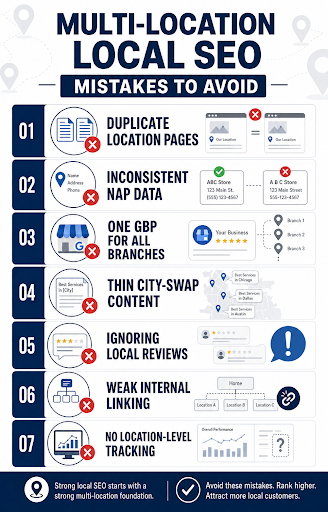
Use a clean URL structure such as /locations/city-name/ or /state/city/service/ so users and search engines can understand the page hierarchy. Avoid thin “city swap” pages where only the city name changes, because multi-location pages need unique, helpful, location-specific content to avoid duplicate content issues and better match local intent.
Step 2 – Optimize And Scale Your Google Business Profiles
Create or claim a separate multi-location Google Business Profile for every eligible branch, then organize them in Google Business Profile Manager using business groups when managing multiple locations.
Each profile should use accurate categories, business hours, services, attributes, photos, website links, and location-specific updates. The NAP on each GBP should exactly match the matching location page and local citations, and each branch should manage its own reviews, photos, posts, offers, and local updates where possible.
Step 3 – NAP Consistency And Citations At Scale
Create a master NAP consistency record for every location before building or fixing citations. This should include the exact business name, address formatting, suite number, phone number, website URL, hours, categories, and any location-specific notes so your team has one source of truth. Audit existing listings on major platforms such as Google Business Profile, Apple Maps, Bing Places, Yelp, Facebook, industry directories, and local directories. Fix the most visible and authoritative listings first, remove duplicate or near-duplicate listings, then use a citation management tool if you need to maintain many locations at scale.
Step 4 – Create Localized, Helpful Content (Not Just City Swaps)
Do not rely on boilerplate content with only the city name changed. Strong multi-location content should explain what is different about that market, including
- Local services
- Neighborhood coverage
- Customer needs
- Regulations
- Weather
- Landmarks
- Events
- case studies
- Staff and community involvement
Build content clusters around each priority location, such as city-specific service pages, local FAQs, project examples, neighborhood guides, and blog posts answering customer questions from that area. Regular localized content helps each location compete for its own search terms instead of forcing every branch to depend on one generic corporate page.
Step 5 – Review Management And Social Proof For Each Location
Set up a review process for each location, not just the brand as a whole. Encourage customers to leave reviews for the exact branch they visited, then respond quickly to both positive and negative feedback to show active customer care.
Add location-specific reviews, testimonials, case studies, ratings, and user-generated content to each location page. Local social proof helps users choose the nearest branch with confidence and supports stronger reputation signals for that individual market.
Step 6 – Technical SEO And Internal Linking For Location Clusters
Use a logical site architecture that groups locations by country, state, city, or service area, depending on business size. The main “Locations” page should link to all branch pages, and relevant service pages should internally link to nearby location pages using descriptive anchor text.
Add local schema markup to each location page, including business name, address, phone number, opening hours, URL, geo coordinates, and relevant business type. Also, make sure each page has unique title tags, meta descriptions, H1s, canonical tags, indexable URLs, fast load speed, mobile-friendly design, and no accidental duplicate or orphaned location pages.
Step 7 – Tracking, Reporting, And Iteration
Track performance at the location level, not only at the domain level. Monitor rankings, organic traffic, calls, direction requests, website clicks, form fills, GBP actions, reviews, conversions, and citation accuracy for every branch in local SEO for multi-location.
Use reporting to find both red flags and winning patterns across locations. For example, if one branch earns more calls after adding local photos, FAQs, or reviews, repeat that tactic across similar markets while still keeping each page locally relevant.
Multi-Location Seo Mistakes To Avoid
Before scaling your local SEO strategy across multiple branches, it’s important to know what can hold your visibility back. Use the infographic below as a quick checklist to spot the most common multi-location local SEO mistakes before they affect your traffic, leads, and local trust.
Conclusion
Scaling local SEO across multiple locations becomes easier when you have the right digital growth partner behind you. Think Shaw specializes in helping multi-location businesses build stronger local visibility, improve search performance, and create consistent customer experiences across every market. We focus on strategies that deliver measurable business growth, not just rankings.
So, don’t let your locations compete with each other; make them dominate together with Think Shaw.
FAQs
Should every business location have separate social media pages?
Separate pages help businesses target local audiences, share branch-specific updates, and improve engagement in markets where customer interaction differs by location.
Does voice search impact local SEO for multiple locations?
Yes, voice searches often include “near me” intent, making accurate business details, conversational keywords, and mobile-friendly experiences increasingly important for visibility.
How important are local backlinks for multi-location businesses?
Local backlinks from regional websites, news platforms, and community organizations strengthen location authority and help branches compete more effectively in local search results.
Does local SEO help businesses beyond Google Maps rankings?
Yes, strong local SEO improves brand trust, increases website traffic, supports customer discovery across platforms, and strengthens overall digital visibility in local markets.
How often should location pages be updated?
Location pages should be reviewed regularly to keep business details, promotions, seasonal updates, staff information, and customer-focused content accurate and relevant.