Running a WooCommerce store involves more than adding products and targeting keywords. Technical SEO plays a major role in how well your store ranks, gets indexed, and converts visitors into customers. Issues like duplicate URLs, slow page speed, poor site structure, and schema errors can quietly hurt your organic performance without obvious warning signs. As Google continues to prioritize user experience and site quality, having a technically optimized WooCommerce store is no longer optional.
In this guide, we’ll break down the essential WooCommerce technical SEO fixes and configurations that help improve visibility, strengthen search performance, and support long-term ecommerce growth.
Technical SEO Setup OverviewStrong WooCommerce technical SEO improves how search engines crawl, index, and rank ecommerce websites while enhancing user experience and store performance. Key optimization areas include SEO-friendly URLs, HTTPS security, crawl management, XML sitemaps, Core Web Vitals, category architecture, and faceted navigation control. Proper technical configurations help reduce duplicate content, improve crawl efficiency, strengthen site structure, and support long-term organic visibility. A well-optimized WooCommerce store creates a stronger foundation for scalable ecommerce growth, better search performance, and higher conversion potential. |
What Is WooCommerce Technical SEO and Why Does It Matter?
WooCommerce technical SEO is the process of optimizing your store’s infrastructure so search engines can efficiently crawl, render, index, and rank product and category pages. This infographic explains WooCommerce SEO and its technical elements in detail.
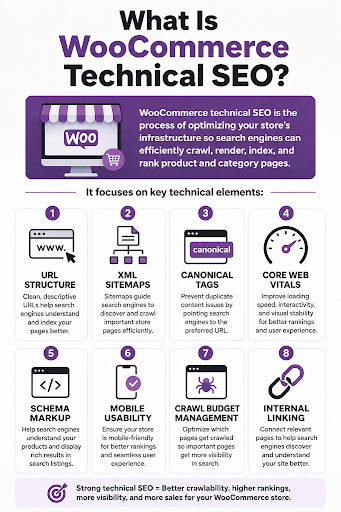
For ecommerce websites, these factors directly affect how well products appear in search results and how easily users navigate the store. Poor technical SEO can lead to duplicate content, indexing issues, slow performance, and lost rankings. Google also emphasizes page experience and structured data as important ecommerce ranking signals, making technical SEO essential for long-term WooCommerce growth and visibility.
The Complete WooCommerce Technical SEO Setup Guide
Let’s look into the WooCommerce SEO checklist that is a must to follow for growth and visibility:
Use SEO-Friendly Permalink Structures
WooCommerce permalink structures should remain clean, readable, and keyword-focused to help search engines understand page relevance more efficiently. URLs containing random numbers, unnecessary parameters, dates, or excessive folder depth can create crawl inefficiencies and poor user experience. Recommended WooCommerce structures:
- /product/product-name/
- /product-category/category-name/
These WooCommerce technical SEO permalink structures improve clarity, indexing, and click-through rates. Consistent URLs also strengthen internal linking and authority distribution across the website. Avoid changing permalink structures frequently because it may cause broken links, redirect chains, and ranking losses unless proper 301 redirects are implemented.
Enable HTTPS Across the Entire Store
HTTPS is critical for WooCommerce because ecommerce stores process sensitive customer information, including payment details, login credentials, and personal data. Google officially confirmed HTTPS as a ranking signal, but its importance extends beyond rankings into trust, security, and conversion optimization. Modern browsers actively warn users when websites are not secure. These warnings can significantly increase bounce rates and reduce customer confidence during checkout.
A technically correct HTTPS setup should include:
- Sitewide HTTPS redirects
- Updated canonical tags
- Secure internal links
- Secure CDN and image delivery
- Fixed mixed-content warnings
Mixed-content errors occur when secure HTTPS pages load assets over HTTP. This weakens security and can break browser trust indicators.
Optimize Crawlability and Indexation
WooCommerce stores often generate unnecessary URLs through filters, tags, pagination, search pages, and sorting parameters. If left unmanaged, these low-value pages waste crawl budget and prevent search engines from prioritizing important products and categories. WordPress technical SEO optimization involves controlling which pages should be crawled and indexed using robots directives, canonical tags, and noindex attributes. Important commercial pages should remain easily accessible within the site architecture, while thin or duplicate pages should be restricted from indexing.
Configure XML Sitemaps Properly
XML sitemaps help search engines discover and crawl important WooCommerce pages more efficiently, especially on large ecommerce websites with constantly changing inventory. A properly optimized sitemap should only include canonical, indexable URLs such as products, categories, and important content pages. Low-value pages, redirected URLs, duplicate pages, and noindexed content should remain excluded to avoid crawl confusion. WooCommerce sitemaps should update automatically whenever products are added, removed, or modified. Submitting XML sitemaps through Google Search Console also provides valuable indexing insights and helps search engines prioritize recently updated content for faster discovery and indexing.
Improve Core Web Vitals and Page Speed
Page speed directly affects WooCommerce rankings, user experience, and conversion performance. Google’s Core Web Vitals evaluate loading speed, visual stability, and interaction responsiveness using metrics such as Largest Contentful Paint (LCP), Interaction to Next Paint (INP), and Cumulative Layout Shift (CLS). WooCommerce stores commonly experience slow performance due to heavy themes, large product images, excessive plugins, and third-party scripts. Technical WooCommerce Core Web Vitals optimizations include image compression, browser caching, CDN implementation, code minification, and database optimization. Faster ecommerce websites improve crawl efficiency, reduce bounce rates, increase customer engagement, and support stronger organic search visibility.
Implement Structured Data (Schema Markup)
Structured data helps search engines understand WooCommerce content by providing machine-readable information about products, pricing, reviews, stock availability, and site hierarchy. Proper WooCommerce schema implementation increases eligibility for rich search results, including product snippets, ratings, breadcrumbs, and FAQ enhancements that improve visibility and click-through rates. Important schema types for WooCommerce include Product, Review, Breadcrumb, Organization, and FAQ schema. Structured data must accurately match visible page content because misleading markup may trigger manual penalties or rich result removal. Regular schema testing helps identify technical errors that could prevent search engines from properly interpreting ecommerce information.
Optimize WooCommerce Category Architecture
Category architecture plays a critical role in WooCommerce technical SEO because category pages often rank for high-volume commercial keywords. A well-organized structure helps search engines understand relationships between products, categories, and topical themes across the website. Categories should follow a logical hierarchy with descriptive naming conventions and minimal unnecessary nesting. Strong category structures improve internal linking, crawl distribution, and user navigation while reducing orphan pages and crawl inefficiencies. Adding optimized category descriptions and linking related collections together also strengthens topical relevance and improves the likelihood of category pages ranking for broader transactional search queries.
Manage Faceted Navigation Carefully
Faceted navigation allows WooCommerce users to filter products by attributes such as color, size, brand, or price, but it can create thousands of crawlable URL combinations. Without proper technical controls, these filtered pages may generate duplicate content, waste crawl budget, and dilute ranking authority across unnecessary URLs. SEO management for faceted navigation involves applying canonical tags, noindex directives, parameter controls, and selective indexing strategies for valuable filter combinations with actual search demand. Properly configured filtering systems improve user experience without overwhelming search engines, helping WooCommerce stores maintain efficient crawling, stronger indexing, and cleaner site architecture.
Conclusion
Technical SEO is what turns a WooCommerce store from simply functional into scalable, search-friendly, and conversion-focused. With search algorithms becoming increasingly sophisticated, ecommerce brands that invest in strong technical foundations are better positioned to compete, grow visibility, and deliver seamless shopping experiences. If you want expert support optimizing your WooCommerce store for performance, indexing, and long-term organic growth, Think Shaw can help. Our team specializes in technical SEO, ecommerce strategy, and performance optimization tailored for modern online stores. Contact us today to build a WooCommerce store that performs as strongly as it sells.
WooCommerce Technical SEO FAQs
How often should a WooCommerce store undergo a technical SEO audit?
A WooCommerce store should ideally undergo a technical SEO audit every 3–6 months to identify performance issues, indexing errors, broken links, and plugin-related technical conflicts before rankings are affected.
Does changing WooCommerce themes affect SEO?
Yes, changing themes can impact page speed, mobile responsiveness, structured data, internal linking, and code quality, all of which directly influence technical SEO performance and search visibility.
Why do WooCommerce product pages sometimes disappear from Google?
Product pages may disappear because of accidental noindex tags, crawl issues, duplicate content, weak internal linking, server errors, or incorrect canonical configurations affecting indexation.
Why is log file analysis useful for WooCommerce SEO?
Log file analysis reveals how search engine bots crawl your website, helping identify wasted crawl budget, orphan pages, server issues, and important pages receiving insufficient crawl attention.
Can too many WooCommerce plugins affect SEO?
Yes, excessive plugins can increase page load times, create code conflicts, generate unnecessary scripts, and negatively impact technical performance, crawlability, and website stability.