It is easy to assume that simply building a website on Squarespace is enough to achieve strong search visibility. But in reality, rankings depend on how effectively the platform is optimized within the limits of its built-in SEO capabilities. Though Squarespace offers essential features such as clean URLs, automatic XML sitemaps, SSL security, responsive templates, and basic metadata controls, it also provides less flexibility for advanced technical SEO compared to more customizable platforms. Hence, understanding where Squarespace performs well and where it requires strategic workarounds can help businesses set realistic expectations and make informed decisions. Well, this guide helps you explore what Squarespace SEO can and cannot do for your website, helping you focus on optimization strategies that deliver measurable, long-term search performance instead of relying on common misconceptions.
Squarespace SEO OverviewSquarespace simplifies technical SEO by automatically managing XML sitemaps, clean URLs, structured data, and essential metadata, creating a solid foundation for search visibility. However, limitations in advanced customization, crawl management, and technical control mean long-term rankings depend on strategic optimization. Consistently refining on-page SEO, site architecture, internal linking, content quality, and technical performance helps businesses maximize Squarespace’s capabilities while overcoming its built-in constraints to achieve sustainable organic growth. |
What Squarespace SEO Can Do Automatically
Automatically Generates XML Sitemaps
Squarespace automatically updates your XML sitemap whenever website content changes, helping search engines discover and recrawl important pages more efficiently. Its sitemap automatically:
- Includes pages, blogs, products, and galleries.
- Refreshes after updates.
- Supports faster crawling.
Creates Search-Friendly URLs
Instead of generating complex web addresses, Squarespace creates clean, descriptive URLs based on your page titles. This automatically provides:
- Static URL structure.
- Better crawlability.
- User-friendly links.
Adds Structured Data Automatically
Squarespace automatically embeds JSON-LD structured data on supported pages, allowing search engines to better interpret your content. As explained in Squarespace’s official SEO documentation, this markup is generated automatically for supported content types without requiring additional plugins or manual configuration. Depending on the page type, it includes:
- Product schema.
- Blog schema.
- Organization and Local Business schema.
- Rich result eligibility.
Generates Essential SEO Metadata
Once you configure your page’s SEO settings, Squarespace automatically converts them into the HTML metadata search engines require, including:
- Title tags.
- Meta descriptions.
- Standard HTML metadata.
Where Squarespace SEO Has Its Limitations
Limited Structured Data Customization
Squarespace automatically generates schema markup, but you cannot fully customize or extend it through the native interface. Implementing advanced schema types often requires manually adding custom code.
Restricted Robots.txt Control
The platform manages the robots.txt file automatically, offering minimal customization. This limits advanced crawl management strategies, especially for websites requiring precise control over search engine bot behavior.
Fixed URL Structure for Collections
Blogs, products, and other collection pages follow predefined URL paths that cannot be fully customized. This restricts websites needing highly specific URL hierarchies for technical SEO or migration purposes.
Limited Bulk SEO Management
Squarespace lacks native tools for bulk editing SEO titles, meta descriptions, redirects, or image metadata, making optimization slower and less efficient as website size and content volume increase.
Minimal Canonical Tag Control
Canonical URLs are generated automatically, but advanced customization options are limited. This can create challenges when managing duplicate content across complex page variations or syndicated content.
No Server-Level SEO Configuration
Users cannot access server settings such as caching rules, HTTP headers, or compression configurations. These technical optimizations remain fully managed by Squarespace with little room for customization.
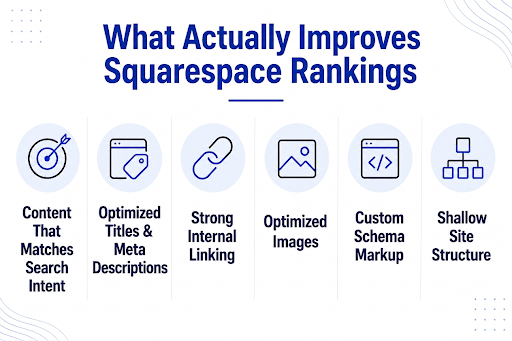
What Actually Improves Squarespace Rankings
What actually improves Squarespace rankings is not the platform itself, but the quality of your website’s optimization. While Squarespace provides a solid technical foundation, search visibility is primarily influenced by how well your content, site structure, and on-page elements align with Google’s ranking systems. The infographic below summarizes the key optimization priorities that have the greatest impact on improving Squarespace rankings.
Conclusion
Getting the most from Squarespace requires more than enabling its built-in SEO features; it demands a strategy tailored to your website’s goals and competition. At Think Shaw, Squarespace SEO experts provide technical audits, keyword research, page speed optimization, landing page SEO, and ongoing performance monitoring to help businesses improve search visibility and attract qualified traffic. So get ready to maximize your Squarespace website’s SEO potential. Contact our team to discuss a strategy tailored to your business goals!
Frequently Asked Questions About Squarespace Seo
Can Squarespace automatically get my business listed on Google Maps?
Squarespace provides a direct sync for your local business metadata, but you must manually claim and optimize a free Google Business Profile to appear on Google Maps.
Will Squarespace handle my mobile optimization and site security for SEO automatically?
Yes; every template features automatic responsive design, and Squarespace provides and renews free SSL certificates to ensure Google doesn’t penalize your site.
Can I change a live page’s URL slug without breaking my current Google rankings?
Squarespace includes a native URL Mappings tool that allows you to easily set up a 301 redirect, passing your existing SEO authority to the new link.
Can Squarespace fix indexing issues by itself?
No, indexing problems often require manual investigation through Google Search Console and proper SEO adjustments.
Can duplicate content still occur on a Squarespace website?
Yes, duplicate content can result from similar pages, repeated copy, or incorrect URL management.