
JavaScript has become a fundamental part of modern websites, enabling interactive features, dynamic content, and application-like experiences. However, when essential information depends on JavaScript to appear, search engines may need to render the page before fully understanding its content. This makes JavaScript an important consideration in technical SEO. JavaScript SEO focuses on ensuring that JavaScript-powered websites remain accessible, crawlable, understandable, and indexable by search engines and AI-driven search systems. For developers, understanding how crawling, rendering, and indexing work together is essential for maintaining search visibility while delivering a smooth user experience.
This guide explores the key JavaScript SEO considerations developers need to know.
JavaScript SEO SummaryEffective JavaScript SEO requires developers to make important content, links, metadata, and technical signals accessible during crawling, rendering, and indexing. Using server-side or static rendering, crawlable URLs, accurate status codes, consistent metadata, and accessible resources supports search visibility. Managing JavaScript also improves Core Web Vitals, including LCP, INP, and CLS. For local websites, essential location information should remain accessible without excessive client-side rendering, balancing functionality, performance, accessibility, and search requirements. |
How JavaScript Impacts Crawling, Rendering, and Indexing
Crawling Depends on Accessible URLs and Resources
Googlebot begins by requesting a URL and examining the response for discoverable links and resources. For JavaScript applications, developers should ensure important pages are connected through standard links rather than relying exclusively on click handlers or application-specific navigation. Google also recommends maintaining crawlable URLs and using sitemaps to help communicate the site’s page structure.
Resource accessibility matters just as much. If robots.txt prevents Googlebot from accessing a JavaScript file or the page itself, Google cannot render that JavaScript. Server availability can also influence crawling because Google may reduce crawling when a site has difficulty handling requests.
Rendering Determines What JavaScript Can Add to the Page
A JavaScript-heavy page may initially return an application shell rather than its complete content. Google can subsequently render eligible pages using a recent version of Chromium and execute JavaScript to generate the final page representation. The rendered HTML is then used for further processing, including discovering additional links and understanding page content. This makes implementation details important. Google also recommends server-side rendering, static rendering, or hydration where appropriate because these approaches can make content available more efficiently to both users and crawlers.
Indexing Relies on the Rendered Page Being Understandable
Indexing determines which processed pages and content are eligible to appear in search results. With JavaScript sites, important text or page elements that exist only after execution need to be available in the rendered page for search engines to process them effectively. Google also advises keeping canonical signals consistent and avoiding a noindex directive in the initial HTML when a page may need to be indexed.
Bing similarly recommends making critical content accessible without excessive client-side rendering and warns that content that cannot be reliably rendered may not be indexed. Its current webmaster guidance also connects accurate indexing with visibility across Bing and Copilot experiences.
| Make sure your JavaScript-powered website is built for both users and search engines
Think Shaw can help identify rendering and indexing issues, improve technical performance, and strengthen your overall JavaScript SEO strategy. |
Essential JavaScript SEO Practices for Developers
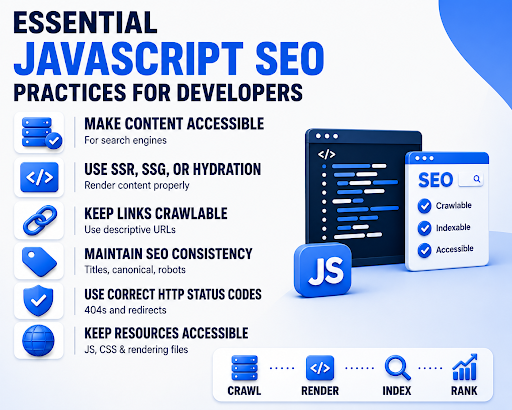
Strong JavaScript SEO best practices start with making important content accessible to search engines without relying entirely on client-side JavaScript. Developers should use server-side rendering, static generation, or hydration where appropriate, while keeping important links crawlable through standard, descriptive URLs. Titles, canonical tags, and robots directives should remain consistent between source and rendered HTML. Correct HTTP status codes, including genuine 404s and proper redirects, also matter. Finally, essential JavaScript, CSS, and other rendering resources should remain accessible so search engines can understand the page accurately.
JavaScript Performance, Core Web Vitals, and Local Search
JavaScript Can Affect Core Web Vitals
Heavy JavaScript can increase main-thread work, delay visible content, and slow user interactions.
- LCP (Largest Contentful Paint): Measures how quickly the main visible content loads. Heavy JavaScript can delay the loading or rendering of the largest image, heading, or content block.
- INP (Interaction to Next Paint): Measures how quickly a page responds to user interactions. Long JavaScript tasks can keep the main thread busy and make clicks, taps, and other actions feel delayed.
- CLS (Cumulative Layout Shift): Measures unexpected movement of page elements during loading. JavaScript that inserts content or changes layouts without reserving space can contribute to visual instability.
Mobile Performance Matters for Local Businesses
Mobile performance is particularly important for local websites because users often search for services, directions, contact details, and nearby businesses from smartphones. The U.S. Department of Transportation emphasizes the importance of mobile-friendly web experiences for users accessing information on mobile devices.
Location Content Should Not Depend Entirely on JavaScript
Essential local information such as business addresses, service areas, opening hours, and contact details should be available in the rendered page rather than requiring complex client-side interactions. The World Wide Web Consortium (W3C) recommends ensuring that important information and functionality remain perceivable and operable across different user agents and technologies.
Build Fast Experiences Without Sacrificing Functionality
JavaScript should support functionality without creating excessive processing overhead. The HTTP Archive, through its Web Almanac research, regularly measures JavaScript usage and its impact on real-world websites, providing evidence that script volume and execution remain important considerations for web performance.
Conclusion
Effective JavaScript SEO helps ensure your website remains crawlable, indexable, fast, and accessible while delivering engaging user experiences. At Think Shaw, we combine technical SEO expertise with performance-focused strategies to identify JavaScript-related barriers and strengthen your website’s search visibility. From rendering and metadata to Core Web Vitals and local search, our solutions support sustainable organic growth. Partner with Think Shaw to build a technically stronger website designed for users and search engines.
| Build a faster, more search-friendly website with expert technical guidance from Think Shaw. Our team can help identify JavaScript SEO challenges, improve website performance, and support stronger organic visibility. |
Frequently Asked Questions About JavaScript SEO
Does JavaScript affect SEO rankings?
JavaScript can indirectly affect rankings when it delays content availability, creates performance issues, or prevents search engines from accessing important page elements and signals.
Is client-side rendering bad for SEO?
Client-side rendering is not inherently bad for SEO, but relying heavily on it can create challenges when important content takes longer or fails to appear reliably.
Does JavaScript affect website traffic?
Poorly implemented JavaScript can affect organic traffic by creating crawlability, indexing, performance, or user-experience problems that reduce a website’s search visibility.
How do I test JavaScript rendering for SEO?
Test important URLs using Google Search Console, browser developer tools, and crawler software to identify missing content, blocked resources, rendering differences, or technical inconsistencies.
Can JavaScript-generated links be crawled by Google?
Google can discover some JavaScript-generated links, but relying on dynamically created navigation can introduce uncertainty compared with using conventional HTML links.