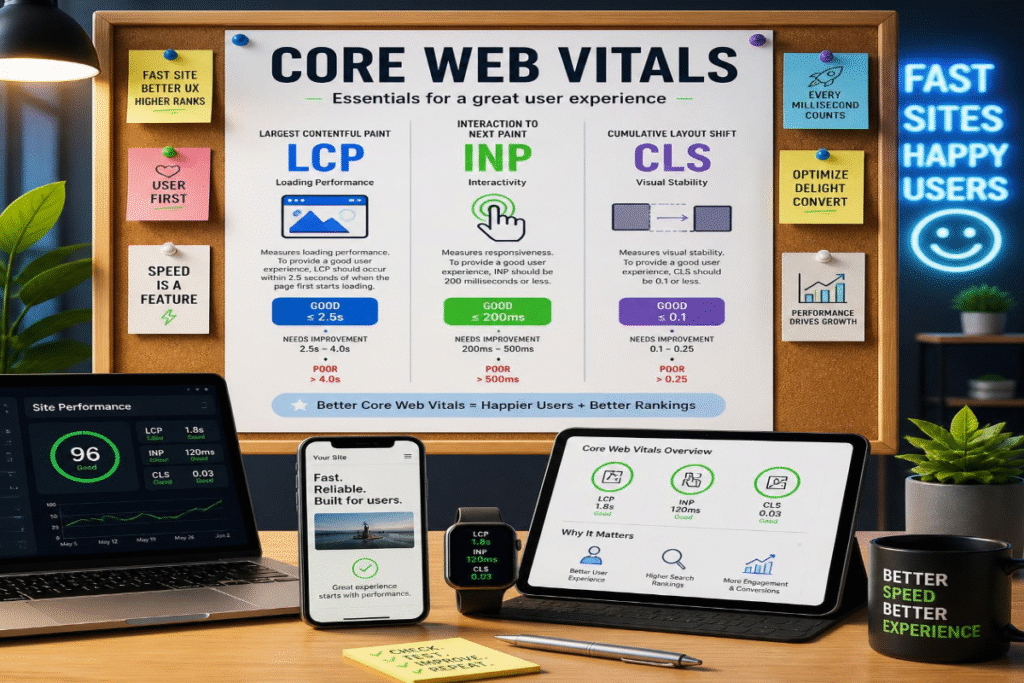
Google’s search algorithm has evolved significantly, but one principle remains constant: websites that deliver a fast, stable, and user-friendly experience are more likely to earn trust from both users and search engines. In 2026, Core Web Vitals fixes continue to play an important role in evaluating page experience, yet they are no longer viewed as standalone ranking drivers. Instead, Google considers them alongside content quality, search intent, technical SEO, and overall website usability. This shift has led many website owners to question whether improving performance metrics alone is enough to improve visibility. Understanding how these factors work together is essential for making informed optimization decisions.
This guide explores what these really mean in 2026, how they influence rankings, and where businesses should focus their efforts for sustainable SEO success.
Core Web Vitals in 2026: InsightsCore Web Vitals fixes remain an important component of Google’s Page Experience signals, with Largest Contentful Paint (LCP), Interaction to Next Paint (INP), and Cumulative Layout Shift (CLS) serving as the primary performance metrics. Improving image optimization, JavaScript execution, server response times, visual stability, mobile performance, caching, and continuous monitoring helps enhance user experience. Combined with high-quality content and technical SEO, these optimizations contribute to stronger long-term search visibility and website performance. |
Which Core Web Vitals Matter Most in 2026?
Google continues to use Core Web Vitals as standardized indicators of real-world page experience. While they remain part of the broader Page Experience framework, their influence on rankings is most meaningful when multiple pages offer similarly relevant and high-quality content.
In 2026, the focus is on three metrics that measure how quickly a page loads, how responsive it feels, and how visually stable it remains during use.
Largest Contentful Paint (LCP): Measuring Loading Performance
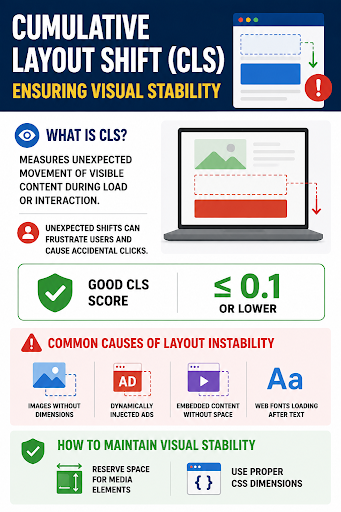
Largest Contentful Paint (LCP) measures how long it takes for the largest visible element, such as a hero image, heading, or featured banner, to fully render within the user’s viewport. Because this element often represents the primary content of the page, LCP is a strong indicator of perceived loading speed.
Google recommends an LCP score of 2.5 seconds or less for a good user experience. Slow server response times, render-blocking CSS and JavaScript, oversized images, and inefficient hosting are among the most common causes of poor LCP performance. Optimizing image formats, implementing caching, reducing unnecessary scripts, and improving server performance can significantly improve this metric.
Interaction to Next Paint (INP): The New Standard for Responsiveness
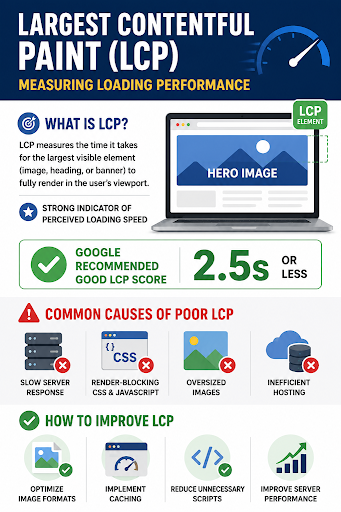
Interaction to Next Paint (INP) replaced First Input Delay (FID) as a Core Web Vitals metric because it provides a more comprehensive measurement of user interactions throughout an entire page visit. Rather than evaluating only the first interaction, INP measures how quickly a page responds to clicks, taps, and keyboard inputs from start to finish.
Google considers an INP score of 200 milliseconds or less as good. High INP values are typically caused by excessive JavaScript execution, long-running tasks on the main thread, and complex client-side rendering. Improving code efficiency, breaking up large JavaScript tasks, and minimizing third-party scripts can make websites feel significantly more responsive.
Cumulative Layout Shift (CLS): Ensuring Visual Stability
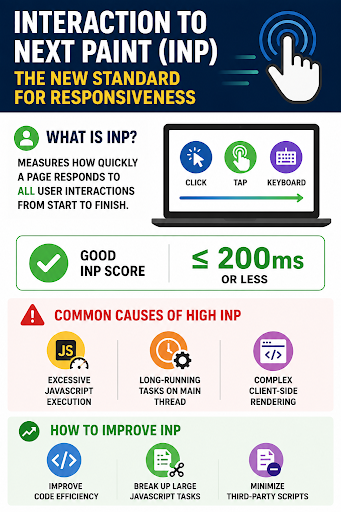
Cumulative Layout Shift (CLS) measures how much visible content unexpectedly moves while a page is loading or being interacted with. Unexpected shifts can frustrate users by causing accidental clicks or making content difficult to read.
A CLS score of 0.1 or lower is considered good. Common causes of layout instability include images without predefined dimensions, dynamically injected advertisements, embedded content without reserved space, and web fonts that load after text is displayed. Reserving space for media elements and using proper CSS dimensions are effective ways to maintain visual stability.
Why Is First Input Delay (FID) No Longer Used?Google officially retired First Input Delay (FID) because it measured only the delay before a browser began processing the first user interaction. While useful, it failed to capture the overall responsiveness of modern, highly interactive websites. Interaction to Next Paint (INP) now provides a more realistic assessment by evaluating responsiveness across multiple interactions during the user’s visit, making it a more accurate reflection of actual user experience. |
How Does Google Evaluate Core Web Vitals?
Google primarily relies on real-world field data collected through the Chrome User Experience Report (CrUX), which reflects how actual users experience a website across different devices and network conditions. This means that passing laboratory tests alone is not enough. Consistently delivering good performance for real users is what determines whether a page meets Google’s Core Web Vitals thresholds.
Website owners can monitor these metrics using tools such as Google Search Console’s Core Web Vitals fixes report, PageSpeed Insights, Lighthouse, and the Chrome DevTools Performance panel. Combining field data with lab testing helps identify both existing issues and optimization opportunities.
How to Improve Core Web Vitals for Better SEO Performance?
The most effective optimization strategies to improve Core Web Vitals focus on:
Optimize Images and Other Large Media Assets
Images are often the largest resources on a webpage and a leading cause of slow loading times. Compressing images without sacrificing quality, serving modern formats such as WebP or AVIF, and delivering responsive image sizes for different screen resolutions can significantly improve loading performance. Preloading critical “hero” images and using lazy loading for below-the-fold media also helps reduce unnecessary network requests while improving Largest Contentful Paint (LCP).
Reduce JavaScript Execution and Main-Thread Work
Heavy JavaScript remains one of the biggest contributors to poor Interaction to Next Paint (INP) scores. Large JavaScript bundles force browsers to spend more time parsing, compiling, and executing code before responding to user interactions.
To improve responsiveness:
- Remove unused JavaScript libraries.
- Split large JavaScript bundles into smaller chunks.
- Defer non-essential scripts until after page load.
- Minimize third-party tracking and marketing scripts.
- Use asynchronous or deferred loading wherever possible.
Reducing long-running tasks allows browsers to respond faster to clicks, taps, and keyboard inputs, creating a smoother browsing experience.
Improve Server Response Time
A slow server delays every stage of page loading, directly affecting Largest Contentful Paint. Faster server response can be achieved by using reliable hosting, implementing server-side caching, upgrading database performance, and optimizing backend code.
Modern technologies such as HTTP/2, HTTP/3, and efficient content compression (Brotli or Gzip) also reduce resource delivery times. Websites with lower Time to First Byte (TTFB) generally provide a faster overall user experience.
Eliminate Layout Shifts for Better Visual Stability
Unexpected movement of page elements creates a poor user experience and negatively impacts Cumulative Layout Shift (CLS).
Common best practices include:
- Always define width and height attributes for images and videos.
- Reserve dedicated space for advertisements and embedded content.
- Avoid inserting banners or pop-ups above existing content after the page begins loading.
- Load custom fonts efficiently to prevent text from shifting during rendering.
Maintaining stable layouts helps users interact with pages confidently without accidental clicks.
Optimize CSS and Critical Rendering Paths
Render-blocking CSS can delay the appearance of meaningful page content. Extracting and inlining critical CSS for above-the-fold elements allows browsers to display visible content sooner while deferring non-essential styles until after the initial render.
Minifying CSS files, removing unused styles, and simplifying complex layouts also reduce rendering overhead, leading to faster page loading and improved LCP scores.
Use Browser Caching and Content Delivery Networks (CDNs)
Caching frequently accessed resources allows returning visitors to load pages much faster because browsers can reuse previously downloaded files instead of requesting them again.
A Content Delivery Network (CDN) further improves performance by distributing website assets across geographically dispersed servers. Visitors receive content from the server closest to their location, reducing latency and improving loading speed worldwide.
Minimize Third-Party Scripts
Advertising platforms, analytics tools, chat widgets, social media embeds, and tracking scripts often consume significant browser resources. While these tools may provide valuable business insights, excessive third-party code can slow loading and reduce responsiveness.
Regularly auditing external scripts and removing unnecessary integrations helps maintain better Core Web Vitals while preserving essential functionality.
Prioritize Mobile Performance
Google primarily evaluates websites using mobile-first indexing, making smartphone performance critical for SEO. Mobile devices often operate on slower processors and variable network connections, exposing performance issues that may not appear on desktop.
To optimize mobile experiences:
- Reduce page weight.
- Limit unnecessary animations.
- Use responsive layouts.
- Ensure touch elements remain responsive.
- Test pages under slower network conditions.
A mobile-optimized website benefits both search rankings and overall user satisfaction.
Continuously Monitor Core Web Vitals with Google’s Tools
Performance optimization is an ongoing process rather than a one-time task. Google provides several tools that help identify issues and measure improvements using both laboratory testing and real-user data.
The most reliable tools include:
- Google Search Console Core Web Vitals Report for identifying affected URLs.
- PageSpeed Insights for combining field data with optimization recommendations.
- Lighthouse for detailed performance audits during development.
- Chrome DevTools Performance Panel for diagnosing rendering and JavaScript bottlenecks.
- Chrome User Experience Report (CrUX) for understanding how real users experience website performance.
Monitoring these reports regularly enables website owners to detect performance regressions before they impact user experience or organic visibility.
Conclusion
Building lasting success in digital marketing requires more than simply running advertisements; it demands a strategy backed by data, creativity, and continuous optimization. If you’re looking for a trusted agency in the USA, Think Shaw helps businesses achieve sustainable organic growth through expert SEO content writing, Core Web Vitals optimization, and technical SEO improvements that enhance both user experience and search performance. Contact us today to strengthen your website’s foundation and build a smarter, long-term SEO strategy.
FAQs About Core Web Vitals Optimization
Can a CDN improve all Core Web Vitals metrics?
A CDN primarily improves loading speed by reducing latency, but it doesn’t automatically fix responsiveness or layout shifts. Additional frontend optimizations are still necessary.
Do Core Web Vitals affect eCommerce websites differently?
Yes. Faster product pages, smoother checkout experiences, and stable layouts can improve user satisfaction, reduce cart abandonment, and indirectly support better business outcomes.
Can too many WordPress plugins hurt Core Web Vitals?
Excessive or poorly optimized plugins can increase JavaScript, CSS, and database requests, slowing page performance and negatively affecting the overall user experience.
Do browser extensions affect Core Web Vitals testing?
Some browser extensions can interfere with lab testing results by adding scripts or consuming resources. Testing in a clean browser profile provides more reliable measurements.
Why should Core Web Vitals be monitored after a website migration?
Website migrations can introduce unexpected performance issues such as broken caching, slower servers, or resource-loading errors, making post-migration monitoring essential for maintaining search performance.