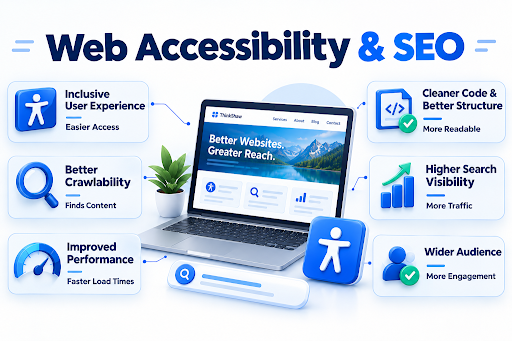
A business website should be usable by the people it is intended to serve. As digital experiences continue to evolve in 2026, accessibility has become a more important consideration in website design and content. It involves creating an online environment where people with different abilities can navigate, understand, and interact with digital information without unnecessary barriers. SEO, on the other hand, determines how effectively a website can be discovered and understood through search. Although accessibility and SEO have different objectives, their connection deserves closer attention as businesses work to build websites that meet modern user and search expectations.
Let’s take a closer look at where website accessibility and SEO intersect and what businesses should consider moving forward.
Key Takeaways: Accessibility and SEOWebsite accessibility creates more inclusive digital experiences while supporting several practices that can strengthen SEO foundations. Semantic structure, descriptive content, alternative text, keyboard navigation, responsive design, and accessible interactions help users engage with websites effectively. Accessibility itself is not a direct Google ranking factor, but crawlability, useful content, page experience, and people-first principles remain important. Regular accessibility audits can identify overlooked barriers and support sustainable website improvements aligned with modern search expectations. |
What Is Website Accessibility and Why Does It Matter for SEO?
An accessible website considers how visitors actually interact with pages. It benefits users who rely on screen readers, keyboard controls, captions, text alternatives, or other assistive technologies. Accessible design can also make websites clearer and easier to navigate for a wider audience. From an SEO perspective, practices such as meaningful headings, descriptive links, structured content, and useful image alternatives can make pages easier for search engines to interpret. Addressing accessibility during website development also allows businesses to identify usability barriers early, creating a stronger foundation for an inclusive and search-friendly online presence.
| A useful perspective
The World Health Organization estimates that more than 1.3 billion people, about 16% of the global population, live with disability. That makes accessibility a substantial consideration for businesses building digital experiences, rather than a niche technical concern. |
Which Website Accessibility Practices Support SEO?
Semantic HTML and Clear Website Structure
A well-organized HTML structure gives both visitors and search engines a clearer understanding of how information is arranged. Using appropriate elements such as headings, navigation, lists, and landmarks creates meaningful relationships between sections instead of relying solely on visual styling.
Descriptive Page Titles, Headings, and Links
Clear wording matters when users need to understand where a page or link will take them. Specific titles and headings establish the subject of a page, while descriptive anchor text provides context before someone selects a link. Google recommends placing relevant words in prominent locations, including titles, headings, link text, and other descriptive areas.
Image Alt Text and Accessible Multimedia
For images that communicate information, useful alternative text provides an equivalent textual description for people who cannot see the visual. Google also uses alt text, alongside the surrounding page content and computer vision, to understand images. Businesses should therefore treat image accessibility as part of the broader user-centered UI/UX design process, ensuring visuals remain meaningful and usable across different browsing experiences.
Keyboard-Friendly Navigation
Consider a visitor who cannot operate a mouse. Menus, buttons, forms, dialogs, and other interactive features should remain usable through a keyboard, with a visible focus indicator and no keyboard traps.
| Build a more accessible, user-focused website with the right design and SEO strategy. Explore Our Services |
Does Website Accessibility Directly Affect Google Rankings?
-
Accessibility is not a standalone Google ranking factor.
Google has explicitly stated that adding accessibility features does not provide an inherent SEO advantage. Accessibility should therefore be implemented for users first, rather than as a ranking tactic.
-
Google evaluates many signals rather than one accessibility score.
Its ranking systems consider numerous page-level and site-level signals when determining relevance and usefulness. Meeting accessibility standards alone does not guarantee stronger rankings.
-
Technical accessibility can still influence how effectively Google accesses content.
If important information is hidden from the accessible page structure, blocked from Googlebot, or difficult to discover, the issue can become an SEO concern. Google confirms that crawlability and indexable content are basic requirements for appearing in Search.
-
The 2026 search landscape also makes genuine usefulness increasingly important.
Google’s latest guidance for AI-powered Search continues to emphasize valuable, unique, people-first content, while noting that established SEO fundamentals remain relevant for visibility across Search experiences.
Actionable Steps to Audit and Fix Your Site’s Accessibility Gaps Today
A practical accessibility audit should look beyond the visible elements of a website. The following checks focus on areas that can easily be overlooked during routine website reviews. Addressing these gaps can make digital experiences more inclusive and easier to use.
| Audit Area | What to Check | Recommended Action |
| Color Dependence | Whether meaning relies only on color | Use text, patterns, or icons alongside color |
| Audio Content | Spoken information without alternatives | Provide transcripts or equivalent text |
| Video Controls | Whether users can control playback | Add accessible play, pause, volume, and caption controls |
| Error Prevention | Risk of mistakes during important submissions | Add confirmation steps before final actions |
| Language Settings | Whether the primary page language is identified | Define the correct language in the page markup |
| Time Limits | Forms or sessions that expire quickly | Allow users to extend or adjust time limits where appropriate |
| Accessibility Statements | Whether visitors can report accessibility problems | Provide a clear accessibility contact or feedback process |
Conclusion
Building an accessible website is an opportunity to create a stronger digital experience. Businesses with thoughtful functionality can serve more users with greater confidence. At Think Shaw, we bring together strategic SEO and user-focused UI/UX design to help businesses build websites that are accessible, engaging, and prepared for evolving search expectations. A smarter website starts with an experience designed for everyone.
| Turn your website into a stronger, more inclusive digital experience with Think Shaw. Get Started |
Frequently Asked Questions About Website Accessibility And Seo
What are the 7 pillars of accessibility?
The seven commonly discussed pillars are perceivable, operable, understandable, robust, equitable, flexible, and usable, though terminology can vary across accessibility frameworks.
What are the 3 C’s of SEO?
The 3 C’s are commonly described as content, code, and credibility. Together, they provide a practical framework for developing a stronger organic search strategy.
Is SEO still worth it in 2026?
Yes. SEO remains valuable in 2026 because businesses can build sustainable organic visibility by creating genuinely useful content and maintaining technically sound websites.
What are the top 5 SEO strategies?
Key strategies include creating helpful content, strengthening technical SEO, understanding search intent, building website authority, and continuously analyzing performance to refine organic visibility.
What is an accessibility audit?
An accessibility audit systematically evaluates a website against recognized accessibility criteria to identify barriers, document issues, and establish priorities for remediation.
How often should a website undergo an accessibility audit?
Businesses should audit accessibility after major website changes and periodically thereafter. High-traffic or frequently updated websites may benefit from more frequent monitoring.