If you are a small business owner running a bakery, dental clinic, salon, plumbing service, or even a neighborhood boutique, you will need a stronger local presence eventually. This is where local SEO is worth your attention. It helps people searching for “coffee shop near me,” “emergency plumber in my area,” or “open now” find you before they find your competitors. However, there is so much more to it that you need to understand, so come along, as in this guide we will cover it all.
At a Glance: How Small Businesses Win Local CustomersSmall businesses win nearby customers by claiming their Google Business Profile, keeping name, address, and phone details consistent everywhere, and collecting reviews. Adding neighborhood keywords, schema markup, and local links strengthens visibility further. With the help of tracking calls, directions, and Search Console data, they can see what actually works. |
What Is Local SEO and Why Does Your Small Business Need It?
Local SEO is the practice of improving your online visibility so that people searching near your location find you in Google Search and Google Maps. It covers your business listing, website, and reviews. For small businesses, it matters because local searches signal readiness to act: calling, visiting, or booking. SCORE notes that local search results level the playing field for small and local businesses, so a single-location shop can compete without a national advertising budget.
| Want Nearby Customers to Find You First?
Our team reviews your Google Business Profile, directory listings, and website, then shows you exactly where local searches are slipping away. |
How Google Decides Who Shows Up in Local Results
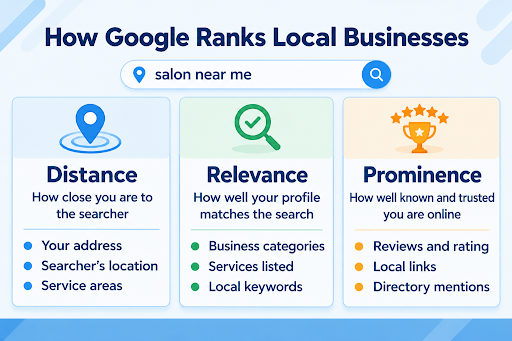
When someone searches “salon near me,” Google doesn’t pick winners at random. It weighs three signals: how close the business is, how well it matches the search, and how well known it is online. Therefore, knowing what feeds each signal shows you where your effort pays off.
6 Local SEO Techniques and Free Tools You Can Start Using Today
1. Claim and Complete Your Google Business Profile
Your Google Business Profile is the free listing that displays your hours, photos, and contact details across Search and Maps. So, verify ownership, choose precise categories, and keep every detail current so nearby searchers can reach you instantly.
- Tools: Google Business Profile, Google Maps app
2. Keep Your Name, Address, and Phone Number Identical Online
“St.” on one site and “Street” on another can confuse search engines and customers alike. That’s why you should audit every listing you can find, then correct each mismatch. A simple spreadsheet keeps the cleanup organized.
- Tools: Bing Places, Apple Business Connect, Google Sheets
3. Add Neighborhood Keywords to Your Key Pages
Where do your customers actually live and search? Work those place names into your homepage title, service pages, and headings, such as “bakery in Oak Park.” At the same time, remember to write naturally, because forced repetition makes pages harder to read.
- Tools: Google Autocomplete, Google Trends
4. Collect and Reply to Customer Reviews
Ask satisfied customers for a review right after the sale, while the experience is fresh. Then answer every review, including critical ones, within a few days. According to Google Business Profile Help, more reviews and positive ratings can improve your business’ local ranking.
- Tools: Whitespark Google Review Link Generator, Canva QR Code Generator
5. Add Local Business Schema Markup
Schema markup is a snippet of code that tells search engines your business name, location, hours, and services in a format they read instantly. Many website platforms and plugins can add it without any coding.
- Tools: Merkle Schema Markup Generator, Google Rich Results Test
6. Earn Links From Local Websites
A mention from your chamber of commerce, a neighborhood blog, or a charity you sponsor signals that your business belongs to the community. Try to start with organizations you already work with, then expand outward.
- Tools: Google Alerts, Google Search Console, Ahrefs Webmaster Tools
How to Measure Local SEO Results
- Customer actions: Always note your calls, direction requests, and website clicks from your profile’s performance section each month; a steady rise means more nearby people are acting.
- Search visibility: Filter Search Console’s Performance report by your city name monthly, and watch whether impressions and clicks for those searches climb.
- Local website traffic: Also, compare visits from your city and surrounding areas in Google Analytics before and after each change to see which updates attract nearby visitors.
- Review momentum: Log new reviews and your average rating monthly; more recent reviews at a steady rating show your request process is working.
- Listing accuracy: Recheck your tracking spreadsheet every quarter to confirm directories still show correct details.
- Schema health: Another way to measure is to retest a key page with the Rich Results Test after any website edit to confirm your markup still passes without errors.
- Local links: Count the new local websites linking to you each quarter in Search Console’s Links report.
Conclusion
Your local visibility grows through steady, accurate effort, not one big push. So, if you need professional help with your local SEO, Think Shaw is one place to reach out. With years of experience in SEO services, we take care of everything from keyword strategy and local link building to regular reporting, so you can focus on running your business.
| Your next customer is searching right now. Let our team help your business show up first in local results and turn those searches into visits. |
FAQs: About Local SEO for Small Businesses
Does my distance from a customer affect my local ranking?
Yes. Google weighs distance, relevance, and prominence, so results change depending on where the searcher is standing.
How do I rank my second business location?
Give each location its own Google Business Profile and its own website page with unique details, instead of sharing one listing.
Can a small business without a storefront rank locally?
Yes. Service-area businesses, like plumbers or mobile groomers, can hide their address on Google Business Profile and list areas served.
How do I update my hours for holidays?
Use the special hours option in your Google Business Profile. Set the dates ahead of time so customers see accurate hours.
Is local SEO worth it if most of my customers come from word of mouth?
Yes. Even referred customers often search your business name online first, so an accurate, well-reviewed listing helps close that decision.
Should I add “near me” to my website pages?
No. Google works out the searcher’s location on its own, so use real city and neighborhood names that customers actually search.