
Getting more reviews is not simply about asking every customer to leave feedback. It requires making the request at a point, so that they can genuinely reflect based on their experience. Businesses also want people to share their opinions without feeling pressured or forced. From simplifying the review process to building a consistent follow-up routine, small improvements can enhance the experience of how businesses collect feedback. This article will help you understand how to get more Google reviews, ways to gather genuine customer opinions and strengthening your online presence.
Summary of Google Review StrategiesGetting more Google reviews requires a simple, consistent, and customer-friendly approach. Businesses can share direct review links and QR codes, request feedback at appropriate times, and use email, SMS, or in-person interactions. A regular review collection process, polite follow-ups, and thoughtful responses help encourage genuine feedback. Following Google’s review policies also supports trust, strengthens online reputation, and improves local search visibility. |
1. Make It Easy for Customers to Leave Google Reviews
Sometimes, customers may want to leave feedback but abandon at half due to a complicated review page process. Making a straightforward process helps them share their experience more conveniently.
Create a Direct Google Review Link
Providing a direct Google review link takes customers to the review section of a business’s Google Business Profile without requiring them to search for the listing themselves.
If you want ot create a link, navigate to your Google Business Profile through a desktop browser, select Read Reviews, and click Get More Reviews. There will be an option to copy the review link, which you can share with customers.
Keep the link accessible in your regular business communications. You can add it to purchase confirmation emails, digital receipts, appointment summaries, or post-service messages. This way, a customer can reach the correct page without navigating through multiple search results.
Use QR Codes to Simplify Review Requests
You can also use a Google review QR code for collecting feedback, especially if you have a physical business location and daily interactions with customers. They can scan the code using smartphones.
Add your QR code on invoices, product packaging, business cards, checkout counters, and in-store displays. Restaurants can include it on printed bills, while service providers can add it to completed job documentation. Also, keep your printed code clear, properly sized, and easy to scan.
| Want to enhance your business’s online visibility? Understanding the type of support your business requires can help with successful growth |
2. Ask Customers for Reviews at the Right Time
Understand the timing of a review request to check whether the customer feels comfortable sharing their experience. Asking too early may leave customers without enough information to evaluate the product or service, while waiting too long can make the interaction less memorable.
Request Feedback After Customers Experience the Product or Service
For product-based businesses, a suitable time is to ask the customer for a review after they have received the order and had enough time to use it. This way, customers can share their opinion based on the product’s quality, functionality, and overall experience.
A service provider can request feedback after completing an appointment or after finishing an agreed-upon work. At this point, customers have a better understanding of the service and can share their experience more accurately.
Follow Up When the Interaction Is Still Relevant
Customers are more likely to remember a brand when a request reaches them at an appropriate time. A business should know how much time is needed for a customer to experience a purchase or assess a completed service before sending a follow-up.
For example, a customer thanking an employee after a successful appointment has a natural opportunity to mention the review option. However, businesses should consider people who openly express their satisfaction. This is because every customer has an equal opportunity to share an honest opinion.
Do not frustrate customers with repeated reminders. A single polite follow-up is better than sending several messages asking the same question. Let them participate without making them feel obligated.
3. Use Different Channels to Request Google Reviews
Customers are already well known about received messages from businesses through email, SMS, and in-person conversations. These are existing interactions that help you invite feedback without making it feel like a separate marketing campaign.
Send Review Requests Through Email and SMS
Email and SMS are most common for reaching customers after a purchase or completed service. Without making the message too lengthy, keep it a short, personal note with a direct review link. This is enough to explain what you are asking for.
For example, an online retailer can send a message in its post-purchase email: “Thank you for shopping with us! We hope you are enjoying your purchase. We’d appreciate it if you could share your experience with us. [Leave a Google Review].”
Additionally, use language that perfectly fits the customer’s interaction with your business. Avoid making a request into a lengthy sales message.
Encourage Reviews Through In-Person Interactions
There is no need for an automated message beyond every review request. Employees can naturally mention the option during conversation after completing a transaction or helping a customer.
For example, a staff member could simply say, “Thank you for visiting us today. If you’d like our service, you can share your experience through our Google review link on your receipt.”
Moreover, do not ask for a particular star rating or suggest what you should write. The decision and content of the review must remain entirely up to the customer. Businesses can also explore SEO outsourcing services, which help with review management
4. Build a Consistent Google Review Collection Process
Getting regular Google reviews becomes easier when businesses make review collection part of their everyday customer service process. This helps them understand when to invite feedback, how to handle responses, and what to do with the information customers share.
Establish a Consistent Review Request Routine
Use simple guidelines, so employees understand when and how to invite customers to leave feedback. Train your employees to share review links politely without demanding specific ratings. For example, mention a review after a completed purchase.
Integrate Review Requests Into Existing Customer Workflows
Make sure to send review invitations after a purchase or service procedure. Businesses can also enhance their local SEO strategy to reach a wider audience.
Monitor Responses and Improve the Collection Process
Respond to both positive and negative reviews with personalised replies, and look for recurring comments that require attention in your service. Compare your responses from email, SMS, and in-person requests to identify which methods work best.
Additionally, Google reviews must follow its content policies to remain visible and trustworthy. For a better understanding of prohibited content, fake engagement, review incentives, and reporting inappropriate feedback, explore Google’s official guidelines on getting more reviews.
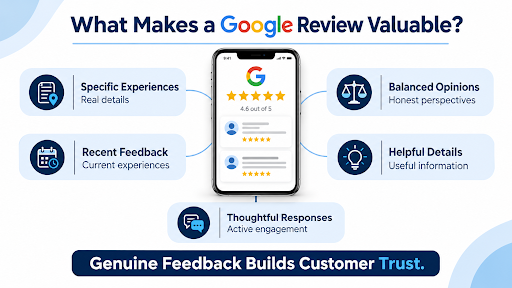
What Makes a Google Review Valuable?
A smartphone displaying customer reviews and star ratings, surrounded by visual elements representing specific experiences, recent feedback, balanced opinions, helpful details, and thoughtful business responses.
Conclusion
Now you understand that building a steady flow of Google reviews does not require complicated campaigns or constant reminders. You just need to make the process easier, ask at an appropriate time, and offer your customer a comfortable way to share their experiences. At Think Shaw, we help businesses get more Google reviews by developing local SEO strategies that improve Google Business Profile visibility, streamline review collection, and encourage genuine customer feedback. In addition, we help you build trust with your potential customers and strengthen your local presence.
| Ready to improve your Google review strategy? Discuss your goal and get tailored support right away |
Frequently Asked Questions About Getting More Google Reviews
Why did Google remove some of my customer reviews?
Google may remove reviews that break its content policies, contain spam, or appear suspicious. Sometimes, automated spam detection can mistakenly affect legitimate reviews.
How long does it take for a Google review to appear?
Eligible reviews appear shortly after submission, but Google may take additional time to process, verify, or review content flagged by its systems.
Can customers leave a Google review without a Gmail account?
Yes, it is possible with an eligible Google account. They can use another email address, such as Yahoo or Outlook, if it is linked to a Google Account.
Can a business respond to a Google review more than once?
Businesses can edit their existing responses to reviews, which allows them to correct or update information when circumstances change.
Can customers edit or delete their Google reviews?
Yes, customers can edit or delete their review anytime, providing control over feedback.