
One well-structured blog post contains enough raw material to fuel carousels, threads, videos, newsletters, and lead magnets, all without starting from scratch. This is precisely what a content repurposing framework is: a deliberate system for turning a single origin asset into a month’s worth of distribution across every platform your audience actually uses, because the brands that dominate their niche aren’t publishing more than everyone else, they’re just getting more mileage out of everything they publish. This guide walks you through exactly how to build that system: what makes a post worth repurposing, which formats to extract, and how to sequence them for sustained reach!
Highlights: Understanding A Content Repurposing FrameworkA content repurposing framework is a structured system that transforms one blog post into multiple platform-ready formats, without creating content from scratch. It works by identifying reusable “content atoms” within a post: frameworks, data points, and standalone insights that each serve a different channel and audience intent. When sequenced strategically across weeks, a single well-built post can sustain an entire month’s distribution, compounding reach, reinforcing expertise, and converting passive readers into leads. |
Why Most Content Fails Before Repurposing Even Starts
The most common mistake is to write first and then ask, “Can I turn this into something?” That reactive approach means retrofitting content that was never designed to be broken apart. A proactive content repurposing framework works the other way. Before you write a word, you already know which section becomes a Twitter thread, which stat anchors a graphic, and which steps map to a carousel. The blog is the origin asset; everything else flows from it.
This also directly supports E-E-A-T: Google’s quality standard built around experience, expertise, authoritativeness, and trustworthiness. When your blog is built on genuine first-hand insight, repurposing it across formats distributes real authority. Shallow content repurposed at scale only spreads noise faster.
What is the concept behind repurposing?
The concept to internalise is content atoms, the smallest reusable units inside any well-structured post, through elements like:
- A compelling stat
- Step-by-step framework
- A counterintuitive insight
- Lastly, a quotable conclusion
When you write with these in mind, you can repurpose blog content with minimal extra effort because the raw material was built for it from the start.
What Makes a Blog Post Actually Worth Repurposing
Before applying any content recycling strategy, the source post needs to be built for it. A post worth repurposing shares the same qualities Google rewards: it’s specific, grounded in real experience, and contains original thinking.
| Element | What It Is | Why It Matters for Repurposing |
| First-hand insight | Observations from real experience or tested methodology | Forms the backbone of podcast segments and video scripts |
| Original framework | A concept you’ve structured or coined yourself | Becomes a carousel, deck, or lead magnet on its own |
| Data points or cited sources | Stats, studies, or original findings | Anchors social graphics, thread openers, and quote cards |
| Step-by-step sections | Numbered processes with specific outcomes | Maps directly to carousels, threads, and checklists |
| Standalone H2s | Headings that make sense out of context | Each one can be a tweet, a slide title, or a video hook |
| Visually describable concepts | Processes, comparisons, hierarchies | Translates cleanly to infographics and Pinterest content |
When you finish a section, ask whether it could stand alone as a newsletter or a slide. If yes, you’ve written a content atom. If not, sharpen it!
The Content Repurposing Framework: 10 Formats, Each With a Distinct Job
These 10 formats can all be extracted from a single well-structured post. Each serves a different platform, audience mindset, and content goal:
LinkedIn Carousel
Pull the numbered steps or H2’s from your blog and assign one per slide. Open with your most striking insight, cover one key point per slide in 20–30 words, and close with a CTA. A five-section blog maps almost perfectly to a 10-slide carousel with no new writing required.
Twitter/X Thread
Each subheading or core insight becomes a tweet. Open with your sharpest, most specific claim, and never a summary of what’s coming. Close with a link to the full post.
Short-Form Video Script
Pick one H3, the most tactical or surprising one, and script it as a 45–60 second video. Social media repurposing for short-form video means going deep on a single piece of your post, not summarising all of it. Focused beats comprehensive on every short-form platform.
Email Newsletter
Distil the blog’s argument into 150–200 words. Lead with why it matters to this specific reader right now, offer one actionable takeaway, and link to the full post. The newsletter’s job is to make clicking feel inevitable, not to replace the read.
Pinterest Infographic
Turn your framework or step list into a tall vertical graphic with a search-friendly title and your blog URL embedded in the image. Unlike social posts that vanish within hours, Pinterest content compounds in reach over months.
Podcast Talking Points
Use your H2’s as segment headers for a solo episode or interview guide. Open each segment with a personal story or real example, not in the written post, so listeners who’ve read the blog still get something new.
Instagram Quote Graphics
Scan your blog for 3–5 punchy, self-contained sentences and design each as a quote card. Post as a series across the week with the blog link in bio. This builds consistent impressions without writing a single new word.
YouTube Video
Expand the blog into a 5–10 minute walkthrough using H2’s as your chapter structure. Add real examples and tool demos that would feel bloated in writing but work naturally on video. YouTube is the second-largest search engine, and a well-optimised video creates an entirely separate discovery path for the same expertise.
SlideShare Deck
Map the blog’s structure into a deck: one slide cluster per section, three to five slides each. Decks circulate in professional communities, get embedded in newsletters, and surface in SlideShare’s own search, one of the most underused passive reach channels in content marketing.
PDF Checklist
Condense the blog’s actionable steps into a one-page downloadable reference and gate it with an email opt-in. This transforms the blog into a conversion asset. Of all 10 formats, this one has the highest compounding ROI; you build the list once, and the asset keeps working.
How to Sequence These Formats Without Burning Through Your Distribution Window
A smart content distribution strategy spreads formats across two to four weeks, keeping the original post in circulation long after its publish date. Publishing everything at once means each piece competes with the others for attention.
| Week | Actions |
| Week 1 | Publish blog → Send email newsletter → Post LinkedIn carousel |
| Week 1–2 | Launch Twitter/X thread → Roll out 2–3 Instagram quote graphics |
| Week 2 | Publish short-form video → Pin the Pinterest infographic |
| Week 3 | Release YouTube video → Share SlideShare deck |
| Week 4 | Promote the PDF checklist as a standalone post or low-budget ad |
Match each format to where it actually performs. LinkedIn rewards depth and dwell time. Twitter rewards a sharp opening line. YouTube rewards searchable titles and chapter structure. A simple Notion or Trello board tracking each format’s status, drafted, scheduled, and live, is all the infrastructure you need.
How to Decide Which Posts Deserve the Full 10-Format Treatment
The goal isn’t all 10 formats every time. The goal is a repeatable system you can scale based on each post’s actual potential.
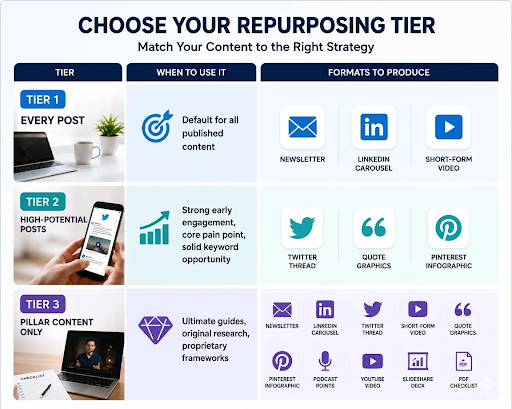
A post earns Tier 3 when it targets a high-intent keyword, contains original data or a named framework, or outperforms your site’s average in organic traffic within the first 30 days.
Conclusion
A single well-built blog post, distributed through the right system, can do the work of an entire month’s content calendar. At Think Shaw, we build content strategies that don’t just get published, they get found, shared, and remembered. Our team specialises in turning your existing expertise into multi-format content ecosystems: from frameworks and carousels to video scripts and lead magnets, we handle the strategy, the structure, and the execution.
If you’ve been sitting on great content that isn’t working as hard as it should, we know exactly what to do with it. Work with Think Shaw today!
FAQs About A Content Repurposing Framework
How many times should you repurpose a single blog post?
There’s no fixed limit; a pillar post can be repurposed continuously as new platforms emerge or the content is updated with fresh data.
What’s the difference between repurposing and republishing?
Republishing is copying the same content to another platform. Repurposing is reformatting the core ideas into a new structure suited to a different audience or medium.
Should you repurpose old blog posts or only new ones?
Both. High-performing evergreen posts from your archive often have more repurposing potential than new ones because they’ve already proven audience interest.
Which repurposed format typically drives the most traffic back to the original blog?
Email newsletters and YouTube videos consistently drive the highest return traffic, as both allow direct linking and reach audiences with high intent.
Can I repurpose a blog post that didn’t perform well organically?
Yes. Poor organic performance is usually a distribution problem, not a quality problem. Repurposing puts the content in front of audiences who may never find it through search.
How long should I wait after publishing before repurposing?
Begin repurposing within the first week of publishing, starting with the newsletter and LinkedIn carousel, to amplify the post while it’s newest and most likely to earn backlinks.