Shopify powers over 4.6 million online stores globally, yet most of them are quietly losing organic traffic, not to better competitors, but to avoidable SEO mistakes baked into how they set up and manage their stores. Duplicate content from Shopify URL structure, thin collection pages, unoptimized meta titles, and mismatched search intent are just a few of the issues silently dragging rankings down. With Google’s algorithms in 2026 placing a heavier weight on E-E-A-T signals, Core Web Vitals, and structured data, store owners who rely on Shopify’s defaults are already a step behind.
If your store isn’t ranking the way your product catalog deserves, the problem is rarely what you think it is. In this blog, we have discussed the major mistakes that hurt Shopify SEO in 2026 and how to mend them, to help you optimize your rankings better.
Shopify SEO 2026: A Concise Store Owner’s EncapsulationShopify’s platform-level behaviors, dual product URLs, faceted navigation generating thousands of crawlable filter combinations, and auto-pulled meta snippets, create compounding technical SEO problems most store owners never trace back to their root cause. Pair that with thin collection pages, search intent mismatches, conflicting schema markup, mobile load times exceeding Google’s Core Web Vitals thresholds, and manufacturer-copied product descriptions, and the result is a store quietly bleeding organic rankings while the real causes stay hidden. |
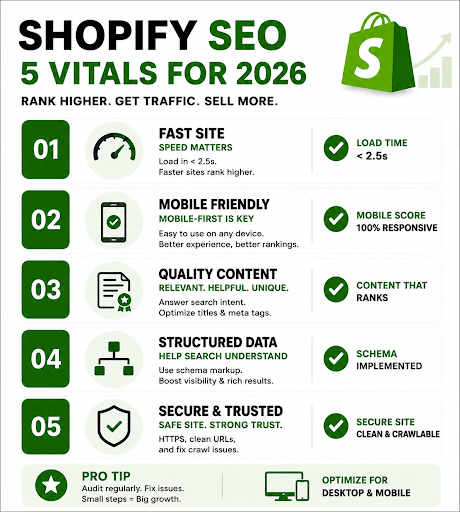
Shopify SEO Vitals for 2026
Ranking a Shopify store in 2026 requires more than just adding products and targeting keywords. Google now prioritizes user experience, mobile performance, structured data, and high-quality content when deciding which stores deserve visibility. Even technically small issues like slow loading speeds, weak collection pages, or broken Shopify schema markup can quietly damage rankings and conversions over time. This infographic highlights the most important Shopify SEO vitals store owners should focus on to improve search visibility, strengthen user trust, and stay competitive in an increasingly AI-driven search landscape.
The Shopify SEO Mistakes That Hurt Store Growth In 2026
Here are some mistakes that hurt Shopify SEO in 2026 and need to be mended immediately:
Duplicate Content from Shopify’s Forced URL Structure
The Problem
Every product in a Shopify store is accessible through two separate URLs — /products/product-handle and /collections/collection-name/products/product-handle. This is a platform-level behavior that store owners rarely notice, but Google always does. When both URLs are crawlable and indexable, Google has to decide which version to rank, and it often picks the wrong one, splitting link equity between the two paths and diluting the ranking power of your actual product page.
Why It Happens
Shopify generates these dual paths by design. Collection-scoped product URLs are created automatically every time a product is listed inside a collection, and without explicit canonical tag management at the theme level, both remain active and indexable.
The Fix
Verify that your theme automatically sets the canonical tag on product pages to point to the /products/ version only. Go to Google Search Console’s URL Inspection tool and check which URL Google considers canonical for your top products. If it’s the collection-scoped version, correct the canonical tag in your product.liquid file or through a reliable SEO app. Never use robots.txt as a substitute for canonical tags; it blocks crawling but does not consolidate ranking signals.
Faceted Navigation Creating Crawl Waste at Scale
The Problem
Shopify’s collection filter system is one of its biggest technical SEO liabilities. A store with 50 products and just 10 filter options (color, size, price, material, etc.) can generate thousands of unique, crawlable Shopify URL structures, most of them containing near-identical content. A store with six filter dimensions and four values each produces over 4,000 URL combinations. Google wastes its crawl budget on these thin pages instead of your high-value collection and product page SEO.
Why It Happens
Shopify’s tag filtering and Storefront filtering systems append filter values directly to collection URLs. Without canonical or noindex rules in place, every combination becomes a separate indexable page in Google’s eyes.
The Fix
Classify your filtered URLs into three buckets:
- Pages that deserve to rank (strong demand, unique content, enough products)
- Shopper-only filtered states (useful for browsing but not for search)
- Crawl-waste combinations (multi-filter, sort orders, empty results)
Apply canonical tags on filtered URLs pointing back to the base collection URL. Use noindex via your theme or a SEO app to filter URLs that carry no standalone search value. Make sure your XML sitemap only includes the URLs you actually want indexed.
Thin or Absent Collection Page Content
The Problem
Another factor that hurts Shopify SEO in 2026 is that most Shopify store owners treat collection pages as product grids, a header, a filter bar, and a list of products. No descriptive copy, no buyer context, no internal links. From Google’s perspective in 2026, a collection page with no written content is a near-empty page. It provides no signal about topical relevance, no E-E-A-T indicators, and nothing to differentiate it from the dozens of similar collection pages competing for the same keyword.
Why It Happens
Store owners assume product listings speak for themselves. The focus is usually on product pages, leaving collection pages as structural afterthoughts despite the fact that they are the primary commercial landing pages Google ranks for category-level queries.
The Fix
Add 150–300 words of useful, keyword-informed copy to every important collection page. This should answer buyer questions, what differentiates the products, what to consider before buying, sizing or compatibility notes, use cases, and links to deeper guides. Place this copy below the product grid so it does not disrupt the shopping experience. Also, write a unique meta title and meta description for each collection. Shopify does not auto-generate these and will pull random page snippets if you leave them blank.
Search Intent Mismatch Between Page Type and Keyword
The Problem
One of the most damaging and overlooked Shopify SEO mistakes is targeting the wrong page type for a given keyword. Store owners routinely push product pages at informational queries like “how to choose a mattress” or “best wireless earbuds for running”, queries where Google has already determined that blog posts or comparison content is what users want. A product page will almost never outrank a well-written guide for an informational query, no matter how well optimized it is.
Why It Happens
The logic seems sound: if someone searches for a product type, show them the product. But Google’s ranking decisions are based on billions of user behavior signals. stores matching page types correctly to search intent, see 40–60% higher organic click-through rates. Ignoring intent means ignoring those signals entirely.
The Fix
Before creating or optimizing any page, search your target keyword and examine the top 10 results. If 7 out of 10 are blog posts, Google has classified that query as informational, build a guide, not a product page. If the results are product and category pages, your collection or product page should target them. Build a content ecosystem: informational blog posts that link to relevant collection pages, comparison content for commercial investigation queries, and product pages reserved for transactional queries. This also prevents keyword cannibalization, where a blog post and a category page compete against each other for the same keyword.
Broken or Conflicting Structured Data (Schema Markup)
The Problem
Shopify themes often include basic Product schema by default, but the moment you install a review app, a product feed app, or customize your theme, you risk generating duplicate or conflicting JSON-LD blocks. Two schema blocks describing the same product with different prices, stock statuses, or review counts send contradictory signals to Google. This does not just miss rich result opportunities, it actively undermines the trust signals that Google’s 2026 algorithms use to evaluate E-E-A-T at the product level. Google’s AI Overviews and AI-driven search surfaces now pull recommendations directly from Shopify schema markup, making invisible or broken schema a direct traffic liability.
Why It Happens
Themes, apps, and third-party tools all inject their own schema without coordinating with each other. A theme update can silently alter JSON-LD output. Review apps add their own aggregateRating block. A product feed app adds another Product entity. None of them knows the others exist.
The Fix
Audit your rendered page source (not just your CMS settings) using Google’s Rich Results Test and Schema Markup Validator. Look for duplicate Product entities, mismatched prices between schema and visible content, missing fields like GTIN, MPN, or availability, and review markup that does not match what users see on the page. Prioritize:
- Product schema with price
- Availability and review aggregation
- BreadcrumbList
- FAQ page on relevant pages
- Organization globally
Keep one well-configured schema source and disable or remove conflicting app-generated markup.
Ignoring Core Web Vitals — Especially on Mobile
The Problem
Most Shopify stores in 2026 load between 3.2 and 5.1 seconds on mobile, well above Google’s Core Web Vitals threshold of 2.5 seconds for Largest Contentful Paint (LCP). Slow stores lose rankings, but the damage goes deeper: slow pages see higher bounce rates, lower time-on-site, and lower conversion rates, all of which feed back as negative engagement signals into Google’s ranking model.
Why It Happens
Here’s why this hurts Shopify SEO in 2026:
Shopify’s platform handles hosting and CDN, so owners assume performance is taken care of. The real culprits are at the theme and app level, installed apps that leave script tags running even after being deactivated, uncompressed hero images and product photography in PNG or unoptimized JPEG formats, render-blocking JavaScript, and theme code bloat. Scandiweb’s 2026 performance playbook notes that most Shopify performance problems originate from app scripts and unoptimized media, not the platform itself.
The Fix
Run Google PageSpeed Insights, Shopify’s built-in performance dashboard, and Google Lighthouse in parallel; no single tool gives the full picture.
- Target LCP under 2.5 seconds, Cumulative Layout Shift (CLS) under 0.1, and Interaction to Next Paint (INP) under 200ms.
- Audit and remove every app that is not actively earning its keep, then disable leftover app embeds under Online Store > Themes > App Embeds.
- Compress product images with TinyPNG or a native Shopify optimizer before uploading.
- Defer non-critical JavaScript in theme.liquid.
A mobile PageSpeed score above 60 is healthy; above 80 is excellent.
Weak or Manufacturer-Copied Product Descriptions
The Problem
A significant portion of Shopify stores copies product descriptions directly from their supplier or manufacturer. Since every competitor sourcing from the same supplier has the identical description, Google treats these as Shopify duplicate content across the web, not just within your store. Thin, copied product copy also fails the E-E-A-T test entirely: it demonstrates no experience, no expertise, and no original value to the user.
Why It Happens
It is faster and easier to copy-paste a manufacturer’s data sheet than to write original descriptions for hundreds of SKUs. For dropshipping stores in particular, supplier-provided content is often the only content available.
The Fix
Rewrite product descriptions around the customer’s actual buying questions: what problem does this product solve, what makes it different from alternatives, what do buyers need to know before purchasing, and what do reviewers consistently say. For large catalogs, prioritize your top-revenue and top-traffic products first. Each description should include the target keyword naturally, focus on benefits over features, and incorporate a short FAQ or spec section where relevant. Even 100 words of genuinely original, helpful copy outperforms 500 words of manufacturer boilerplate in Google’s current evaluation model.
Conclusion
Getting Shopify SEO right in 2026 is not about chasing algorithm updates; it is about building a technically sound, content-rich store that Google can trust and users can navigate with confidence. If your store is losing ground despite your efforts, the fixes exist, but they take expertise to execute correctly. Looking for a reliable Shopify SEO partner who knows exactly where stores leak rankings? Think Shaw helps Shopify brands fix what’s broken and build what ranks. We have delivered results across industries, including retail, fitness, financial services, healthcare, education, and more, and offer agency-grade expertise at a highly competitive cost structure. Let’s grow your store. Get in touch with Think Shaw today.
FAQs
Does Shopify handle SEO automatically, or do store owners need to do it manually?
Shopify handles a few basics like auto-generated sitemaps and some canonical tags, but critical elements, meta titles, collection copy, schema accuracy, and page speed require manual attention from store owners.
What is the best Shopify theme for SEO in 2026?
Shopify’s native Dawn theme is currently the fastest and most SEO-friendly default option. It ships with clean code, minimal render-blocking scripts, and solid schema foundations out of the box.
Can Shopify stores rank in Google’s AI Overviews?
Yes, but only if the store has well-structured schema markup, high E-E-A-T signals, and content that directly and clearly answers user queries. AI Overviews favor authoritative, factually grounded pages.
Should Shopify stores have separate landing pages for paid ads and organic SEO?
Yes. Pages optimized for paid ads prioritize conversion elements that can conflict with organic SEO signals. Keeping them separate protects your SEO page structure while allowing ad pages to be freely modified.
How does Google Search Console help Shopify store owners with SEO?
Google Search Console surfaces crawl errors, index coverage issues, Core Web Vitals data, and which queries drive impressions, making it the most important free diagnostic tool for any Shopify SEO audit.