Search engines don’t have unlimited time for your website, because every site gets a finite “crawl budget.” For large sites, a meaningful chunk of it gets burned on duplicate pages, broken links, and endless filter URLs instead of the content that actually matters. This happens when your site’s architecture isn’t built right, and fixing it gets you faster indexing, stronger rankings, and better visibility in AI-generated answers too. But how do you do it? Well, this guide breaks down exactly how to build a website structure that works for search engines, AI engines, and real users.
Understanding: Proper Website Architecture for SEOA good website architecture organizes your content into a flat, logical hierarchy so both search engines and AI tools can find, understand, and cite it efficiently. It combines clean URL structures, strategic internal linking, and schema markup to improve the crawlability, user experience, and visibility in AI-generated search results. |
Why Website Architecture Matters for SEO
Crawlability & Indexation
Search bots don’t dig endlessly; instead, they follow a clear path. Give them a flat, logical structure, and they’ll reach every important page in just a few clicks. But if you bury pages too deep, indexing slows down. Clean architecture keeps your content visible instead of lost in digital clutter.
Link Equity Distribution
Picture your internal links as roads connecting different parts of your site. Some pages carry more authority than others, and that authority needs somewhere to go. Per Google’s own SEO Starter Guide, links are how the vast majority of new pages get discovered on the web each day, making internal linking one of the most direct ways to guide both users and search engines toward your most valuable content. A well-planned structure spreads that authority evenly, so your top pages lift the rest instead of leaving weaker ones isolated and forgotten.
User Experience & Dwell Time
Think about the last time you landed on a confusing website and left within seconds. That’s exactly what happens when your website’s architecture is messy. People want answers fast, and when they get lost hunting for them, they leave. Search engines notice this, and an intuitive structure keeps visitors around longer.
AI/LLM Discoverability (GEO Angle)
Here’s something most site owners haven’t caught on to yet: tools like ChatGPT and Perplexity don’t read your site the way a person does. They scan for structure like clear headings, logical sections, and grouped topics. That’s exactly why organizing your site well helps these tools actually pull your content into their answers.
|
Not Sure If Your Site’s Architecture Is Holding You Back? Our SEO experts dig into your site’s structure, fix what’s slowing you down, and build a roadmap for faster indexing and stronger rankings. |
How to Build a Search-Friendly Site
Use a Flat, Shallow URL Structure
Keep every important page within three clicks of your homepage. We already know that deep, nested URLs confuse both users and crawlers. A shallow structure signals importance clearly, speeds up indexing, and makes navigation intuitive, which is critical for both SEO performance and overall usability.
Build Topic Clusters & Pillar Pages
Make sure to organize content around core themes: one comprehensive pillar page linked to several supporting cluster pages. This structure signals topical authority to search engines, improves internal linking naturally, and helps AI tools understand the full context of your expertise.
Implement Schema Markup
Always add FAQ, Breadcrumb, and HowTo schema to help search engines interpret your content’s structure. This markup increases eligibility for rich results and featured snippets, while also making your content easier for AI engines to extract and reference in generated answers.
Mobile-First, Fast-Loading Structure
Google indexes mobile versions first, so your architecture must perform flawlessly on smaller screens. Combine this with fast load times like compressed images, minimal redirects, and clean code, since speed and structure together determine how efficiently your site gets crawled and ranked.
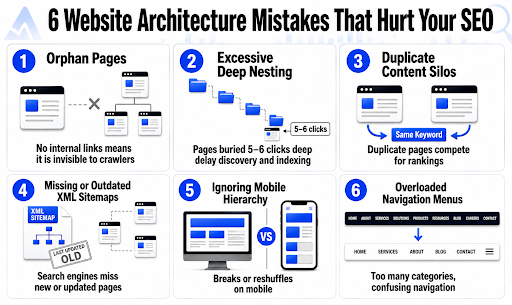
Common Mistakes That Quietly Break Your Site’s Architecture
Even a well-optimized site loses visibility to small, overlooked structural errors. These mistakes rarely show up as obvious red flags, but they just slowly choke your crawl efficiency and rankings over time. Here’s what to watch out for before it costs you:
How to Check If It’s Working
This is how you can track whether your changes are improving crawlability, indexing, and visibility across both traditional and AI search:
- Google Search Console: Monitor the Crawl Stats report and Index Coverage report to see how efficiently Google is crawling and indexing your pages.
- Screaming Frog or Sitebulb: Run technical audits to visualize your site’s structure, spot orphan pages, and identify broken internal links.
- AI Citation Visibility: Search relevant queries in AI Overviews and Perplexity to check whether your content is being referenced. This is a direct signal of GEO effectiveness.
Conclusion
Always know that great architecture isn’t a one-time fix; it’s an ongoing discipline that keeps your site discoverable as search evolves. Looking to get it right professionally? At Think Shaw, with years of experience managing SEO for businesses across industries, we know exactly what search engines and AI tools look for in a well-structured site.
|
Are you ready to build a proper site structure that search engines and AI actually trust?
|
FAQs- About Website Architecture for SEO
How many internal links should my pages have?
There’s no fixed number, just focus on relevance. Link naturally to related, valuable pages rather than hitting an arbitrary count.
Does website architecture affect Core Web Vitals?
Yes. Poor structure often causes render-blocking resources and slower load times, indirectly hurting your Core Web Vitals scores.
How does site architecture impact multilingual or multi-region websites?
It requires careful hreflang implementation and clear folder or subdomain structuring, preventing duplicate content issues across different language versions.
Can I fix site architecture without a full redesign?
Absolutely, by restructuring internal links, updating sitemaps, and pruning orphan pages you can. This works without touching visual design.
How often should I audit my site structure?
Quarterly audits work well for most sites. If you have a larger, frequently updated site, then it benefits from monthly technical crawls.