Managing the SEO for your WooCommerce store, be it a fashion boutique or a furniture brand that has thousands of products, can actually feel like an uphill battle. The reason is that when your catalog grows, so do duplicate pages, thin content, and crawl issues that quietly drag your rankings down. Not only that, but it can slow down how fast new products get indexed and make it harder for customers to even find what they’re searching for. Also, these problems are the ones that usually push store owners to bring in a WooCommerce SEO agency in the first place. So, to avoid them at maximum, you just have to follow some simple steps. But how exactly do you pull that off? That’s what we’ll break down in this guide. Let’s go!
Quick Look: WooCommerce SEO for Big CatalogsWooCommerce SEO for large product catalogs refers to the technical and content practices used to help search engines efficiently crawl, index, and rank stores with thousands of products. It differs from standard SEO because it must address crawl budget limits, duplicate variant pages, and site speed at scale. A WooCommerce SEO agency typically handles this through canonical tagging, structured data, and crawl optimization. |
Why Stores With Large Catalogs Struggle With SEO?
You first need to understand what’s actually working against you. Here’s why large catalogs often underperform in search:
Duplicate and Thin Content
It is very common that large catalogs often have near-identical product descriptions across variants, colors, or sizes. Due to this, search engines see this as duplicate content, which confuses ranking signals and dilutes visibility for every similar page competing against itself.
Crawl Budget Gets Wasted
With thousands of URLs, filters, and sorting options, search engines simply can’t crawl everything on your site. Every website only gets a limited amount of “crawl time,” and Google has confirmed that duplicate or unnecessary URLs eat up a big chunk of it, leaving less time for your actual product pages to get noticed and indexed.
Slow Site Speed at Scale
More products obviously mean heavier pages, more images, and more plugins running simultaneously. This directly affects loading performance, which search engines factor into rankings, especially on mobile devices where speed issues are amplified.
Weak Internal Linking
Think about it like if a product takes six clicks to find from your homepage, chances are search engines won’t bother finding it either. With thousands of products and no clear linking structure between categories and pages, both customers and search engines lose track of what actually matters most. This is exactly why many stores get a WooCommerce SEO agency to rebuild their site architecture from scratch.
Keyword Cannibalization
When you sell dozens of similar products, like ten variations of the same jacket, they often end up targeting the same keywords. Search engines can’t decide which page to rank, so instead of one strong page winning, all of them end up competing against each other and losing!
WooCommerce SEO Tips to Scale Your Catalog
Let’s now get into a few practical fixes that you can start applying today:
Fix Canonical Tags on Variant Pages
Set your canonical URLs on color, size, or style variants pointing to the main product page. This consolidates ranking signals instead of splitting them across near-duplicate pages, which helps your primary product page rank stronger and faster.
Optimize Crawl Budget With Robots.txt and Sitemaps
Make sure to block low-value URLs like filtered searches, cart pages, and sort parameters using robots.txt. Keep sitemaps clean and updated with only indexable pages so search engines focus their limited crawling resources on your genuinely valuable content.
Improve Core Web Vitals
You will also need to compress images, lazy-load product galleries, and minimize unnecessary scripts. Google recommends keeping Largest Contentful Paint under 2.5 seconds, Interaction to Next Paint under 200 milliseconds, and Cumulative Layout Shift under 0.1 for a healthy ranking signal.
Strengthen Internal Linking Between Related Products
Another very important tip is to add “related products” and “frequently bought together” sections strategically. This distributes authority across your catalog, keeps users browsing longer, and gives search engines more contextual pathways to discover deeper product pages.
Handle Out-of-Stock and Discontinued Products Properly
Instead of deleting pages, redirect the no longer available products to relevant categories or similar items. This preserves your existing backlinks and link equity while avoiding sudden spikes in broken links across your store’s crawl paths.
Build a Logical Category Hierarchy
Nobody wants to click through five menus just to find one product, and search engines feel the same way. So just keep it simple; every item should be reachable within three clicks from your homepage. It’s a structure any experienced WooCommerce SEO company would set up first when auditing a large store.
Use Structured Data for Products
Ever notice how some search results show star ratings, prices, or stock status right there on Google? That’s schema markup at work. Adding it to your product pages doesn’t change your rankings directly, but it’s one of the easiest wins a WooCommerce SEO expert can implement quickly across thousands of listings.
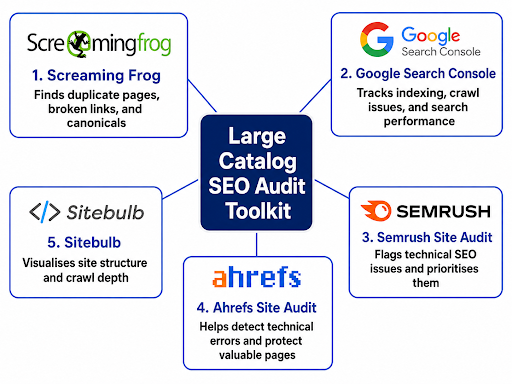
Tools to Audit SEO Across Large Product Catalogs
Auditing a large WooCommerce catalog manually can quickly become overwhelming, especially when you are dealing with thousands of products, categories, and duplicate URLs. That is where SEO tools make it easier to spot technical issues, crawl problems, indexing gaps, and weak site architecture before they start affecting rankings. Here are some of the most useful tools for auditing large WooCommerce product catalogs:
Conclusion
SEO for large catalogs isn’t a one-time checklist; it’s an ongoing habit. The stores that stay consistent with these fixes are the ones that keep climbing, steadily, and sustainably. Now, if you need any professional assistance regarding all of this for your store, reach out to Think Shaw right now. We’re your trusted WooCommerce SEO partner for category page optimization, product schema markup, and site-wide speed audits built specifically for large catalogs.
Let’s make your catalog into your biggest search asset. Contact us for more information!
FAQs- About SEO for Large WooCommerce Catalogs
Should out-of-stock products be removed immediately from the catalog?
No, redirect or noindex them instead of deleting, in order to preserve backlinks and avoid unnecessary crawl errors.
How often should large product catalogs be audited for SEO?
With weekly Search Console checks, quarterly deep audits of canonicals and schema, and an annual strategic review, you can keep large catalogs optimized.
What makes WooCommerce SEO different for stores with large product catalogs?
Large catalogs face crawl budget limits, thin content at scale, and many other issues that smaller WooCommerce stores rarely encounter or need to manage.
Does store size affect how Google indexes a WooCommerce catalog?
Yes, larger catalogs take longer to fully index since Google prioritizes crawling based on site structure, authority, and available crawl budget.
How many products before WooCommerce SEO strategy needs to change?
Once your store crosses a few thousand products, standard SEO tactics stop scaling and dedicated large catalog strategies become necessary for visibility.