Many Magento store owners don’t realize that their homepage can rank perfectly fine while the rest of the site quietly loses traffic. That’s because Google doesn’t just rank your domain; it ranks each page on its own. Since most pages are categories and products, you need to know that two things control how well those pages do: the category architecture and the product discovery. When these two aren’t set up right, Magento’s own filters and navigation can hide good products behind duplicate URLs, and this is often when store owners bring in a Magento SEO expert to catch what’s quietly costing them traffic. So, come along as we have this guide right here to help you know more about them in detail.
Overview: Magento Category & Product DiscoveryProperly done Magento category hierarchy and product discovery help search engines crawl your store more efficiently while making products easier for shoppers to find. Focus on keeping products within three clicks of the homepage, strengthening internal linking, and ensuring every important product page remains crawlable and indexable. |
Understanding Category Architecture and Product Discovery
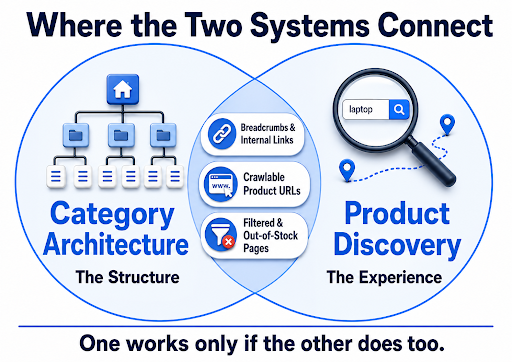
Category Architecture
It means how your catalog is structured behind the scenes, which categories sit under which parent, and how URLs are built as a result. If it’s organized logically, both shoppers and Google can move through it without getting lost.
Product Discovery
It is the actual experience of finding a specific item, whether that’s a shopper using filters and search, or Googlebot following internal links and structured data to reach a product page. A store can have a clean category structure and still have poor product discovery if filters or stock status get in the way.
Working of Category Architecture and Product Discovery
Always remember, they aren’t two separate fixes; they work as one connected system, where structure feeds discovery and discovery depends on structure. Through the visual below, you can easily map out exactly where that overlap happens.
Magento SEO Tips for Better Category Architecture
Limit Click Depth
If a shopper or Google has to click through four or five menus just to reach a product, that’s a problem. Therefore, keep the product just two or three clicks away from your homepage. This is one of the first things your Magento SEO services provider will restructure, since it directly affects crawl efficiency.
- For Example: Home → Men → Shirts → Product page. Instead of Home → Clothing → Men → Tops → Casual → Shirts → Product page.
Canonicalize Filtered Page URLs
When shoppers filter products by color or size, Magento creates a brand-new URL for every single combination. Google doesn’t need to see all of them, just the main category page. Getting this right is a routine part of the work the Magento SEO company handles, since unmanaged URLs can multiply into thousands of duplicate pages.
- For Example: Your main shoes page is yoursite.com/category/shoes. When someone filters by black, size 10 shoes, it creates a new link like yoursite.com/category/shoes?color=black&size=10. That filtered link should point back to the main shoes page.
Write Unique Descriptions
If every category on your site has the same generic paragraph, Google can’t tell them apart, and neither can your customers. Each category deserves its own short, honest description.
- For Example: For “Men’s Running Shoes,” write a couple of sentences that actually talk about running shoes. Mention things like “lightweight” or “breathable,” instead of reusing the same paragraph you used for sandals/boots.
Use Breadcrumb Navigation
Breadcrumbs, like Home > Men > Shoes, aren’t just helpful for users; they also help Google understand how your categories connect. Magento has this built in, but it’s often left unused.
- For Example: On a running shoes product page, a breadcrumb trail showing Home > Men > Shoes > Running Shoes should also appear in Google’s search result snippet, not just on your website.
Magento SEO Tips to Improve Product Discovery
Add Product Structured Data
Adding schema markup to your product pages tells Google what it’s selling. Google’s own documentation on product structured data confirms this markup lets your product information appear in richer ways in search results, including price, availability, and review ratings shown directly on the results page.
- For Example: A running shoe product page with Product schema filled in can show its price and star rating right in Google’s search results, instead of just a plain blue link with no extra detail.
Give Products Crawlable URLs
If a product only appears after clicking a JavaScript filter that never changes the URL, Google may never find it. Google’s guidance on managing faceted navigation recommends keeping a dedicated page for each individual product, separate from the filtered combinations, so it stays crawlable.
- For Example: A jacket that only shows up under “Men > Outerwear > Waterproof” filters should still have its own URL, like yoursite.com/mens-waterproof-jacket.html, linked from somewhere crawlable.
Avoid Out-of-Stock Dead Ends
Magento can hide out-of-stock products completely or leave the page up with nowhere for the shopper to go. Both hurt discovery in different ways. Your Magento SEO agency will usually flag this during an audit, since dead-end pages waste crawl budget and rankings.
- For Example: Instead of pulling a sold-out shoe’s page down, keep it live, mark it “Back in Stock Soon,” and show three similar in-stock alternatives on the same page.
Strengthen Related Product Linking
Google finds new products mostly by following links from pages it already knows. Related products and cross-sells are an easy way to create those links, but most stores leave them empty. If this is starting to feel like more than an in-house task, the Magento SEO expert can usually map out which product clusters need linking first.
- For Example: On a running shoe page, show related items like matching insoles and running socks, so shoppers and Googlebot both have somewhere relevant to go next.
Common Magento Category and Product Discovery Mistakes to Avoid
Blocking CSS/JS Files
Some Magento sites accidentally hide their design files like CSS and JS from Google, thinking it saves crawl time. This backfires, because Google then can’t see the page properly or tell if it looks right to shoppers.
Ignoring Image-Heavy Page Speed
Stores that have lots of product photos often run slower, because big, uncompressed images take longer to load on every category and product page. A slow-loading page gets crawled less and loses visitors.
Skipping URL Redirects
When you rename a product or category in Magento, the old web address doesn’t automatically lead anywhere new, unless you manually set up a redirect. Any traffic or ranking that old link had earned just disappears.
Missing Product Image Alt-Text
Magento doesn’t force you to add a short text description to product photos, so many stores skip it on every single image. Without that text, Google can’t tell what’s in the picture, so it may never appear when people search using Google Images.
Conclusion
Just work through both sides together, and the traffic that’s currently getting lost in your catalog has a real chance of showing back up. Whenever you’re looking for an expert to handle this for you, just reach out to Think Shaw. We specialize in Magento SEO audits, category and product page optimization, and technical fixes that keep your catalog fully crawlable, so your rankings and revenue grow together.
Ready to stop losing traffic in your own catalog? Let’s turn your Magento maze into a search engine’s favorite shortcut. Reach out now!
FAQs- About Magento SEO for Category Architecture and Product Discovery
How many categories should a Magento store have?
There’s no fixed number of categories; it all depends on your catalog size. Prioritize a logical structure so every product is reachable within two to three clicks from the homepage, regardless of category count.
Does migrating to Magento hurt my existing SEO rankings?
Not if done correctly. Rankings drop mainly when old URLs aren’t redirected, so map every legacy URL to its new equivalent before launch.
When should I hire a Magento SEO expert for category architecture and product discovery instead of handling it in-house?
Once technical issues like duplicate URLs, faceted navigation, or indexing problems pile up, a Magento SEO expert can usually resolve them faster than trial and error.
Do customer reviews help Magento product pages rank better?
Yes, reviews add fresh, unique content and can trigger star ratings in search results, which often improves click-through rate and rankings.
How long does it typically take to see Magento SEO results for my category architecture and product discovery?
Most stores see meaningful movement in 3 to 6 months, depending on site age, and how many technical issues existed beforehand.