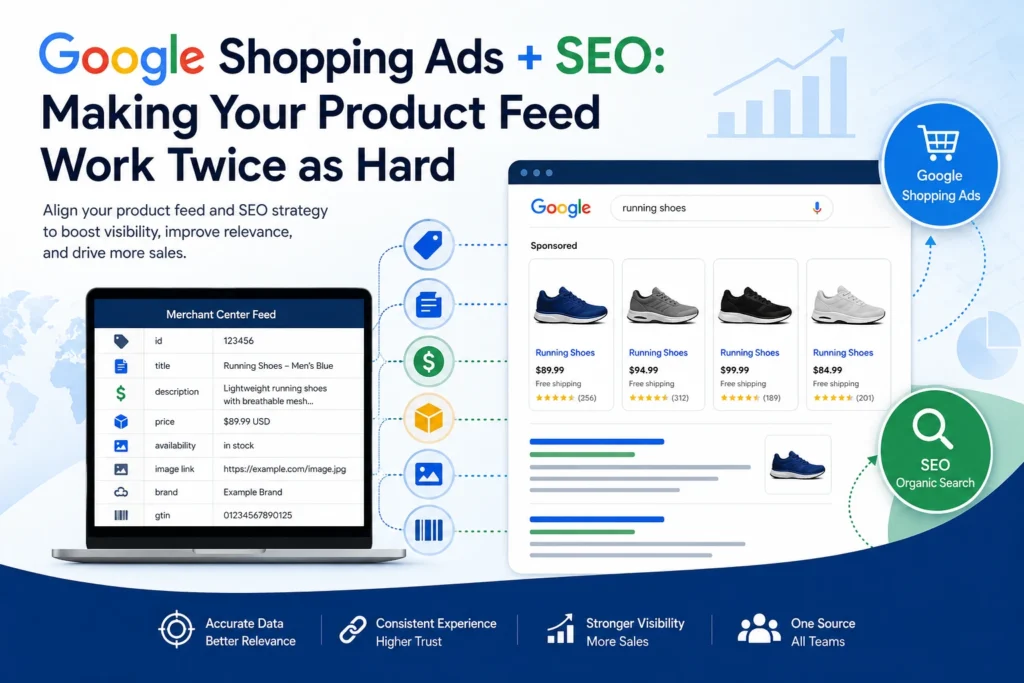
Google Shopping Ads are often treated as a paid-media channel, but their performance begins with the same product information that shapes ecommerce search visibility. Your Merchant Center feed tells Google what each item is through details such as titles, descriptions, prices, availability, images, brand data, and unique identifiers. When this information is accurate, complete, and aligned with the corresponding product page, it helps maintain eligibility and relevance for Shopping listings; price and availability mismatches can also lead to issues in campaign performance. For ecommerce brands, this creates an opportunity to connect paid advertising and SEO rather than manage them in isolation. Thoughtful, shopper-focused product data can make listings easier for Google to interpret and for potential customers to evaluate, turning a routine feed-management task into a more valuable search asset.
This blog will explain how to align Google Shopping Ads and SEO so your product feed improves paid visibility, organic relevance, and the customer journey from search to purchase.
Product Feed Optimisation: Key TakeawaysGoogle Shopping Ads and SEO perform best when product data remains accurate, detailed, and consistent across Merchant Center feeds, product pages, and structured data. Optimised titles, descriptions, identifiers, pricing, availability, images, categories, and variants help Google understand products and help shoppers make informed decisions. For US and UK retailers, market-specific currencies, sizing, terminology, delivery details, and landing pages further improve relevance, trust, and conversion potential. |
Why Google Shopping Ads and SEO Should Share the Same Product Data
Google Shopping Ads and SEO should not operate as separate ecommerce activities. Both rely on product information that helps Google understand what you sell, match items with relevant searches, and give shoppers enough detail to decide whether to click. A Google Shopping feed provides structured data such as product titles, descriptions, prices, availability, images, brands, unique identifiers, and variant details. Your SEO strategy uses many of these same signals across product pages, category pages, image alt text, internal links, and Product schema markup.
For US and UK ecommerce businesses, aligning this information is especially important when products are sold in multiple markets. A shopper in the United States may see prices in USD, while a UK shopper expects GBP pricing, local delivery terms, and region-appropriate spelling or sizing. The core product facts, however, should remain consistent across the feed and the landing page.
Key reasons to use shared product data
- Improve relevance across paid and organic visibility: Product titles, brands, categories, specifications, and attributes help Google interpret the item in both Shopping environments and organic search results. Clear data gives Google stronger context about what the product is and who it may suit.
- Create a consistent shopper experience: The title, image, price, availability, and variant shown in a Shopping listing should accurately reflect the product page. A user who clicks “Women’s Waterproof Hiking Boots – Brown, UK Size 6” should land on that exact product and variant, not a generic footwear category or a different size.
- Reduce product-data errors: Mismatches between the feed and website can affect product eligibility and customer trust. Keep stock status, prices, sale prices, product variations, and shipping information current in both systems.
- Support free and paid product visibility: Google uses product data across Shopping ads and free listings. Google advises merchants to keep product and store information descriptive and up to date, add high-quality images, include customer search terms in titles and descriptions, and provide relevant attributes such as size or gender.
- Make cross-team work more efficient: SEO, PPC, ecommerce, merchandising, and development teams can use one agreed product-data standard. This reduces duplicated work and prevents a product from being described differently in an ad campaign, feed, product page, and structured data.
- Build stronger product entities: Complete information helps Google distinguish one product from similar alternatives. For example, “Dyson V15 Detect Absolute Cordless Vacuum – Yellow/Nickel” is far more precise than “Powerful Cordless Vacuum.” The first title provides the brand, model, product type, and colour, all of which can influence matching and customer confidence.
Effective Google Shopping feed management should therefore include regular checks for product-page alignment, broken landing-page links, discontinued items, variant errors, pricing changes, and missing attributes. Treating the feed as a shared source of product truth allows paid and organic teams to make every update work harder.
How Google Shopping Ads and SEO Use the Same Product Signals
Google Shopping Ads use a product feed rather than advertiser-written keywords as the primary source of product information. Google evaluates the feed and the associated landing page to determine how an item may be matched and displayed. SEO works differently, but it also depends on Google being able to crawl, understand, and trust the content on your product and category pages.
This overlap makes Google Shopping product feed optimization a practical part of a broader ecommerce search strategy. The objective is to provide complete, accurate, and well-structured product information wherever Google and customers encounter the item.
Product signals that matter across channels
- Product title: Titles identify the item and help match it with shopper searches. Google permits titles between 1 and 150 characters, but notes that users may see only the first 70 or fewer characters depending on screen size. Important details should therefore appear early.
- Product description: Descriptions provide context that a title cannot contain, including features, materials, compatibility, dimensions, usage, and key benefits. For Shopping listings, Google recommends putting the most important details in the first 160 to 500 characters and generally keeping descriptions around 500 to 1,000 characters, even though the maximum submission limit is much higher.
- Brand and product identifiers: Brand, GTIN, MPN, and SKU information help distinguish a specific item from competing or similar-looking products. These identifiers are particularly valuable for well-known branded goods, electronics, beauty products, books, home appliances, and other standard retail items.
- Price and availability: These must accurately reflect the product landing page. For US and UK stores, ensure that market-specific feeds and URLs show the correct currency, tax treatment where applicable, sale price, stock status, and delivery information.
- Product category and product type: Google Product Category helps standardise classification, while product type lets retailers use their own category structure. Google recommends adding a product type at least three levels deep to improve discoverability.
- Variants: Colour, size, material, age group, gender, pattern, and other differentiators should be accurate. Variants need clear distinctions so Google does not confuse a red item with a blue item, or a US size 9 with a UK size 8.
- Images and on-page content: High-quality images help shoppers assess the product, while matching image, title, and description details on the landing page reinforce consistency. Do not use an image that depicts a different colour, bundle, accessory, or model than the feed entry represents.
Applying the signals in US and UK markets
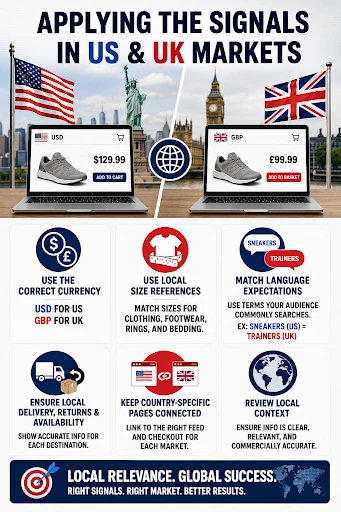
For international ecommerce stores, avoid simply copying a US feed into the UK market without reviewing local context. Ensure product information is understandable and commercially accurate for each audience.
- Use the correct currency: USD for US product listings and GBP for UK listings.
- Use local size references where relevant, especially for clothing, footwear, rings, and bedding.
- Match language expectations without changing core product facts. For instance, US shoppers may search “sneakers,” while UK buyers may use “trainers.”
- Ensure delivery, returns, and availability information matches the destination market.
- Keep country-specific landing pages connected to the appropriate feed rather than sending UK customers to a US-only checkout experience.
A structured Google Merchant Center Optimization process should also include Product schema on landing pages. Google explains that structured data can help it retrieve up-to-date product and offer information directly from the website. Relevant properties include the product name, description, price, availability, and other offer details. The markup should always match visible on-page content and the submitted feed.
How to Optimize Product Titles and Descriptions for Shopping Ads and Organic Search
Product titles and descriptions are two of the highest-impact fields in a Google Shopping feed optimization guide because they help Google interpret your product and help customers decide whether it matches their needs. The most effective approach is factual, specific, user-focused, and consistent with the product page.
Do not treat titles as a place to force every keyword variation. Instead, use the language shoppers are likely to recognise while accurately describing the actual product.
Build titles around product-defining attributes
A useful title formula is:
Brand + Product Type + Key Attribute + Model/Variant + Colour/Size
Examples:
| Product type | Weak title | Optimised title |
| Footwear | Men’s Running Shoes | ASICS Gel-Kayano 30 Men’s Running Shoes – Black/White, UK Size 9 |
| Electronics | Wireless Headphones | Sony WH-1000XM5 Wireless Noise-Cancelling Headphones – Black |
| Homeware | Oak Table | Solid Oak Dining Table for 6 – Natural Finish, 180 cm |
| Skincare | Face Moisturiser | CeraVe Facial Moisturising Lotion SPF 30 – 52 ml |
Title optimization best practices
- Lead with the clearest identifiers: Include the brand, product type, and model first when they are important to purchase intent. Google advises merchants to place significant details early because shoppers may not see the complete title.
- Differentiate every variant: Add details that distinguish products within the same group, such as colour, size, capacity, pattern, material, or storage size. For example, “Apple iPhone 16 Pro 256GB – Desert Titanium” is clearer than “Apple iPhone 16 Pro.”
- Use market-appropriate language: A US store may use “women’s sneakers,” while a UK store may test “women’s trainers” where the product and search behaviour justify it. Keep terminology natural and consistent with the corresponding local landing page.
- Avoid promotional language: Do not use phrases such as “Best Seller,” “Free Shipping,” “Discount,” “Buy Now,” or excessive capital letters in a title unless Google’s policies and the product data requirements specifically permit the information elsewhere.
- Keep the title truthful: Google requires the title to clearly identify the product being sold and to describe the product shown on the landing page. Titles do not need to be identical to landing-page wording, but they must refer to the same item.
Write descriptions that answer purchase questions
Descriptions should expand on the title with useful information that supports an informed purchase. Start with what the product is, then explain its relevant features and specifications.
Include details such as:
- Main use or intended customer
- Material, ingredients, dimensions, capacity, and compatibility
- Model number or technical specifications
- Colour, size, fit, and variant details
- Included items, where relevant
- Care, installation, safety, or usage information
- Genuine, verifiable benefits rather than unsupported claims
For example:
The Sony WH-1000XM5 are over-ear wireless headphones with active noise cancellation, Bluetooth connectivity, up to 30 hours of battery life, and an integrated microphone for calls. The lightweight black design includes a carrying case and USB charging cable.
This description is specific, readable, and useful for both Shopping and organic search. It avoids vague claims such as “the world’s best headphones” while giving shoppers the information they need to compare the item.
Maintain feed and page consistency
Successful Google Shopping feed management does not end after writing a title or description. Review the content whenever product specifications, stock status, pricing, colour options, bundle contents, or landing-page copy changes. If you use AI-generated feed text, Google provides structured title and structured description attributes for disclosing generative-AI content.
By treating product titles and descriptions as shared SEO and Shopping assets, retailers can create more accurate listings, clearer landing pages, and a stronger buying experience for customers in both the United States and the United Kingdom.
Conclusion
A well-optimised product feed can become one of your strongest ecommerce growth assets, improving Google Shopping visibility, supporting SEO performance, and creating a smoother path from search to sale. But managing titles, attributes, pricing, variants, policy requirements, and landing-page consistency at scale takes expertise. Think Shaw helps ecommerce brands unlock more value from every product listing through strategic Google Shopping feed optimisation, Merchant Center management, SEO-led product content, and data-driven campaign support. Partner with us to turn your product feed into a high-performing engine for qualified traffic, stronger conversions, and sustainable online growth.
Google Shopping Ads + SEO FAQs
How often should I update my Google Shopping product feed?
Update the feed whenever prices, availability, or product details change. For most stores, daily updates are a practical minimum; high-volume stores may require real-time synchronisation.
What happens if a product is disapproved in Merchant Center?
A disapproved item cannot appear in eligible Shopping ads or free listings until the underlying issue is corrected and Google reviews the updated product data.
Can I advertise products without a GTIN?
Yes, where a genuine GTIN is unavailable. Submit the appropriate brand and MPN where possible, or use the identifier_exists attribute correctly for custom-made products.
What are custom labels in Google Shopping campaigns?
Custom labels are merchant-defined feed attributes used to segment products in campaigns. They can group items by margin, seasonality, bestseller status, clearance priority, or price range.
How can I identify feed issues before they affect sales?
Review the Merchant Center Diagnostics section regularly. Prioritise red disapprovals first, then address warnings affecting the highest percentage of your product catalogue.