
Website speed is a critical part of building a high-performing website, affecting how quickly pages load, respond, and become usable across different devices and network conditions. From a development perspective, improving speed requires more than compressing images or reducing page content. Developers need to examine the underlying code, rendering process, JavaScript execution, server response times, caching, resource loading, and overall page architecture. These technical improvements can also support better search performance because search engines consider page experience and performance-related signals when evaluating websites. By applying practical website speed optimization techniques at the development level, teams can create faster, more efficient, accessible, and technically sound websites that provide a stronger experience for both users and search engines.
Website Speed Optimization SummaryWebsite speed optimization strengthens SEO and user experience by improving server response times, JavaScript execution, rendering, assets, and mobile performance. Developers can enhance efficiency through minification, Brotli compression, resource hints, optimized fonts, and simpler DOM structures. A structured workflow of auditing, diagnosing, prioritizing, developing, testing, deploying, and reviewing supports continuous improvement, while performance budgets, RUM, browser profiling, automated testing, and dependency audits help prevent regressions. |
How Website Speed Affects SEO Rankings and User Experience
Server Response Time
A slow server delays HTML delivery before the browser can begin rendering the page. Developers can reduce Time to First Byte (TTFB) by optimizing database queries, server-side processing, caching, hosting configuration, and backend logic, allowing browsers to receive and process page resources sooner.
JavaScript Execution
Large JavaScript bundles can consume significant browser CPU resources during parsing, compilation, and execution. Developers can improve responsiveness through code splitting, tree shaking, deferred scripts, dependency reduction, and lazy loading, minimizing main-thread blocking and allowing interactive elements to respond faster.
Render-Blocking Resources
Stylesheets and synchronous scripts can prevent browsers from rendering visible content efficiently. Developers can improve the critical rendering path by inlining critical CSS, removing unused CSS, deferring non-essential JavaScript, and prioritizing essential resources, helping important page elements become visible sooner.
Image and Asset Optimization
Unoptimized images and static assets increase network transfer requirements and can delay visual rendering. Developers should implement responsive images, WebP or AVIF formats, compression, lazy loading, and explicit image dimensions to reduce payload size while maintaining visual quality and preventing unnecessary layout movement.
Mobile Performance
Mobile devices often have weaker processing capabilities and variable network conditions, making inefficient websites particularly noticeable. Developers should test pages using real mobile devices, CPU throttling, network throttling, responsive layouts, and performance profiling to identify rendering, execution, and resource-loading bottlenecks.
Key Website Speed Optimization Techniques Developers Should Implement
Minify Production Assets
Use production build pipelines to minify HTML, CSS, and JavaScript by removing whitespace, comments, redundant characters, and unreachable code. Configure tools such as Terser, esbuild, or CSS minifiers within the deployment process so optimized assets are automatically generated rather than manually compressed.
Configure Brotli Compression
Enable Brotli compression for text-based resources such as HTML, CSS, JavaScript, SVG, and JSON. Configure the web server or CDN to negotiate compression through Accept-Encoding and return the appropriate Content-Encoding: br response, reducing transfer sizes without modifying application source files. Developers can refer to guidance on HTTP compression to better understand how compressed responses are delivered between servers and browsers.
Use Efficient Resource Hints
Developers can use <link rel=”preconnect”>, <link rel=”dns-prefetch”>, and <link rel=”preload”> to influence browser connection and resource-fetching behavior. Apply these selectively to genuinely important origins or assets, because excessive hints can consume connection capacity and compete with higher-priority page resources. Developers can review resource hints to understand how techniques such as preconnect, dns-prefetch, and preload should be applied.
Optimize Web Font Delivery
Reduce font overhead by serving WOFF2 files, removing unused font weights and character subsets, and defining font-display appropriately. For critical fonts, developers can use carefully targeted preload declarations. Avoid loading multiple font families when system fonts can satisfy secondary interface or content requirements.
Reduce DOM Size and Layout Complexity
A large or deeply nested DOM increases the browser’s work during style calculation, layout, and painting. Developers should remove unnecessary wrapper elements, simplify component structures, avoid excessive nesting, and reduce dynamically generated nodes to make browser rendering more computationally efficient.
| Build a stronger online presence with Think Shaw’s tailored digital strategies designed to connect your business with the right audience! |
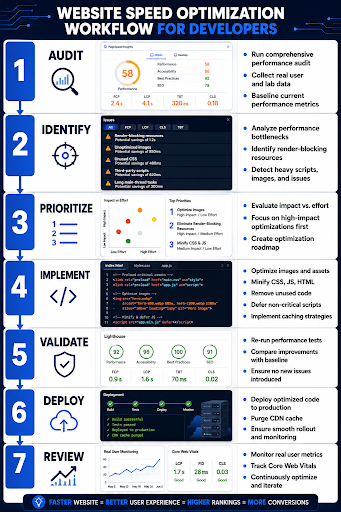
Website Speed Optimization Workflow for Developers
Improving website speed works best when developers follow a structured process rather than making isolated changes. A clear workflow helps teams identify performance issues, determine their impact, apply targeted improvements, and verify results before and after deployment. From the initial Audit to the final Review, the following infographic outlines seven practical stages developers can follow to build faster, more efficient, and SEO-friendly websites.
How to Monitor and Maintain Website Performance for Better SEO
Establish Performance Budgets
Define measurable limits for page weight, request count, JavaScript size, and key browser timings within the development workflow. Performance budgets can be enforced through tools such as Lighthouse CI or automated build checks, preventing new code or dependencies from silently increasing resource consumption.
Monitor Real User Performance
Use the Performance API and Real User Monitoring to collect performance data from actual visitors across different devices, browsers, and network conditions. Developers can monitor navigation timing, resource loading, interaction latency, and long tasks to identify issues that may not appear during controlled testing. This ongoing monitoring helps teams understand real-world performance and address problems that could affect user experience and overall website performance.
Profile Browser Bottlenecks
Use Chrome DevTools Performance recordings to inspect main-thread activity, scripting, style calculations, layout, painting, and browser task duration. The Chrome DevTools Performance panel can help developers record and analyze these browser activities. Developers can identify long tasks and expensive functions by examining flame charts, call stacks, and execution timelines, then trace bottlenecks back to specific components.
Detect Performance Regressions Automatically
Integrate automated performance testing into CI/CD pipelines so every significant code change can be compared against an established baseline. Developers can configure threshold-based checks for metrics such as total transfer size, JavaScript payload, request counts, and browser execution timings before deployment.
Audit Third-Party Dependencies
Regularly inspect analytics scripts, advertising tags, chat widgets, embedded media, SDKs, and external libraries because their behavior can change independently of application code. Developers should measure each dependency’s network requests, execution time, and transferred bytes, then remove, replace, or isolate unnecessary integrations.
Conclusion
A fast, reliable website is essential for creating a strong digital presence and making a lasting impression on visitors. At Think Shaw, we focus on creating modern, high-performing websites that are built with quality, usability, and business goals in mind. Our approach brings together thoughtful web development, clean design, and performance-focused solutions to help businesses establish a stronger presence online. With the right development expertise behind your website, you can create a digital experience that looks professional, works smoothly, and is ready to support your business as it grows.
| Partner with Think Shaw for a faster, high-performing website designed to strengthen your digital presence and deliver better results! |
FAQ’s About Website Speed Optimization
What is the difference between website speed and website performance?
Website speed generally refers to how quickly a page loads, while website performance covers the broader experience, including rendering, responsiveness, stability, and how efficiently the browser handles interactions.
Can a website framework affect loading performance?
Yes. Different frameworks can introduce different levels of runtime overhead, rendering behavior, and application complexity. Developers should consider the framework’s rendering model, dependency requirements, and application architecture when building performance-sensitive websites.
How can developers improve website speed during the development stage?
Performance should be considered before deployment rather than treated as a final-stage fix. Developers can make performance-conscious decisions when selecting frameworks, structuring components, handling data, writing code, and designing the application’s architecture.
Does website hosting infrastructure affect development performance?
Yes. The infrastructure supporting an application can influence how efficiently requests are processed and delivered. Developers should consider server resources, geographic distribution, infrastructure configuration, and scalability when selecting an environment for performance-focused applications.
Why should developers test website performance across different browsers?
Browsers can process JavaScript, CSS, rendering tasks, and APIs differently. Cross-browser testing helps developers identify performance inconsistencies that may not appear when testing exclusively in one browser or development environment.