
In 2026, website performance is no longer simply a technical consideration; it is an important part of search visibility, user experience, and digital revenue. Google continues to evaluate page experience alongside relevance, content quality, and other ranking systems, while Core Web Vitals provide measurable signals for loading performance, responsiveness, and visual stability. The impact goes beyond rankings. Even small delays can create friction, increase abandonment, and interrupt the path toward enquiries, purchases, or other conversions. As search and digital experiences become increasingly performance-focused, businesses need to treat speed as both an SEO and conversion priority.
Let’s understand how page speed influences Google rankings, why delays can reduce conversions, and which technical improvements can deliver immediate performance gains.
Page Speed Impact SummaryPage speed affects both Google rankings and website conversion rates by shaping search visibility, user experience, and visitor behavior. Core Web Vitals LCP, INP, and CLS provide measurable performance signals, while CrUX reflects real-user conditions. Slow loading can increase abandonment and reduce conversions, especially on mobile. Improving TTFB, caching, WordPress performance, CDN delivery, and image loading can strengthen page experience, SEO potential, engagement, and overall conversion performance. |
How Page Speed Influences Google Rankings
Page speed is not a single Google ranking number. It is an umbrella concept covering several measurable aspects of loading, responsiveness, and visual stability. In 2026, Google’s performance framework continues to center on Core Web Vitals LCP, INP, and CLS while real-user data from the Chrome User Experience Report (CrUX) provides important evidence of how pages perform in actual browsing conditions.
Page speed affects Google rankings primarily through page experience and real-world performance signals, rather than through a single “speed score.” Google’s Core Web Vitals measure loading performance, responsiveness, and visual stability, and these signals are incorporated into its ranking systems.
Core Web Vitals Connect Speed With Search Performance
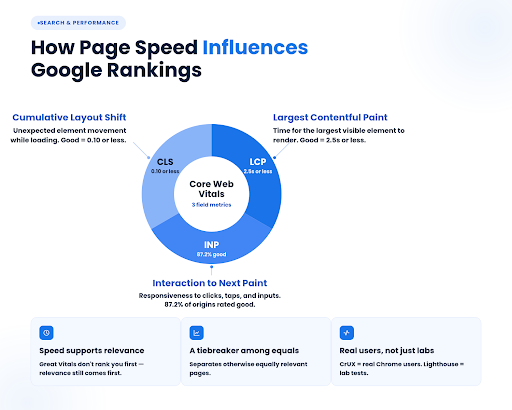
Largest Contentful Paint (LCP) measures when the largest visible content element—such as a prominent image, video, or heading—has rendered. A high LCP indicates that users may have to wait longer before the page’s primary information becomes visible. Google classifies 2.5 seconds or less as “good” at the 75th percentile, with slower performance moving into “needs improvement” or “poor.”
Interaction to Next Paint (INP) since March 12, 2024, Interaction to Next Paint (INP) has been a Core Web Vitals metric, replacing First Input Delay (FID). INP evaluates interaction latency across a user’s interactions with a page, making it particularly relevant to pages containing menus, forms, filters, carts, search interfaces, and other interactive elements.
In 2026, Google’s Chrome UX data continues to track INP as a primary Core Web Vitals metric. The February 2026 CrUX release reported 87.2% of origins with good INP, demonstrating that responsiveness remains a measurable area of real-world web performance.
Cumulative Layout Shift (CLS) measures unexpected movement of page elements while content loads. A page can technically load quickly yet still provide a poor experience if buttons, text, images, or other interface elements shift unexpectedly. Google considers CLS of 0.10 or below “good.”
Google’s Ranking Systems Consider Page Experience Alongside Relevance
Speed does not operate as an isolated ranking formula. Google states that Core Web Vitals are used by its ranking systems, while also emphasizing that good Core Web Vitals do not automatically place a page at the top of Search. Relevance and content quality remain fundamental.
However, when multiple pages provide similarly relevant and helpful information, a stronger page experience can contribute to search performance. In this sense, page speed can become a competitive SEO factor, particularly when differences in user experience separate otherwise comparable pages.
Google Uses Real-User Experience Data Through CrUX
A major distinction in modern performance evaluation is the difference between lab measurements and field data. CrUX collects performance information from eligible real Chrome users, while Lighthouse provides controlled laboratory testing. Google makes CrUX data available through tools including PageSpeed Insights and Search Console.
This means a page can perform well in a controlled test while delivering different results to real users because of differences in devices, networks, browsers, geographic conditions, and actual interaction patterns.
Why Slow Pages Reduce Website Conversion Rates
Page speed affects conversion performance through measurable changes in user behavior.
Higher Bounce Rates and Immediate Abandonment
The first conversion loss occurs before a visitor interacts with the page. Longer loading times increase the probability of abandonment, particularly when users encounter a blank screen, incomplete layout, or delayed primary content.
Google’s research on mobile page performance found that as page load time increased from 1 to 3 seconds, the probability of a mobile visitor bouncing increased by 32%. When load time reached 5 seconds, bounce probability increased by 90% compared with a 1-second load. These figures demonstrate why initial loading latency can directly reduce the pool of visitors available for conversion.
SEO–CRO Connection
Slow performance affects the funnel before conversion begins. Poor Core Web Vitals—particularly LCP, INP, and CLS—can weaken page experience, while Google evaluates page experience alongside its broader ranking systems.
The commercial chain is:
Slower pages → weaker search performance potential → fewer qualified organic visits → higher abandonment → fewer completed conversions.
For 2026, measure both sides: Search Console organic traffic/rankings + GA4 conversion rate + CrUX Core Web Vitals. This distinguishes an SEO acquisition loss from a CRO usability loss.
Mobile Performance Can Magnify Conversion Losses
Mobile visitors are especially sensitive to loading delays because performance varies according to device capability, network conditions, and connection quality. Google’s mobile benchmarks show a clear increase in bounce probability as mobile loading time increases, meaning that performance degradation can remove potential customers before they engage with the conversion path.
| Don’t let slow loading times drive potential customers away. ThinkShaw can help identify performance bottlenecks and implement practical improvements that create a faster, smoother website experience. |
Technical Blueprint: Optimization Fixes for Immediate Speed Gains
A fast website starts with controlling what the browser has to download, process, and render. The following optimization fixes will help.
Reduce TTFB at the Application Layer
Audit Time to First Byte (TTFB) separately from frontend rendering. Slow PHP execution, uncached WordPress requests, inefficient database queries, and excessive server-side processing can delay the first response before the browser receives any page content. Use server-side page caching and profile slow requests rather than attempting to solve a backend bottleneck with frontend changes.
Implement Persistent Object Caching
A persistent object cache such as Redis or Memcached can retain frequently requested database objects between requests, reducing repeated database operations. This is particularly useful for dynamic WordPress sites where uncached queries contribute to backend latency.
Optimize the Autoload Footprint
Audit autoloaded options in WordPress. Excessive autoloaded data is loaded during WordPress requests and can increase database and PHP processing overhead. Remove obsolete plugin/theme options and prevent unnecessary data from being autoloaded. WordPress specifically identifies excessive autoloaded options as a performance concern.
Offload Static Delivery From the Origin
Move high-volume static assets to a CDN or separate asset delivery layer so requests for CSS, JavaScript, fonts, and media do not consume the origin server’s resources. This becomes particularly valuable when geographically distributed users generate substantial concurrent traffic.
Lazy-load below-the-fold images
Defer images outside the initial viewport to reduce initial network requests. Prioritize LCP images. Do not lazy-load the primary hero/LCP image; preload or prioritize it so the largest above-the-fold element renders faster.
Conclusion
Page speed influences more than rankings—it shapes user experience, engagement, and conversions. From Core Web Vitals to server performance, every optimization can reduce friction and strengthen digital performance. ThinkShaw helps businesses identify technical bottlenecks, improve website speed, and create faster, more effective online experiences. Connect with ThinkShaw to turn website performance into measurable growth.
| Improve your website’s performance, strengthen user experience, and create more opportunities for conversions with the right technical strategy. Connect with ThinkShaw to take the next step toward a faster website. |
FAQs About Page Speed, Google Rankings & Conversion Rates
What is a good website loading speed?
A website should ideally display meaningful content quickly, with users experiencing minimal waiting. Performance targets should focus on Core Web Vitals and real-user experience.
How can I check my website’s page speed?
Use Google PageSpeed Insights, Lighthouse, or Search Console to evaluate performance, identify technical issues, and compare laboratory measurements with real-user performance data.
Does website speed affect ecommerce sales?
Yes. Slow product pages, filters, carts, and checkout experiences can create friction that encourages shoppers to leave before completing their purchase.
Can website speed affect paid advertising performance?
Slow landing pages can negatively affect user experience after an ad click, potentially reducing engagement and making paid campaigns less efficient.
Does hosting affect website speed?
Yes. Hosting quality influences server response, resource availability, reliability, and scalability, making hosting infrastructure an important consideration for maintaining consistent website performance.
How can I improve website speed without redesigning my website?
Start with targeted technical improvements such as optimizing assets, reducing unnecessary scripts, improving caching, upgrading infrastructure, and fixing backend bottlenecks before considering a complete redesign.