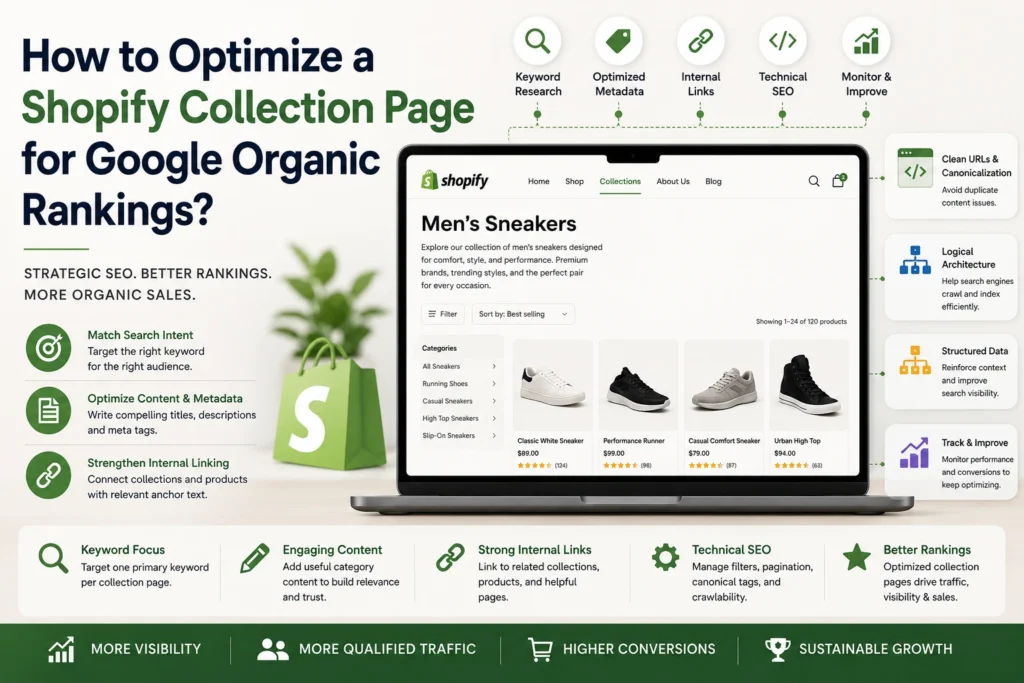
A Shopify collection page can do more than group similar products; it can become a valuable organic search landing page that captures category-level queries and guides shoppers toward relevant products. Strong collection-page SEO requires more than adding keywords to a description. The page should align with search intent, use clear titles and metadata, provide useful category information, and create logical internal links between collections and products. Technical elements such as crawlability, canonicalization, faceted navigation, pagination, and structured data also influence how search engines understand these pages. In this guide, we’ll cover the key steps for optimizing Shopify collection pages for organic search.
Shopify Collection SEO OverviewOptimizing a Shopify collection page starts with matching search intent and assigning a focused keyword without creating cannibalization. Strong titles, descriptions, metadata, useful category content, strategic internal links, and logical site architecture strengthen relevance. Managing faceted URLs, canonicalization, pagination, and crawlable product links supports technical SEO, while structured data reinforces page context. Monitoring Search Console, organic performance, and conversions helps identify opportunities to refine collection pages and strengthen ecommerce growth. |
Match the Collection to Search Intent and Commercial Demand
Before optimizing a collection, determine what shoppers expect when searching for the category it represents. The page should target a clear commercial intent and offer products that genuinely satisfy it. Review the primary queries associated with the category and examine competing results to understand what Google considers relevant. This also helps prevent multiple collections from targeting the same search intent and competing for visibility. Google also recommends using logical internal links to organize ecommerce navigation so important category and product pages are easier for search engines to discover.
Assign One Primary Keyword to Each Collection
Choose one primary keyword that accurately describes the collection and matches the products users expect to find. For example, a collection selling different types of running shoes could target running shoes, while a narrower collection could target trail running shoes. Use related phrases naturally instead of forcing multiple primary keywords onto one page.
Prevent Keyword Cannibalization Between Collections
Review existing collections before targeting a new term. If two pages serve nearly identical search intent, differentiate them through product type, use case, audience, material, or another meaningful category distinction. This gives each collection a distinct search purpose.
Optimize the Shopify Collection Page’s Core SEO Elements
Once search intent is established, optimize the elements that help Google and shoppers understand the collection. Shopify allows you to edit collection titles, descriptions, search-engine listings, and URLs, giving you control over several important on-page elements.
- Write a keyword-focused collection title and H1: Make the primary topic clear while accurately representing the products displayed.
- Create a unique collection description: Explain what shoppers will find and highlight relevant product attributes without forcing keywords.
- Optimize the meta title, meta description, and collection URL: Keep each element concise, descriptive, unique, and aligned with the collection’s primary topic.
Clear page elements also support how Google interprets ecommerce pages, while descriptive URLs can make individual pages easier to understand and crawl.
Make Collection Content Useful for Category-Level Searches
A collection page should provide enough context to help shoppers evaluate their options without becoming a long-form article. Focus supporting content on information that genuinely belongs to the category and demonstrates knowledge of the products being offered.
- Address buying considerations specific to the category: Cover factors such as materials, sizing, compatibility, features, applications, or other criteria that influence product selection.
- Add product-specific expertise instead of generic SEO copy: Provide accurate, original insights about meaningful product differences and practical considerations.
Identify Conversion Friction Before It Costs You Sales
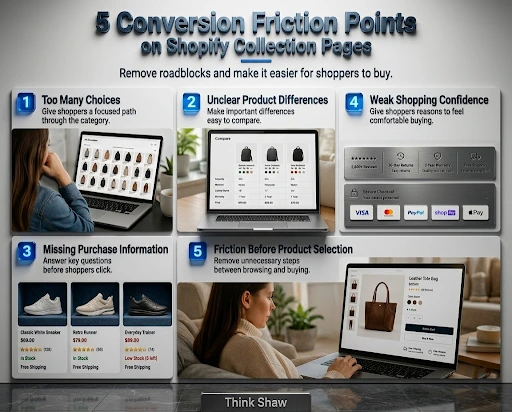
Even a well-optimized Shopify collection can lose potential customers when browsing feels overwhelming or important purchase information is difficult to find. Small UX barriers can create hesitation between discovering products and choosing one. Research from the Baymard Institute also shows that product-list usability, filtering, and sorting can significantly affect how easily shoppers browse and find suitable products. This infographic highlights five common conversion friction points, helping you identify where shoppers may struggle and where thoughtful collection-page improvements can create a smoother path toward purchase.
Strengthen Shopify Collection Architecture With Internal Links
Internal linking helps establish relationships between your Shopify collections, products, and supporting content while creating clearer paths for both shoppers and search engines. Rather than adding links randomly, prioritize connections that reinforce your ecommerce hierarchy and direct authority toward commercially important collection pages.
- Connect related collections and subcategories: Link logically related collection pages so Google can understand how categories and subcategories relate to one another.
- Link priority collections with relevant products and content: Use descriptive links from product pages, buying guides, and relevant blog content to help users and search engines discover important collections.
Control Shopify Filters, Faceted URLs, and Duplicate Pages
Shopify stores can generate numerous URL variations when shoppers combine filters such as color, size, material, brand, or product type. While some filtered pages may have genuine search value, indexing every combination can create duplicate or low-value URLs and make it harder for search engines to identify the pages worth ranking.
- Identify filtered URLs with genuine search value: Determine whether specific combinations of attributes represent meaningful search demand and deserve their own landing pages.
- Prevent low-value filter combinations from competing with the main collection: Avoid allowing every possible filter combination to create an indexable page with little unique value.
- Check canonicalization and indexing: Review canonical tags, indexability, and URL variations to ensure Google understands which collection URL should be treated as the primary version.
Make Products and Pagination Accessible to Search Engines
Use crawlable links to connect collection pages with products and additional product pages. Avoid making important products accessible only through JavaScript-based interactions such as “Load More.” Ensure pagination provides a clear path to deeper products so search engines can discover the full collection rather than only the products initially displayed. Google explains that ecommerce sites using pagination or incremental loading should provide crawlable paths to additional content so search engines can discover the full set of products.
Use Structured Data to Reinforce Collection Context
Implement relevant structured data that accurately reflects the content visible on the page. Product markup can help search engines understand individual products, while BreadcrumbList markup reinforces their position within the site’s hierarchy. Validate the implementation and correct errors rather than adding unsupported or misleading markup.
Measure Collection Performance and Refine What Works
Use Google Search Console to monitor collection-page impressions, clicks, queries, rankings, and CTR. Compare this information with organic traffic and conversion data to identify pages that need stronger targeting, better content, improved internal linking, or technical adjustments.
Turn Shopify Collection Pages Into Growth Assets
A strong Shopify collection strategy can turn category pages into meaningful entry points for organic traffic and ecommerce growth. At Think Shaw, we bring together Shopify SEO, ecommerce SEO, website design, UI/UX, paid advertising, and Shopify development to build stores where search visibility and user experience work together. Our approach focuses on creating digital experiences that attract qualified visitors and support conversions.
| Your collection pages already hold your products. Let Think Shaw turn them into stronger opportunities for discovery, engagement, and sales. |
Frequently Asked Questions About Shopify Collection Page SEO
How long does it take to see SEO results from an optimized Shopify collection page?
Most stores notice ranking movement within 4–8 weeks, though competitive categories can take 3–6 months. Consistency, backlinks, and site authority all influence how quickly Google responds.
How many products should a Shopify collection page have before it’s worth optimizing for SEO?
There’s no strict minimum, but collections with fewer than 8–10 products often struggle to rank. Consider merging sparse collections until inventory grows to support a dedicated landing page.
Does adding customer reviews to a Shopify collection page help SEO?
Yes, review snippets and ratings can improve click-through rates and provide fresh, unique content signals. They also build trust, which indirectly supports conversions and search performance over time.
How often should Shopify collection page content be updated?
Review collection titles, descriptions, and product mixes quarterly, or whenever inventory shifts significantly. Regular updates signal freshness to search engines and keep the page aligned with current demand.
Can seasonal Shopify collections hurt SEO if they’re removed after the season ends?
Yes, deleting seasonal collections creates broken links and lost rankings. Instead, keep the URL live, update content for the off-season, or redirect it to a relevant permanent collection.