Choosing between Google Search Ads and Performance Max often comes down to one question:
Do you want control, or do you want reach?
Search campaigns let you bid on specific keywords and show text ads only within Google Search results, giving advertisers precise command over who sees their ads and when. Performance Max takes a different approach entirely, using Google’s AI to automatically place ads across Search, YouTube, Display, Gmail, Maps, and Discover from a single campaign, optimizing toward your conversion goals in real time. Understanding how these two campaign types actually differ has become essential for anyone managing an ad budget. This guide breaks down exactly where they diverge.
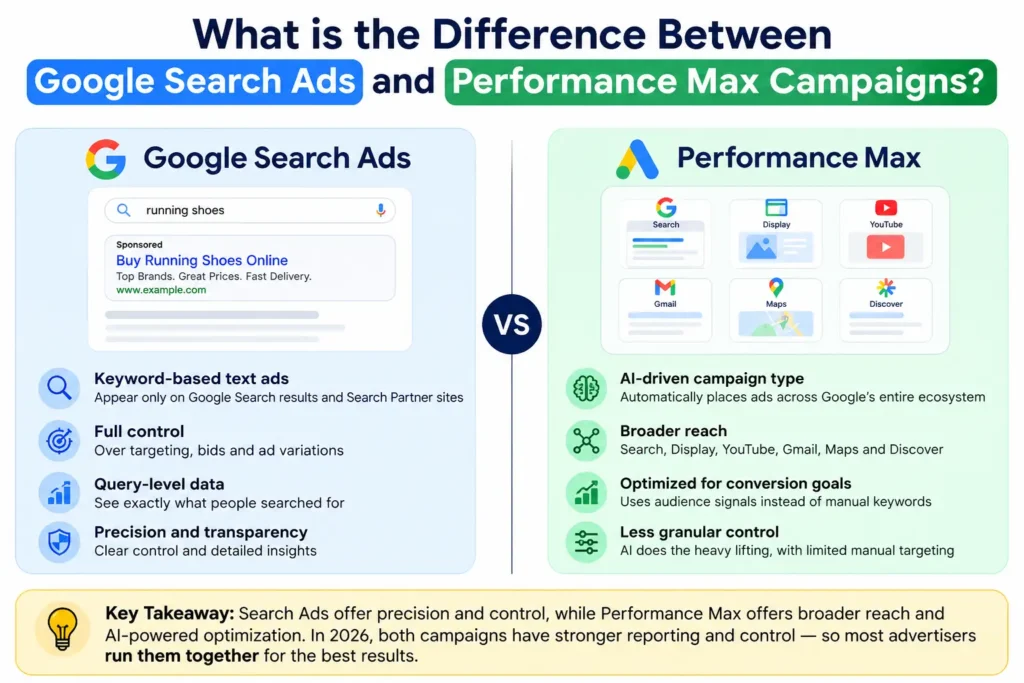
Overview: Search Ads vs. Performance MaxSearch campaigns are keyword-based text ads that appear only on Google Search results and Search Partner sites, giving advertisers full control over targeting, bids, and query-level data. Performance Max is an AI-driven campaign type that automatically places ads across Search, Display, YouTube, Gmail, Maps, and Discover from a single campaign, optimizing toward conversion goals using audience signals instead of manual keywords. Search offers precision and transparency; Performance Max offers broader reach with less granular control, though 2026 updates added channel-level reporting and negative keyword controls to both. Most advertisers run them together rather than choosing one exclusively. |
Difference Between Google Search Ads and Performance Max Campaigns
Here is how both of these approaches differ in terms of methods and performance:
| Feature | Google Search Ads | Performance Max |
| Campaign Type | Keyword-based text ad campaign | AI-driven, goal-based automated campaign |
| Primary Goal | Capture high-intent search demand | Maximize conversions across all Google inventory |
| Targeting Method | Manual keyword targeting (exact, phrase, broad match) | Asset groups + audience signals; AI decides placement |
| Keyword Control | Full control over keywords bid on and excluded | Indirect via “search themes” (up to 25–50 per asset group) |
| Ad Formats | Text ads (responsive search ads) | Text, image, video, and Shopping/product feed assets |
| Bidding | Manual or Smart Bidding, adjustable by keyword/device/location | Smart Bidding only, optimized across all channels simultaneously |
| Reporting Granularity | Full search query-level data available | Channel-level and search-theme reporting (expanded in 2026) |
| Conversion Data Needed | Works even with lower conversion volume | Google recommends 50+ conversions/month for reliable optimization |
| Management Effort | Higher — requires ongoing keyword/bid management | Lower — largely automated, less day-to-day tuning |
| Best For | High-intent lead gen, precise targeting, brand terms | E-commerce, broad reach, scaling with limited bandwidth |
| Query-Level Visibility | Full visibility into exact search terms | Limited; theme-based reporting instead of exact queries |
| Negative Keywords | Granular, keyword-level negatives | Campaign-level negatives (up to 10,000 as of 2026) |
| Audience Control | Limited to audience layering on top of keywords | First-party audience signals and exclusions (2026 update) |
| Brand Protection | Full control since only branded keywords are bid on | Brand exclusion controls added in 2026 to prevent overlap |
Where Your Ads Appear — Inventory and Channel Reach
The most fundamental difference between these two campaign types isn’t how they’re managed; it’s simply where your ads actually show up.
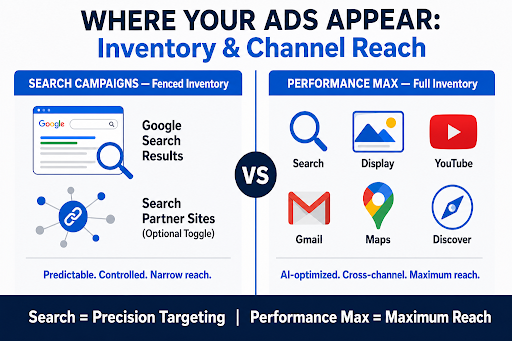
Search campaigns are deliberately narrow. They run exclusively on the Google Search Network, meaning your ads appear only on Google’s own search results pages and, optionally, on Search Partner sites, a network of non-Google search engines, directories, and even YouTube search results and Watch pages that syndicate Google ads. Advertisers can toggle Search Partners on or off entirely from the campaign’s Networks settings, giving full control over whether that secondary inventory is included.
Performance Max takes the opposite approach: instead of one network, it draws from Google’s entire advertising inventory in a single campaign. That means your assets can appear on Google Search, Search Partners, Display, YouTube, Gmail, Maps, and Discover simultaneously, with Google’s AI deciding in real time which channel and placement is most likely to drive a conversion for any given user. This is the core trade-off strategists need to communicate to clients: Search offers a fenced, predictable inventory; Performance Max offers maximum reach at the cost of placement predictability.
Which Campaign Type Should You Choose — Search, PMax, or Both?
The right choice depends on what you’re optimizing for, not which campaign type is inherently better.
- Search suits advertisers who need precise control over keywords, budgets tied to specific queries, and full visibility into search terms driving conversions.
- Performance Max suits advertisers prioritizing reach across Search, Display, YouTube, Gmail, Maps, and Discover, especially for e-commerce accounts using product feeds or teams with limited time for manual bid management.
Most established accounts don’t treat this as an either-or decision. Roughly 82% of advertisers running Performance Max also run it alongside Search campaigns, using Search to capture high-intent branded and category terms while Performance Max expands reach across remaining inventory. Budget, conversion volume, and reporting needs should guide the split between the two.
Conclusion
Choosing between Search and Performance Max ultimately comes down to matching campaign structure to business goals rather than picking a universal winner. If managing these decisions feels overwhelming, Think Shaw‘s paid ads specialists can help. As a Google-certified white hat digital marketing agency with 50+ team members and over 6,271,747 leads delivered for clients, Think Shaw builds tailored Search and Performance Max strategies backed by data-driven optimization and up-to-date knowledge of Google Ads algorithms.
Ready to stop guessing and start converting? Get your free strategy proposal from us today.
Google Search Ads and Performance Max Campaigns FAQs
Can Performance Max run without a website or product feed?
Yes, but it needs at least one asset group or a Merchant Center product feed to serve ads. Feed-only PMax skips creative assets and relies purely on Shopping data.
Do Search campaigns require a Google Merchant Center feed?
No. Search campaigns run on text ads triggered by keywords and don’t need a product feed, though Shopping-specific extensions can pull limited product data separately.
Can I set different bids for mobile vs. desktop in Search campaigns?
Yes. Search campaigns support bid adjustments by device, letting you increase or decrease bids by a percentage for mobile, tablet, or desktop traffic.
Do sitelink extensions affect Quality Score in Search ads?
No, sitelinks and other ad assets aren’t part of the Quality Score calculation, but they can improve ad rank and visibility in the auction separately.
How long does Performance Max take to optimize after launch?
Google generally recommends a 6-week learning period for Performance Max to gather enough conversion data before evaluating performance or making major changes.