Identifying the marketing channel that drives the most revenue starts with connecting acquisition data to actual business outcomes in GA4. Rather than judging channels by traffic or conversions alone, marketers can use GA4 to compare revenue generated by different channel groups, sources, mediums, and campaigns. The Traffic acquisition report helps evaluate how users arrive at a website, while attribution reporting provides additional insight into how credit for conversions and revenue is assigned across customer touchpoints. By analyzing revenue alongside conversion and acquisition data, businesses can determine which channels contribute the greatest financial value and use these insights to guide budget allocation, campaign optimization, and overall marketing strategy.
GA4 Revenue Analysis: Key InsightsGA4 helps marketers identify revenue-driving channels by connecting acquisition data with revenue, key events, source/medium, campaigns, and attribution data. Accurate event tracking, UTM tagging, channel grouping, and traffic-source validation create reliable analysis. Comparing channel revenue, attribution, customer journeys, and revenue efficiency reveals valuable performance patterns. These insights support smarter budget allocation, channel optimization, campaign prioritization, performance evaluation, and future marketing planning while improving data-driven decision-making and overall marketing effectiveness. |
How to Set Up GA4 Data for Marketing Channel Revenue Analysis
Configure Revenue-Generating Events
GA4 must receive accurate revenue events before channel analysis can produce meaningful results. For ecommerce, implement the purchase event with parameters such as transaction_id, value, currency, and items, following Google’s GA4 ecommerce event requirements. A unique transaction_id also helps GA4 deduplicate duplicate purchase events and maintain more accurate transaction data. For lead-generation businesses, define relevant key events and assign appropriate monetary values where revenue is measurable.
Implement Consistent UTM Tracking
Use consistent UTM parameters across manually tagged campaigns, particularly utm_source, utm_medium, and utm_campaign. This is highly relevant because Google explains how Source, Medium, Campaign, and Campaign ID are used to identify and analyze traffic sources. GA4 uses Google’s traffic-source values to populate dimensions such as Source, Medium, Campaign, and channel groupings. Standardized naming prevents fragmented reporting and makes channel-level revenue comparisons more reliable.
Verify Default Channel Grouping
GA4 automatically classifies traffic into rule-based channel groups, including Organic Search, Paid Social, Email, Referral, and Direct. Review these classifications before analyzing revenue because incorrectly tagged traffic can appear as (not set), Unassigned, or another unintended channel, potentially distorting channel performance comparisons.
Set Up Revenue Data Collection
Configure GA4 to collect the revenue parameters required for channel analysis. For ecommerce, ensure the purchase event sends value, currency, transaction ID, and item-level data. For non-ecommerce businesses, configure relevant key events and assign suitable event values so GA4 can associate measurable monetary outcomes with acquisition sources.
Validate Traffic Source Data
Check that GA4 is correctly receiving source, medium, campaign, and channel-grouping information across your marketing activities. Review the Traffic acquisition report for unexpected (not set), Unassigned, or Direct traffic. This gives readers a technically relevant Google resource explaining why traffic can appear as (direct) / (none), including missing UTM parameters, redirects, and other causes. Correct inconsistent UTM parameters and tagging issues before comparing revenue, ensuring each channel receives accurate acquisition and revenue data.
How to Use GA4 to Identify the Marketing Channel That Drives the Most Revenue
Analyze the Traffic Acquisition Report
Open Reports → Acquisition → Traffic acquisition and use Session default channel group as the primary dimension. This is essential for your article. Google explains that the Traffic acquisition report shows where new and returning users come from and provides cross-channel traffic-source dimensions. Compare each channel against Total revenue, key events, sessions, and engagement metrics. This reveals how revenue performance differs across Organic Search, Paid Search, Paid Social, Email, Referral, and other channels.
Compare Revenue by Channel
Sort the Traffic acquisition report by Total revenue to identify channels generating the highest reported revenue. Then compare revenue with sessions and key events to distinguish high-volume channels from genuinely valuable ones. A channel producing fewer sessions but substantially higher revenue may have stronger commercial performance than a traffic-heavy channel.
Examine Source and Medium Performance
Drill down from channel grouping into Session source/medium to identify the specific platforms contributing revenue. This is an excellent fit because Google’s documentation specifically defines Source and Medium and explains their role in traffic-source analysis. For example, separating google/organic from facebook/paid-social provides greater diagnostic detail than channel-level reporting alone. This helps determine which individual acquisition sources are responsible for a channel’s revenue performance.
Compare Attributed Revenue by Channel
Use GA4’s attribution reporting to compare the revenue credited to each marketing channel under the selected attribution model. Review Primary channel group, attributed revenue, and key events to determine whether the channel identified in Traffic acquisition also receives substantial attribution credit across customer journeys.
Identify Revenue-Driving Channels Across Customer Journeys
Review Attribution paths to determine which channels repeatedly appear before revenue-generating key events. This is extremely relevant because Google’s documentation specifically explains how the Key event paths report shows customer paths and how different attribution models distribute credit across those paths. Examine touchpoints, key-event revenue, and channel interactions to identify channels that consistently contribute to profitable customer journeys, even when they are not the final interaction receiving conversion credit.
Validate the Highest-Revenue Channel
After identifying the leading channel, validate its performance across different reporting dimensions and periods rather than relying on one figure. Compare channel group, source/medium, campaign, revenue, and key-event data to confirm consistency. This reduces the risk of interpreting incorrectly classified traffic or incomplete attribution as genuine channel performance.
| Turn your marketing data into smarter growth strategies with Think Shaw’s expertise and a results-focused digital approach! |
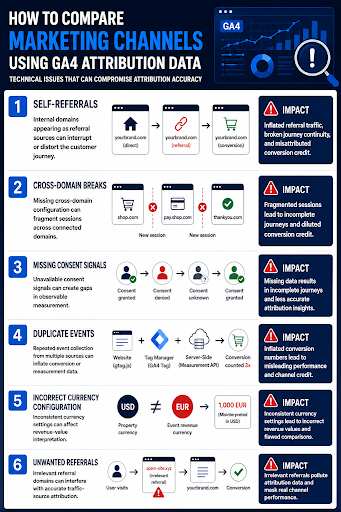
How to Compare Marketing Channels Using GA4 Attribution Data
GA4 attribution data helps marketers compare how different channels contribute to conversions and revenue across customer journeys. By evaluating attributed revenue, key events, and channel interactions, businesses can identify meaningful differences in channel performance.
How to Turn GA4 Revenue Insights Into Better Marketing Decisions
Reallocate Budget Toward High-Revenue Channels
Compare each channel’s Total revenue, Purchase revenue, key events, and advertising cost before changing budgets. A channel generating substantial revenue but requiring disproportionately high spend may need optimization rather than increased investment. Use GA4’s channel-level performance data to prioritize channels demonstrating stronger financial returns and scalable conversion volume.
Optimize Channels With High Conversion Value
Identify channels producing strong revenue but lower traffic or key-event volumes. Analyze revenue per session, key-event rate, and attributed revenue to determine whether these channels have untapped potential. Increasing qualified traffic through better campaigns, landing pages, or audience targeting can help scale channels already demonstrating strong commercial value.
Investigate Underperforming Marketing Channels
Use GA4 channel, source/medium, and campaign dimensions to isolate channels generating substantial traffic but limited revenue. This supports your use of source and medium as the underlying dimensions for investigating traffic performance. Examine engagement, key events, and revenue together to identify potential targeting, messaging, landing-page, or campaign-quality problems. This prevents marketing teams from continuing to invest heavily in channels based solely on traffic volume.
Prioritize Marketing Channels With Strong Revenue Efficiency
Compare each channel’s revenue, key events, sessions, and marketing spend to assess revenue efficiency rather than relying on revenue volume alone. Prioritize channels that consistently generate stronger financial returns relative to their acquisition cost, while reviewing weaker channels for budget reductions, campaign refinement, or targeting improvements.
Use Revenue Trends for Future Planning
Analyze channel revenue across consistent date ranges to identify sustained growth, decline, or seasonal fluctuations before making budget decisions. Combine historical revenue with channel and campaign dimensions to distinguish temporary performance changes from persistent trends, then use those findings to establish more informed acquisition priorities and future campaign objectives.
Conclusion
Make every marketing decision count by turning your GA4 insights into stronger, more focused campaigns. Think Shaw brings the expertise and strategic approach needed to help businesses maximize channel performance, strengthen digital marketing results, and turn valuable data into growth opportunities. With the right partner, your GA4 data can become a powerful foundation for smarter marketing success.
| Turn your GA4 revenue insights into smarter marketing strategies with Think Shaw’s expert guidance and performance-focused approach! |
FAQ’s About GA4 Marketing Channel Revenue
Can GA4 show the return on investment for each marketing channel?
GA4 can show revenue associated with channels, but ROI requires cost data too. Combine GA4 revenue with advertising spend or other marketing costs to calculate channel-level return on investment accurately.
Why can two GA4 reports show different revenue for the same channel?
Different GA4 reports can apply different dimensions, scopes, attribution methods, or reporting perspectives. Comparing reports requires checking their selected dimensions, date ranges, attribution settings, and metric definitions before interpreting discrepancies.
Does GA4 measure revenue from returning customers?
Yes. GA4 can associate revenue-generating events with returning users when their activity is properly measured. This helps businesses evaluate whether marketing channels contribute to repeat purchases and ongoing customer value.
How can businesses improve the accuracy of GA4 revenue reporting?
Accuracy improves through correctly implemented events, consistent campaign tagging, validated transaction values, reliable currency settings, and regular data-quality checks. Testing implementations also helps identify missing or duplicated revenue events.
Can GA4 revenue data be customized for different business goals?
Yes. GA4 supports customized reports and explorations that can organize relevant dimensions and metrics around specific objectives. Businesses can create views focused on ecommerce revenue, lead value, customer acquisition, or campaign performance.