A business website should do more than look polished. It needs to make it easy for visitors to find what they need while helping search engines understand, crawl, and index its pages. That is where SEO-friendly web design comes in. Elements such as clear navigation, mobile responsiveness, fast-loading pages, logical site structure, and accessible content all influence how people experience a website and how search engines interpret it. Google recommends making websites accessible, fast, mobile-friendly, and easy for search engines to crawl and understand. Building these elements into the design from the start creates a stronger foundation. In this article, we’ll walk you through the key elements of SEO-friendly web design and what your business website needs to support both search visibility and a better user experience.
SEO-Friendly Web Design: Key TakeawaysSEO-friendly web design combines clear site architecture, crawlable content, responsive usability, strong page performance, and well-optimized on-page elements. Businesses should organize URLs and internal links logically, optimize Core Web Vitals, create mobile-friendly pages, use descriptive titles and image attributes, and apply relevant structured data. Trust also matters, requiring transparent business information, clear conversion paths, and content aligned with search intent to turn organic visibility into meaningful opportunities. |
What Website Structure Does an SEO-Friendly Business Site Need?
A well-structured website makes it easier for visitors to navigate and gives search engines clearer paths to discover and understand important pages. The foundation starts with logical page organization, useful internal links, and crawlable content.
Build a Clear Page and URL Hierarchy
Organize pages into logical categories that reflect your business offerings and user needs. Use descriptive, readable URLs that clearly indicate what each page covers. Keep important pages within a sensible navigation structure rather than burying them several clicks deep. Consistent URL structures also make large sites easier to manage and maintain.
Create an Internal Linking Structure
Internal links connect related pages and help visitors move naturally through your website. Link from relevant, authoritative pages to important service, product, and informational pages using descriptive anchor text. This also helps search engines discover related URLs and understand how different pages connect.
Make Important Content Easy to Crawl
Ensure essential pages and content can be discovered through standard HTML links rather than relying entirely on complex JavaScript interactions. Keep important resources accessible to crawlers, maintain an accurate XML sitemap, and use appropriate canonicalization when duplicate or similar URLs exist.
| A stronger website structure makes it easier for visitors and search engines to find what matters. Think Shaw helps you create a site built for both clarity and growth. |
How Does Website Performance Affect SEO and User Experience?
A fast, responsive website creates a smoother experience for visitors and removes technical barriers that can affect how pages perform in search. Performance and mobile usability should therefore be considered during design, not treated as fixes after launch.
Optimize Core Web Vitals and Page Speed
Google’s Core Web Vitals currently include Largest Contentful Paint (LCP), Interaction to Next Paint (INP), and Cumulative Layout Shift (CLS). These metrics measure loading performance, responsiveness, and visual stability, as detailed in the technical documentation on web.dev’s Core Web Vitals guide.
To improve performance:
- Compress and properly size images.
- Reduce unnecessary JavaScript and third-party scripts.
- Use efficient caching and hosting.
- Prevent page elements from shifting as content loads.
Design for Mobile-First Usability
Your website should work smoothly across screen sizes, with readable text, accessible navigation, and buttons that are easy to tap. Following standard accessibility principles like the W3C Web Content Accessibility Guidelines ensures your site remains fully readable and usable for every visitor. Mobile users should receive the same important content and functionality as desktop users, making responsive design vital for preventing unnecessary layout issues.
What On-Page Elements Should an SEO-Friendly Website Include?
Once the technical structure is in place, individual pages need clear signals that help both visitors and search engines understand their purpose. Titles, headings, images, and structured data each contribute differently to how a page is interpreted and presented in search.
Optimize Titles, Headings, and Page Content
Use a unique, descriptive title tag and a clear H1 that accurately reflects the page topic. Organize supporting information with logical H2s and H3s, and create content that matches the searcher’s intent. Keywords should fit naturally into useful, original copy rather than being repeated unnecessarily.
Make Images Search-Friendly
Use descriptive image filenames, meaningful alt text, appropriate dimensions, and modern formats. Compress images where possible to reduce unnecessary page weight without compromising visual quality.
Add Structured Data Where Relevant
Relevant structured data can help search engines understand information such as organizations, products, services, and other entities. Use markup only when it accurately represents visible page content and follows Google’s guidelines.
How Can Business Websites Build Trust and Convert Organic Traffic?
Strong organic visibility only matters when visitors can trust the business and understand what to do next. Clear business information, useful content, and straightforward conversion paths help turn search traffic into genuine opportunities while keeping the experience focused on people. This approach directly aligns with official guidance from Google Search Central on creating helpful, reliable, people-first content, which emphasizes serving real user needs over creating pages primarily to manipulate search rankings.
Establish Trust Through Clear Business Information
Make essential business details easy to find, including:
- Company or brand information
- Contact details and location, where relevant
- Clear descriptions of products or services
- Author or expert information for relevant content
- Privacy, terms, and other important policies
Accurate information gives visitors more context for evaluating a business and supports a transparent experience.
Create Clear Conversion Paths
Each important page should give visitors a logical next step. Use relevant CTAs, easy-to-complete forms, visible contact options, and service-specific landing pages without overwhelming users with competing actions.
Align Content With Search Intent
Create content around what visitors actually want to accomplish with their search. A page should answer the query clearly and provide the information needed to move forward. This people-first approach also supports visibility across evolving Google Search experiences.
Essential Checklist for Launching an SEO-Friendly Website
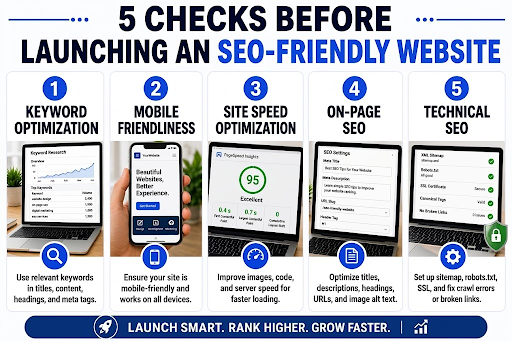
Launching a site without proper technical validation can permanently damage organic rankings and indexation. This horizontal infographic maps out the seven non-negotiable checks required before going live. From setting up tracking tools to validating sitemaps, robots.txt directives, and canonical tags, following this structured workflow ensures search engines efficiently crawl your site, preserve existing link equity via 301 redirects, and deliver an optimized mobile user experience.
Build a Website That Works Harder
Your website should do more than look professional; it should attract the right audience, guide visitors smoothly, and support business growth. At Think Shaw, we combine SEO, web design, usability, and performance to build websites that strengthen search visibility and turn more visitors into qualified opportunities. If your current website isn’t delivering the results you expect, we’re ready to help you build one that does.
| Give your website the strategic edge it needs with Think Shaw to attract more traffic, engage the right audience, and drive growth. |
Frequently Asked Questions About SEO-Friendly Web Design
What is the best website platform for SEO?
There is no universally best platform. The right choice depends on technical flexibility, scalability, content requirements, performance capabilities, and how easily SEO elements can be managed.
How often should a business website be redesigned?
A redesign is worth considering when technology, usability, branding, business goals, or search requirements have significantly changed, rather than following a fixed schedule.
Can a website redesign hurt SEO?
Yes. Changes to URLs, page structure, content, or internal links can cause traffic losses if redirects, indexing, and existing search visibility are not properly managed.
How can I make my website more SEO-friendly without redesigning it?
Start with technical and content improvements such as fixing broken links, improving page templates, updating outdated content, optimizing images, and strengthening internal linking.
How do I know if my website is SEO-friendly?
Review technical accessibility, indexing, mobile usability, page performance, content quality, internal linking, structured data, and organic search performance using appropriate SEO tools.