Local customers often rely on Google Search and Google Maps to discover nearby businesses, compare services, and decide whom to contact. A well-maintained Google Business Profile helps businesses present accurate information and establish credibility when potential customers search for relevant products or services. However, visibility in local search results depends on more than simply creating a listing. Google identifies relevance, distance, and prominence as the primary factors influencing local rankings, making accurate business information and a trustworthy online reputation essential.
Effective Google Business Profile optimization requires understanding how local search works and which improvements can strengthen your online presence. This complete guide explores the fundamentals of optimizing your profile to improve local visibility, build customer trust, and help more potential customers discover your business.
Google Business Profile Optimization OverviewGoogle Business Profile optimization helps businesses improve local search visibility, build credibility, and attract relevant customers. Accurate business details, appropriate categories, correct location settings, and successful verification establish a strong foundation. Relevant services, authentic photos, and an informative business description strengthen profile quality. Regular monitoring helps businesses maintain accurate listings and address changes. With Think Shaw’s local SEO expertise, businesses can identify optimization opportunities, track performance, and turn local searches into qualified enquiries. |
What is Google Business Profile
Google Business Profile is a free tool that allows businesses to manage how they appear on Google Search and Google Maps. It displays essential information, including the business name, address or service area, phone number, opening hours, website, customer reviews, and photos. This helps potential customers understand what a business offers and how to contact it before making a decision. Additionally, a verified profile allows eligible businesses to manage their information and keep it accurate.
Set Up and Verify Your Google Business Profile Correctly
Create or Claim Your Existing Business Listing
Sign in with the Google Account you want to use to manage your business. Search for your business name on Google Search or Google Maps before creating a new profile. If a listing already exists, claim it rather than creating a duplicate. If no listing exists, create a new Business Profile and enter your business details accurately. Use the business’s real-world name as it appears on your signage, website, and business materials. Before publishing your listing, review Google’s Guidelines for Representing Your Business to ensure your business name, eligibility, and listing details comply with Google’s requirements.
Enter the Correct Business Address and Service Area
Your address settings should reflect how customers interact with your business. If customers visit your premises, enter the complete physical address and ensure the map pin points to the correct entrance or location. If you travel to customers, such as a plumber or cleaning service, configure a service-area business profile and hide your address if customers are not served there. List only the cities, postal codes, or areas you genuinely serve. Do not use a virtual office, P.O. box, or an address where your business does not operate. Accurate location details help customers understand where they can access your services.
Choose the Most Accurate Primary Category
Select the category that most closely describes your main business activity, rather than choosing a category simply because it contains a popular search term. You can add relevant secondary categories if your business genuinely provides those services. Keep the list focused on what you actually offer, because categories help Google understand what your business does and which searches may be relevant.
Complete Verification Using Google’s Available Method
After entering your details, select Get verified and follow the verification option Google provides. Depending on your business and account, this may involve phone or text, email, video recording, a live video call, or mail. You cannot freely choose any method; Google determines which options are available for your profile. For step-by-step instructions, you can check Google’s Business Profile Verification Guide, which explains how to complete the verification method offered for your business.
For video verification, prepare to demonstrate that your business exists and that you manage it. Depending on your business type, this may include:
- Your storefront, permanent signage, or nearby street signs.
- Your equipment, tools, products, or branded work materials.
- Access to staff-only areas or other evidence that you manage the business.
Once verification is complete, you can manage your profile information and interact with customers through Google.
Best practices to beat local competition
Understanding what drives local search competition helps you see why other businesses get more visibility and customer engagement. However, applying the right optimization practices helps you close performance gaps, strengthen your online credibility, and improve your chances of attracting relevant local customers.
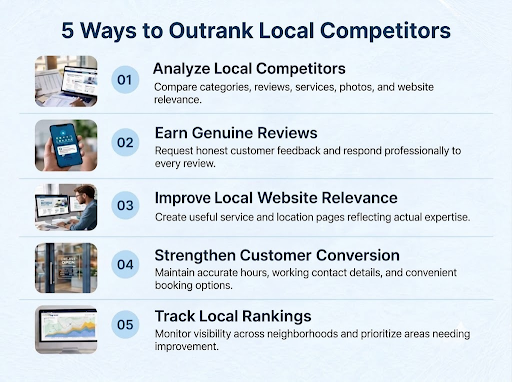
Your Google Business Profile should do more than display your business details. Our team helps strengthen your local search presence through targeted profile optimization, competitor insights, and location-focused SEO strategies tailored to your market. |
Optimize Categories, Services, Photos, and Business Description
Refine Categories to Reflect Your Business Specialization
Review your categories whenever your core offerings change. Select secondary categories only when they represent distinct activities your business genuinely performs. Check Google’s available category options instead of creating your own labels, and remove irrelevant categories that no longer describe your operations. This keeps your profile focused and helps Google interpret your business accurately.
Add Specific Services Customers Can Identify
List individual services with clear names and concise descriptions that explain their scope, deliverables, or intended outcome. Avoid combining unrelated services under one broad label. Review Google’s suggested services, retain only relevant options, and remove discontinued offerings. Where available, add service prices if they are accurate and useful to customers comparing providers.
Upload Authentic Photos That Demonstrate Quality
Prioritize original images of completed projects, products, work processes, and customer-facing facilities. Google recommends clear, well-lit, realistic JPG or PNG images between 10 KB and 5 MB, with a recommended resolution of 720 × 720 pixels and a minimum of 250 × 250 pixels. Avoid excessive filters, misleading edits, and stock images presented as actual work.
Write a Business Description That Establishes Expertise
Use the 750-character limit to communicate your specialization, relevant experience, operating history, and the customers or industries you serve. Include factual details that distinguish your business, such as established expertise in a particular service or product category. Avoid repeating your service list, inserting keyword variations unnaturally, or including URLs, promotional offers, and prices. Keep the description informative rather than sales-driven.
Conclusion
Effective Google Business Profile optimization requires a strategy that connects local visibility with measurable business growth. At Think Shaw, our team combines local SEO audits, geo-targeted keyword research, citation management, competitor analysis, and reputation management to strengthen your local search presence. We also optimize business listings and location-specific pages, track ranking progress, and provide actionable performance reports. With transparent performance reporting, we identify opportunities to improve visibility, attract local traffic, and convert searches into customer enquiries.
| Turn local searches into business opportunities with reliable hands! Partner with us to attract relevant local traffic, generate qualified leads, and improve your chances of reaching prominent positions in Google Search and Maps. |
Frequently Asked Questions About Google Business Profile Optimization
How long does it take to improve Google Business Profile rankings?
Improvements may take several weeks or months, depending on competition, business location, profile quality, and the strength of competing local businesses.
Can I manage multiple business locations under one Google account?
Yes, eligible businesses can manage multiple locations through one Google account, making centralized access, updates, and oversight easier for location managers.
How long does Google take to approve Business Profile edits?
Many edits are reviewed within minutes, but some remain pending for up to 30 days, depending on verification and Google’s review process.
Do I change my business name after creating my Google Business Profile?
Yes, if your real-world business name has changed, update it accurately and provide supporting evidence if requested to avoid potential verification complications.
What happens if someone changes my Google Business Profile information?
Google may apply suggested edits from users or other sources. Check profile notifications regularly, review unexpected changes, and correct inaccurate information promptly.