Website performance is no longer solely a development concern; it also intersects with how effectively a page performs in search. Core Web Vitals give developers measurable indicators of real-world page experience, covering loading, responsiveness, and visual stability. However, achieving strong Core Web Vitals is not simply a matter of compressing images or reducing page weight. Server delivery, rendering, JavaScript execution, resource prioritization, and layout behavior can all influence these measurements. Therefore, understanding these factors is essential to knowing how web development affects SEO, particularly when building and maintaining search-focused websites. This article explores the key connections between development practices, Core Web Vitals, and SEO performance, helping readers understand what technical decisions can influence page experience and where developers should focus when improving website performance.
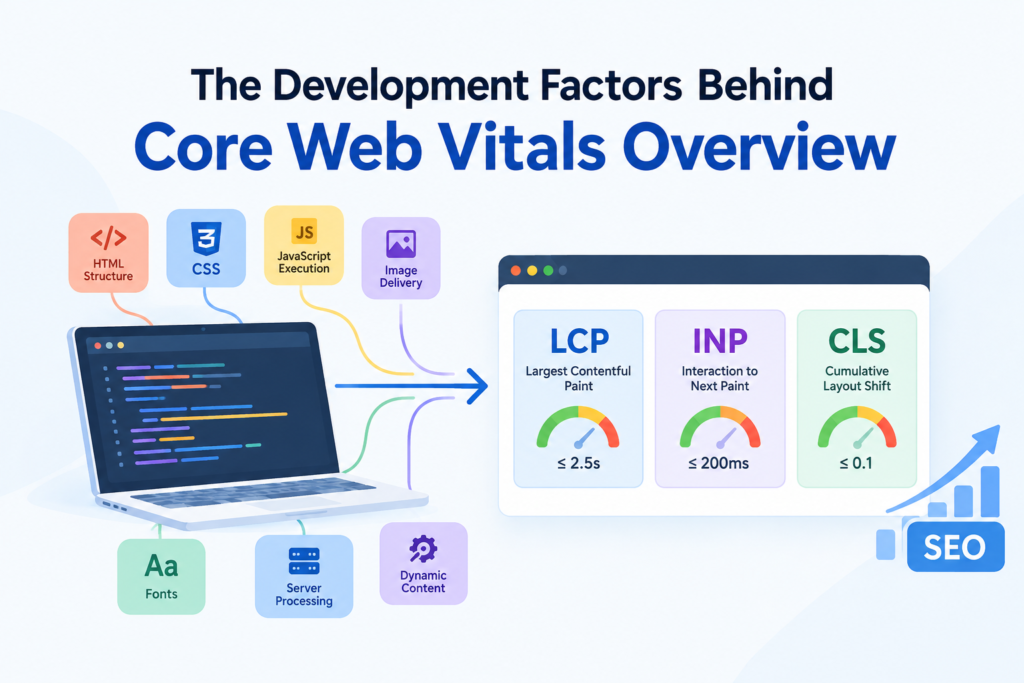
The Development Factors Behind Core Web Vitals OverviewCore Web Vitals connect web development decisions with measurable page experience. LCP evaluates how quickly the primary visible content renders, INP measures responsiveness to user interactions, and CLS measures unexpected visual movement. Development choices involving HTML structure, CSS, JavaScript execution, image delivery, fonts, server processing, and dynamic content can therefore influence SEO-related performance. Google recommends achieving LCP of 2.5 seconds or less, INP of 200 milliseconds or less, and CLS of 0.1 or less at the 75th percentile. |
What Are Core Web Vitals and Why Do They Matter for SEO?
Core Web Vitals are Google’s standardized user-experience metrics for evaluating how a webpage performs during loading, interaction, and visual rendering. They are based on real-world user data, and Google Central Search identifies LCP, INP, and CLS as the current Core Web Vitals used to assess these aspects of real-world page experience.
- LCP — loading performance: It measures the time until the largest visible content element, such as a hero image, video poster, or substantial text block, is rendered. The Understanding Core Web Vitals and Google search results recommend an LCP of 2.5 seconds or less at the 75th percentile to provide a good user experience.
- INP — interaction responsiveness: This determines how quickly a page responds visually to user interactions throughout the visit. An INP of 200 milliseconds or less is considered good. Better responsiveness reduces delays when users interact with navigation, forms, filters, buttons, or other interactive elements.
- CLS — visual stability: A good CLS is 0.1 or less. It measures unexpected layout movement while a page loads or updates. Stable layouts prevent users from losing their position or accidentally selecting the wrong element.
Which Web Development Factors Affect Core Web Vitals?
Server Response and HTML Delivery Set the LCP Starting Point
Server-side processing, redirects, connection setup, caching, and Time to First Byte (TTFB) determine how quickly the initial HTML reaches the browser. Delays here postpone resource discovery and rendering, reducing the time available for the largest visible element to load.
Resource Discovery Determines How Early the LCP Element Can Load
The browser must discover the eventual LCP resource before downloading and rendering it. JavaScript-dependent content, client-side rendering, CSS references, or poor prioritization can delay discovery, whereas directly referenced critical resources can be discovered and requested earlier.
CSS Processing Controls When Content Becomes Renderable
CSS influences when the browser can construct and render visible content. Large stylesheets, render-blocking CSS, complex layout rules, and background-image references can delay processing or resource discovery, making stylesheet architecture an important factor in the LCP rendering timeline.
JavaScript Main-Thread Work Drives Interaction Latency
INP is affected by JavaScript occupying the browser’s main thread during interactions. Long tasks, synchronous computation, oversized bundles, and inefficient event handlers can delay event processing and the subsequent visual update, increasing interaction latency even when initial loading is fast.
DOM Changes After Interaction Can Extend INP
Interactions can trigger JavaScript execution, DOM mutations, component re-renders, style recalculation, layout, and painting. When an interaction causes unnecessarily broad or expensive updates, the browser takes longer to produce the next visual state, worsening INP.
Undimensioned Elements Create Layout Instability
CLS increases when the browser cannot reserve space for content before it appears. Images, videos, advertisements, embeds, and iframes without defined dimensions can shift surrounding content after loading, while explicit dimensions or aspect ratios establish predictable layout space.
Dynamic Content and Fonts Can Shift an Existing Layout
Asynchronous components, advertisements, cookie notices, and font-related rendering changes can alter an already-established layout. These unexpected movements contribute to CLS because visible content shifts after users begin viewing the page, rather than remaining within its initially calculated geometry.
Responsive Architecture Changes Performance by Device
Identical implementations can perform differently across mobile and desktop because processing power, network conditions, viewport dimensions, and resource requirements vary. As mentioned in the Web Vitals study, Core Web Vitals are evaluated using field data across mobile and desktop experiences, so development decisions should account for how different users actually experience the site.
| Your website’s Core Web Vitals deserve expert optimization, and our team at Think Shaw delivers performance-focused web development that improves loading speed, responsiveness, and technical implementation for stronger SEO outcomes. |
How Web Development Shapes SEO Performance Across the Search Journey
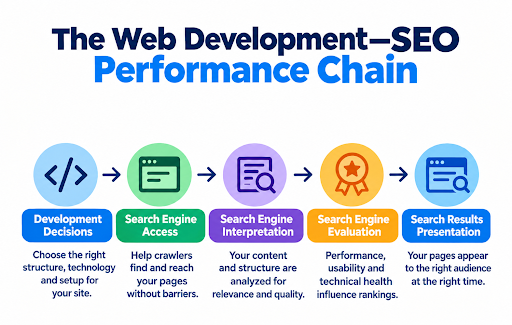
The web development–SEO performance chain describes how decisions are made while building and maintaining a website. Rather than treating development and SEO as separate disciplines, this chain connects the technical implementation of a website with how search engines can access, interpret, evaluate, and present its pages. Understanding this relationship is essential because it influences several stages of a page’s search journey, making the quality of the underlying implementation an important part of a sustainable SEO strategy.
How Developers Can Improve Core Web Vitals for SEO
Reduce Server-Side Response Delays
Improve backend processing, caching, and content delivery to reduce TTFB. Faster initial document delivery gives the browser more time to discover and render critical content, directly supporting better LCP performance.
Prioritize the Actual LCP Resource
Identify the element reported as LCP and make its resource discoverable early. Avoid loading critical above-the-fold content through unnecessary JavaScript or low-priority request paths that postpone its retrieval.
Remove Non-Critical Render-Blocking Work
Separate critical CSS and defer non-essential resources where appropriate. Reducing work that must complete before the initial render allows the browser to reach meaningful content sooner without indiscriminately removing required styles or functionality.
Break Up Long JavaScript Tasks
Divide lengthy main-thread tasks into smaller units so user interactions can be processed sooner. This is particularly important for INP because excessive synchronous JavaScript can delay both event handling and the subsequent visual update.
Monitor After Deployment
Core Web Vitals should be monitored after releases because changes to templates, JavaScript bundles, third-party scripts, infrastructure, or content can introduce new regressions. Performance validation therefore needs to continue beyond the initial optimization cycle.
Conclusion
To build a search-ready website, it is essential to combine technical planning, scalable architecture, clean implementation, and SEO-focused development practices. And to make it easy, our team at Think Shaw creates websites structured around your business goals while supporting search visibility, usability, and long-term growth. From development strategy to ongoing technical improvements, we provide a dependable foundation for websites that strengthen your digital presence as it evolves.
| Every performance improvement should support better search visibility, and Think Shaw provides technical SEO and website optimization that addresses long-term Core Web Vitals performance. |
Frequently Asked Questions About Core Web Vitals and SEO
Are Core Web Vitals a direct Google ranking factor?
Yes. Google states that Core Web Vitals are used by its ranking systems. However, they are only one part of Google’s broader evaluation, so passing the thresholds does not guarantee higher rankings.
How can I check my website’s Core Web Vitals?
Use Google Search Console for real-user performance data and Lighthouse or PageSpeed Insights for diagnostic testing during development.
Why do Core Web Vitals scores differ between Google tools?
Different tools use different testing methods; field data reflects real users, while laboratory tests simulate controlled browsing conditions.
Do Core Web Vitals affect mobile and desktop SEO differently?
Performance can vary substantially between devices, and Google evaluates page experience across mobile and desktop search environments.
Do single-page applications affect Core Web Vitals?
They can. SPA navigation and rendering require careful measurement because application architecture influences how performance is experienced and recorded.