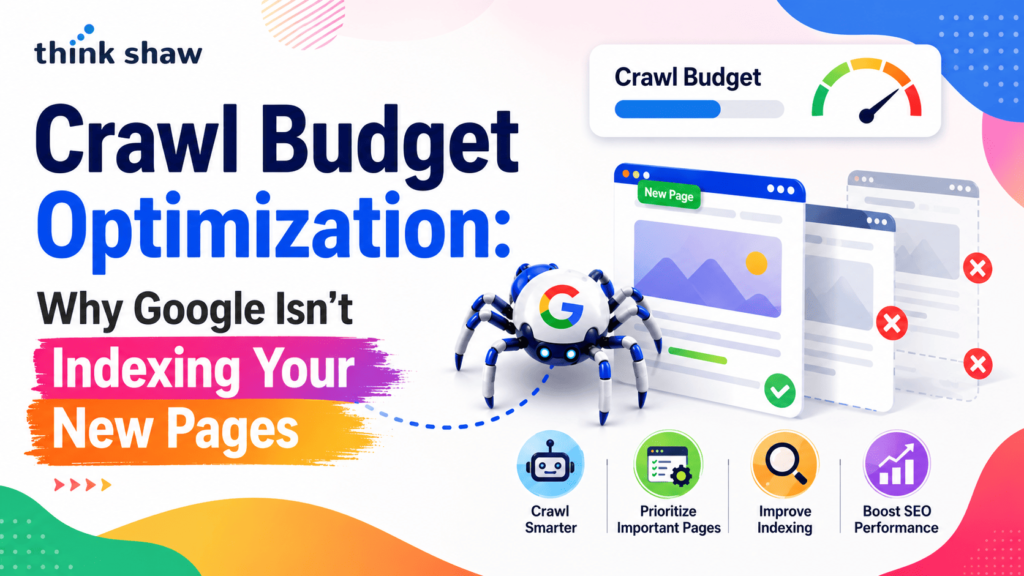
You publish a new page, submit your XML sitemap, and even request indexing through Google Search Console, yet days or weeks later, the page still doesn’t appear in search results. This is a common challenge for website owners, SEO professionals, and content marketers, and it’s often rooted in how Google discovers and prioritizes web pages for crawling and indexing. One of the most overlooked technical SEO factors behind this issue is crawl budget optimization. While crawl budget doesn’t affect every website equally, inefficient crawling can prevent important pages from being discovered promptly, especially on large or rapidly growing sites.
Understanding how Google allocates its crawling resources is the first step toward improving indexation, maximizing your site’s visibility, and ensuring your newest content gets the attention it deserves. In this guide, we are set to shed light on exactly that, so let’s begin!
Crawl Budget Optimization OverviewCrawl budget optimization helps search engines prioritize your most valuable pages, improving the chances of timely crawling and indexing. Strong internal linking, high-quality content, an updated XML sitemap, efficient site architecture, and a technically sound website all contribute to better crawl efficiency. Regularly monitoring crawl activity through Google Search Console and addressing technical issues such as duplicate URLs, crawl errors, and server performance ensures Google can consistently discover, evaluate, and index important content, supporting stronger long-term organic search visibility. |
The Top Reasons Google Isn’t Indexing Your New Pages
Here are some key reasons why, even after so much effort, Google still isn’t indexing your new pages:
Your Content Doesn’t Provide Enough Unique Value
One of the most common reasons Google chooses not to index a page is that it doesn’t consider the content sufficiently valuable compared to what’s already in its index. Pages with thin content, duplicate information, automatically generated text, or little original insight are often crawled but excluded from indexing. Google’s systems evaluate whether a page offers unique value before adding it to the search index. Simply publishing new content doesn’t guarantee indexation if similar or higher-quality alternatives already exist.
Your Pages Are Difficult for Google to Discover
Google can only index pages it can reliably discover. If a newly published page has few or no internal links, isn’t included in an XML sitemap, or lacks backlinks from other websites, Googlebot may take considerably longer to find it. Google specifically recommends using crawlable internal links and maintaining an updated XML sitemap to help search engines discover important content.
Technical SEO Issues Are Preventing Indexing
Many indexing problems stem from technical configuration errors rather than content quality. Common issues include accidental noindex meta tags, blocked URLs in robots.txt, incorrect canonical tags pointing to another page, redirect loops, server errors (5xx), and broken internal links. Google also notes that slow server response times and frequent availability issues can reduce crawling efficiency, causing Googlebot to crawl fewer pages over time. Regular technical SEO audits and monitoring the Page Indexing and Crawl Stats reports in Google Search Console help identify these problems before they affect visibility.
Low-Value URLs Are Wasting Your Crawl Budget
For large or rapidly growing websites, inefficient crawl budget usage can delay the discovery of important pages. Google’s documentation explains that crawl budget is influenced by crawl demand and crawl capacity, and unnecessary URLs can consume resources that would otherwise be spent on valuable content. Duplicate pages, faceted navigation, URL parameters, soft 404s, infinite URL combinations, and long redirect chains all reduce crawl efficiency. Google states that crawl budget optimization is primarily important for sites with 10,000+ rapidly changing URLs or approximately 1 million+ pages, while most smaller websites don’t need to worry about crawl budget limitations.
Your Website or Page Is Simply Too New
Not every indexing delay indicates a problem. According to Google Search Central, newly published pages often require several days before they are crawled and evaluated, and Google cannot guarantee when—or even if—a page will be indexed. Factors such as site authority, content quality, internal linking, crawl demand, and overall website health all influence how quickly Google discovers new content. Rather than repeatedly requesting indexing, website owners should focus on publishing high-quality pages, strengthening internal linking, and maintaining a technically sound website to improve long-term indexation.
What Is Crawl Budget Optimization?
Crawl budget optimization is the process of helping search engines, particularly Google, use their crawling resources more efficiently to discover and evaluate your most important web pages. A crawl budget is the number of URLs Googlebot is willing and able to crawl on a website within a given timeframe, based on factors such as crawl demand and the site’s server capacity.
While most small websites rarely face crawl budget management limitations, optimizing it becomes increasingly important for large, frequently updated, or complex websites. By eliminating crawl waste, improving internal linking, and maintaining a clean site architecture, you can help Google prioritize valuable pages for crawling and potential indexing.
How to Monitor Crawl Budget and Confirm Google Is Indexing Your Pages?
Monitoring your crawl budget isn’t just about tracking how often Googlebot visits your website; it’s about understanding whether your most valuable pages are being discovered, crawled, and indexed efficiently. The infographic below highlights the essential tools and steps you can use to evaluate crawl activity, identify indexing issues, and measure the effectiveness of your optimization efforts. Use it as a quick reference to ensure Google is prioritizing the pages that matter most and to spot potential problems before they impact your search visibility.
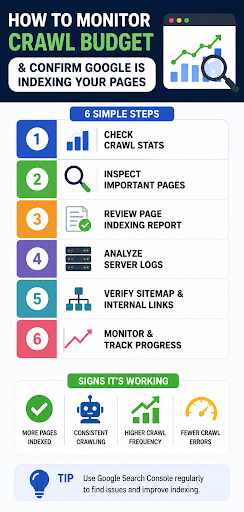
How to Optimize Your Crawl Budget for Faster Google Indexing
Now let’s learn how you can optimize your crawl budget for faster Google Indexing:
Strengthen Internal Linking to Guide Googlebot
Internal links help Googlebot discover new pages and understand their importance within your website. Pages that receive more relevant internal links are generally easier for Google to find and crawl. Google recommends using descriptive anchor text and ensuring that important pages are linked from other relevant pages rather than relying solely on XML sitemaps. Avoid creating orphan pages, URLs with no internal links, as they are significantly harder for search engines to discover. A logical site architecture also helps distribute crawl resources more efficiently and improves the overall crawlability of your website.
Eliminate Crawl Waste by Removing Low-Value URLs
Every unnecessary URL that Googlebot crawls consumes resources that could be spent on your most valuable pages. Large websites often generate thousands of duplicate or low-value URLs through faceted navigation, URL parameters, session IDs, internal search pages, and outdated archives. Google recommends reducing these crawl traps by consolidating duplicate pages with canonical tags, blocking unimportant parameter URLs where appropriate, fixing redirect chains, and removing soft 404 pages. According to Google Search Central, crawl budget optimization becomes particularly beneficial for websites with more than 10,000 frequently changing pages or approximately 1 million+ URLs, where crawl efficiency can directly influence how quickly new content is discovered.
Maintain a Healthy Technical SEO Foundation
Technical issues can prevent Googlebot from efficiently crawling your website, even if your content is valuable. Regularly audit your site for broken links, server errors (5xx), redirect loops, incorrect canonical tags, and accidental noindex directives. Google also advises monitoring server response times because slow or unstable servers may reduce Google’s crawl rate to avoid overloading your website. Keeping your XML sitemap updated, ensuring important URLs return a 200 OK status, and resolving crawl errors reported in Google Search Console all contribute to a healthier crawling environment.
Improve Website Speed and Server Performance
Google determines part of your crawl capacity based on how quickly and reliably your server responds. Fast, stable websites allow Googlebot to crawl more pages during each visit without affecting server performance. Conversely, slow response times, frequent timeouts, or repeated server errors can reduce crawl frequency. Optimizing Core Web Vitals, enabling compression, minimizing unnecessary JavaScript, implementing browser caching, using a Content Delivery Network (CDN), and upgrading hosting infrastructure can all improve server responsiveness. While faster websites don’t guarantee faster indexing, they help Google crawl your site more efficiently and consistently.
Monitor Crawl Activity with Google Search Console
Optimization should always be guided by data rather than assumptions. Google Search Console provides several reports that help identify crawl and indexing issues, including the Crawl Stats Report, Page Indexing Report, and URL Inspection Tool. These reports reveal how often Googlebot visits your site, which pages are excluded from indexing, crawl response codes, and server performance trends. Regularly reviewing these insights allows you to identify technical issues early, prioritize fixes, and verify whether your crawl budget optimization efforts are helping Google discover and index new pages more efficiently. Google recommends using these reports as part of an ongoing technical SEO maintenance process rather than only when indexing problems occur.
Conclusion
Effective crawl management is an ongoing part of maintaining a search-friendly website, especially as your content library grows. Regular technical audits and proactive monitoring can help you stay ahead of indexing challenges and support long-term organic performance. If you’re looking for expert guidance to strengthen your technical SEO strategy, Think Shaw offers data-driven SEO solutions that help businesses improve search visibility, maximize crawl efficiency, and build sustainable organic growth.
Contact us today for a comprehensive technical SEO audit and discover how to optimize your website for faster crawling.
FAQs: Crawl Budget Optimization
Does requesting indexing in Google Search Console guarantee indexation?
No. The URL Inspection Tool only requests that Google review a page. Google still evaluates its quality, uniqueness, and technical accessibility before deciding whether to include it in search results.
Should I delete pages that Google doesn’t index?
Not necessarily. First, determine why the page isn’t indexed. If it offers valuable, original content, improving its quality and visibility is usually a better approach than deleting it.
Can changing a page’s URL affect its indexing?
Yes. Changing URLs without proper 301 redirects can temporarily remove pages from Google’s index and require Googlebot to rediscover and evaluate the new URL.
Do JavaScript-heavy websites experience indexing challenges?
They can. Although Google renders JavaScript, excessive client-side rendering or blocked resources may delay content processing and reduce the likelihood of complete indexing.
Can publishing content more frequently improve indexing?
Consistently publishing valuable content can encourage Google to revisit your website more often over time, but publishing frequency alone doesn’t guarantee faster indexing.
How can I tell if an indexing problem is site-wide?
If multiple important pages remain unindexed despite being technically accessible, review Google Search Console for widespread crawl, coverage, or manual action issues affecting the entire website.